uuBluetooth® HandsFreeLink®uHFL Menus
426
■
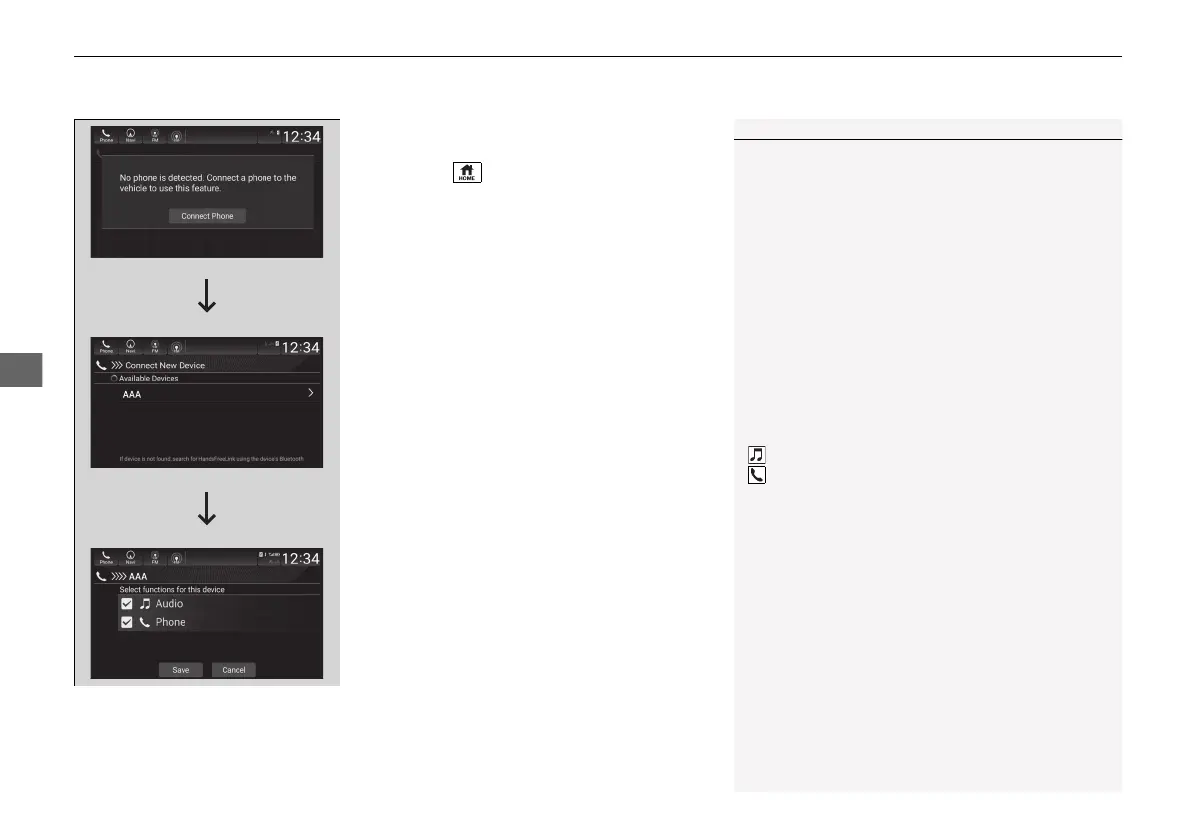
To pair a cell phone (when there is no
phone paired to the system)
1. Press the button.
2. Select Phone.
3. Select Connect Phone.
4. Make sure your phone is in search or
discoverable mode, then select + Connect
New Device.
u HFL automatically searches for a
Bluetooth® device.
5. Select your phone when it appears on the
list.
u If your phone still does not appear,
search for Bluetooth® devices using your
phone.
From your phone, search for
HandsFreeLink.
6. The system gives you a pairing code on the
audio/information screen.
u Confirm if the pairing code on the screen
and your phone match.
This may vary by phone.
7. Select desired functions and then select
Save.
1Phone Setup
Your Bluetooth-compatible phone must be paired to
the system before you can make and receive hands-
free calls.
Phone Pairing Tips:
• You cannot pair your phone while the vehicle is
moving.
• Up to six phones can be paired.
• Your phone’s battery may drain faster when it is
paired to the system.
Once you have paired a phone, you can see it
displayed on the screen with one or more icons on
the right side.
These icons indicate the following:
: The phone is compatible with Bluetooth® Audio.
: The phone can be used with HFL.
If there is an active connection to Apple CarPlay
pairing of additional Bluetooth compatible devices is
unavailable.
21 INSIGHT-31TXM6200.book 426 ページ 2020年2月5日 水曜日 午前10時0分














 To Next Page