uuWhen DrivinguTire Pressure Monitoring System (TPMS)
480
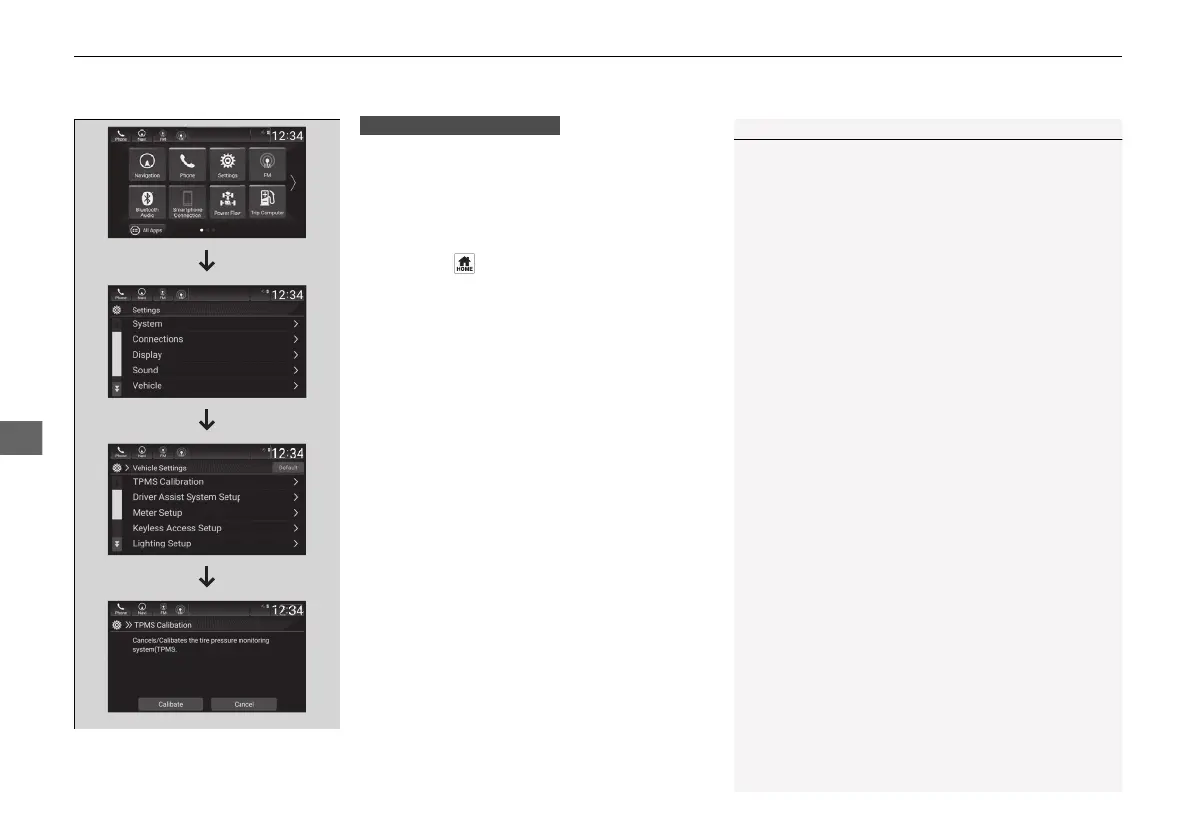
You can calibrate the system from the
customized feature on the audio/information
screen.
2 Audio System Basic Operation P. 268
1. Set the power mode to ON.
2. Press the button.
3. Select Settings.
4. Select Vehicle.
5. Select TPMS Calibration.
6. Select Calibrate.
• If the Calibration Failed To Start.
message appears, repeat steps 5-6.
• The calibration process finishes
automatically.
1TPMS Calibration
If the tire chains are installed, remove them before
calibrating the TPMS.
If the low tire pressure/TPMS indicator comes on even
when the properly inflated specified regular tires are
installed, have your vehicle checked by a dealer.
We recommend that the tires be replaced with the
same brand, model, and size as the originals. Ask a
dealer for details.
The vehicle stability assist
TM
(VSA®) system, vehicle
stability assist
TM
(VSA®) OFF, adaptive cruise control
(ACC) with low speed follow, safety support and low
tire pressure/TPMS indicators may come on in amber
along with a message in the driver information
interface when you set the power mode to ON after
re-connecting a 12-volt battery.
Drive a short distance at more than 12 mph (20
km/h).
Each indicator should go off. If any do not, have your
vehicle checked by a dealer.
Models with Display Audio
21 INSIGHT-31TXM6200.book 480 ページ 2020年2月5日 水曜日 午前10時0分














 To Next Page