10
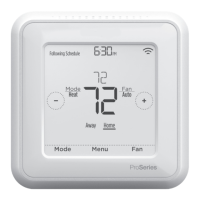
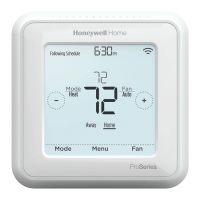
ZWave connection status is located in the upper-right corner of the screen.
• Thermostat is included and connected to a ZWave network.
• Thermostat is excluded from a ZWave network.
• Thermostat is either included in a ZWave network but the ZWave signal
is lost, or is included but AC power is lost (battery used as backup). In this
case, ZWave radio is turned off to preserve battery life. AC power must be
restored or you have to change the power mode. It can be done via excluding
thermostat from Z-wave network and including again in battery power mode
where batteries are used as main power source. You can check the actual
power mode in the thermostat MENU/DEVICE INFO.
ZWave connection status
AM
Menu FanMode
Fan
Auto
Mode
Heat
Wake AwayHomeSleep
Following Schedule
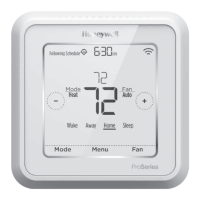
Example of Wi-Fi is connected.
Wifi is on and
connected
Wifi is disconnected
or wifi is not setup
Wifi is off
AM
Menu FanMode
Fan
Auto
Mode
Heat
Wake AwayHomeSleep
Following Schedule
Example of Wi-Fi is connected.
Wifi is on and
connected
Wifi is disconnected
or wifi is not setup
Wifi is off
AM
Menu FanMode
Fan
Auto
Mode
Heat
Wake AwayHomeSleep
Following Schedule
Example of Wi-Fi is connected.
Wifi is on and
connected
Wifi is disconnected
or wifi is not setup
Wifi is off
This thermostat may be configured to report the actual room temperature in
a higher resolution than can be shown on the thermostat display. The default
temperature reporting resolution is 1 °F or 0.5 °C. When configured to ADVANCED,
the temperature reporting resolution will be 0.5 °F or 0.25 °C. To change default
temperature reporting to a higher resolution, go to thermostat MENU/ZWAVE
SETUP/TEMP REPORT and set to ADVANCED. The temperature is reported by
every displayed value change, and no later than 2 hours from last report.
NOTE: When higher temperature resolution reporting set, you may experience
different resolution of temperature displayed on the thermostat and ZWave
controller.
Advanced ZWave temperature reporting


 To Next Page
 Loading...