
 Need help?
Do you have a question about the Honeywell 50690 and is the answer not in the manual?
Includes warnings about personal injury, sharp edges, and the fan's weight.
Covers dimmer switch use, wire connector limitations, and grounding requirements.
Addresses outlet box security, blade clearance, and using correct fan parts.
Step-by-step guide to attach the mounting bracket securely to the outlet box.
Guides on feeding wires through the downrod and assembling it to the motor.
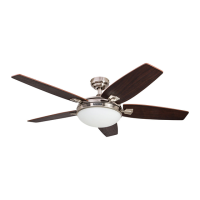
This document describes the Honeywell Bonterra Ceiling Fan, models #50610 and #50690, providing a comprehensive user guide for its assembly, operation, and maintenance. The fan is designed to provide air circulation and illumination in residential settings, offering various mounting options to suit different ceiling heights and angles.
The Honeywell Bonterra Ceiling Fan serves a dual purpose: providing air circulation and offering illumination. As a ceiling fan, it features multiple blades that rotate to create airflow, helping to cool a room in warmer weather and circulate warm air in cooler weather. The fan's speed can be adjusted to high, medium, or low settings, allowing users to customize the airflow intensity according to their comfort needs.
In addition to air circulation, the fan incorporates a light kit, providing ambient lighting for the room. The light kit is designed to accommodate E26-base B10 bulbs and includes a glass bowl to diffuse the light. The lighting function can be controlled independently of the fan, allowing users to turn the lights on or off, and for dimmable bulbs, to adjust their brightness. This integrated design makes the Bonterra Ceiling Fan a versatile fixture, combining essential room functions into a single unit.
The fan's operation is managed via a remote control, which provides convenient access to all fan and light functions from anywhere in the room. This remote control allows for easy adjustment of fan speeds, turning the fan on or off, and controlling the light. The fan also includes a reverse switch, which changes the direction of blade rotation to optimize airflow for different seasons. In warmer weather, the blades can be set to create a downward airflow, producing a wind chill effect. In cooler weather, reversing the blade direction creates an upward airflow, helping to move stagnant, hot air off the ceiling area and distribute it more evenly throughout the room.
The Honeywell Bonterra Ceiling Fan offers several usage features designed for flexibility and convenience.
Mounting Options: The fan supports two primary mounting configurations:
These options ensure the fan can be installed in a variety of room types and ceiling structures, maintaining a minimum clearance of 7 feet from the blades to the floor and at least 30 inches from the tip of the blades to any obstruction for safety and optimal performance.
Remote Control Operation: The fan is operated using a dedicated remote control, which simplifies user interaction. The remote features distinct buttons for:
Seasonal Performance Optimization: A reverse switch located on the light kit allows users to change the direction of the fan blades, optimizing airflow for different seasons:
Safety Features: The manual emphasizes several safety precautions:
Proper care and maintenance are crucial for ensuring the longevity and optimal performance of the Honeywell Bonterra Ceiling Fan. The manual outlines simple yet effective maintenance practices.
Regular Inspections: At least twice a year, users are advised to lower the canopy to inspect the downrod assembly and tighten all screws on the fan. This helps ensure that all components remain securely fastened, preventing potential wobbling or noise issues that could arise from loose parts over time.
Cleaning: The motor housing and blades should be cleaned with a soft brush or a lint-free cloth. This method is recommended to avoid scratching the finish of the fan components. It is explicitly stated that water or a damp cloth should NOT be used to clean the fan, as this could damage electrical components or the finish.
Power Disconnection for Maintenance: A critical safety instruction for any maintenance task is to shut off the main power supply to the fan. This involves turning off the circuit breakers or removing fuses, ensuring that there is no electrical current flowing to the fan during cleaning or inspection. This precaution is essential to prevent electric shock or injury.
Troubleshooting Guide: The manual includes a comprehensive troubleshooting section to help users address common issues:
Warranty Information: The product comes with a Limited Lifetime Warranty from Hong Kong China Electric Appliance Company (HKC). The fan motor is warranted to be free from defects in workmanship and material for the life of the product. Other ceiling fan parts (excluding the motor and parts made with glass) are warranted for one year from the date of purchase. The warranty explicitly states that purchasers are responsible for removal and reinstallation costs, and that damage from ordinary wear and tear, accident, misuse, or improper installation is not covered. HKC's sole responsibility is to repair or replace defective parts or the entire product. The warranty is void if the original purchaser ceases to own the fan or if service is performed by a non-licensed electrician.
Replacement Parts: A detailed list of replacement parts with corresponding model numbers (for both 50610 and 50690) is provided, including the canopy, canopy cover, yoke cover, mounting bracket, downrod, light kit, glass bowl, remote pack, blade arm, blade, and hardware bag. Users can contact customer service for replacement parts.
Overall, the Honeywell Bonterra Ceiling Fan is presented as a user-friendly and maintainable device, with clear instructions for installation, operation, and troubleshooting, supported by a robust warranty and accessible customer service for parts and assistance.
 General
| Brand | Honeywell |
|---|---|
| Model | 50690 |
| Number of speeds | 3 |
| Voltage | 120V |
| Fan Speed Settings | Low, Medium, High |
| Oscillation | Yes |
| Tilt Adjustment | Yes |
| Power Source | Electric |



 To Next Page