EasyManua.ls Logo

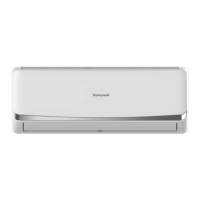
Honeywell HW-QUICK12E User Manual

Honeywell HW-QUICK12E
20 pages
To Next Page IconTo Next Page
Page #1 background imageLoading...
Page #1 background image
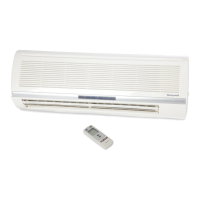
HW-QUICK12E
Wall-mounted
Air Conditioner
Wall-mounted Air Conditioner with Quick-Connection –
Heating and Cooling with only one unit
Comfortable room temperature without difficult
installation; our Quick-Connection makes it
possible
Easy and safe assembly + installation
Immediately applicable and ready to plug in
Convenient, selectable operating modes–
Cooling + Heating
Defrost function protects the outdoor unit
against freezing-up in the case of low
temperatures
Sleep mode
Suitable for rooms up to approx. 125 m³
*1
Optimal air circulation due to an adjustable
air outflow grid
Infrared remote control for easy handling
Timer function
Pilot light
Environmentally friendly refrigerant R410a
- CFC-free
*1
To calculate the optimal cooling capacity the following rule can be taken
as basis: Usually the air-conditioning of 1 m² requires 60 to 100 Watt.
Slants of a roof, large glass/window surfaces, humidity and additional
factors can influence the unit´s performance capacity.
www.kaz.com
The Honeywell trademark is used by Kaz, Inc. under licence from Honeywell Intellectual Properties, Inc.

Questions and Answers:

Honeywell HW-QUICK12E Specifications

General IconGeneral
BrandHoneywell
ModelHW-QUICK12E
CategoryAir Conditioner
LanguageEnglish

Summary

CONSTRUCTION AND USAGE

Construction of the wall-mounted split air conditioner

Details the physical components and layout of the indoor and outdoor units.

IMPORTANT SAFETY INSTRUCTIONS

General Safety Precautions

Crucial warnings and guidelines for safe operation and installation of the air conditioner.

SPECIFICATIONS AND TECHNICAL PARAMETERS

Technical Specifications and Operating Range

Provides detailed technical data, performance parameters, and operational limits for the unit.

OPERATING INSTRUCTIONS

Remote Control Overview

Explains the functions and layout of the remote control for operating the air conditioner.

Mode Selection

Details how to select and use different operating modes like COOL, DRY, FAN, and AUTO.

Timer and Sleep Mode Operation

Describes how to use the timer function for scheduled operation and the sleep mode for comfort.

INSTALLATION

Installation Location and Electrical Connection

Guides on selecting an appropriate location and performing the electrical connection for safe installation.

Indoor Unit Installation Details

Provides specific dimensions and procedures for installing the indoor unit of the air conditioner.

Piping, Drainage, and Rear Panel Installation

Covers steps for installing the rear panel, drainage hose, opening piping holes, and indoor unit routing.

Outdoor Unit Installation and Quick Connector System

Details outdoor unit placement, ventilation requirements, and the quick connector system.

Quick Connector and Electrical Connections

Step-by-step guide on connecting the quick connector and securing electrical power connections.

Trial Run and Post-Installation Checks

Outlines the trial run procedure and essential checks to ensure correct installation and functionality.

CARE AND MAINTENANCE

Routine Cleaning and Filter Installation

Instructions for cleaning the front panel, air filters, and installing them correctly.

Pre-Season and Post-Season Maintenance Checks

Guidance on checks before and after the usage season for optimal unit performance and longevity.

TROUBLE SHOOTING

Common Issues and Solutions

Lists common problems with the air conditioner and their troubleshooting steps or solutions.

Disposal and Purchase Conditions

Product Disposal

Information on environmentally responsible disposal of the product.

Purchase Terms and Responsibilities

Details the conditions of purchase and user responsibilities for the product.

Technical Information

Assembly Steps and Specifications

Provides assembly guidance and detailed technical specifications for the air conditioner model.

Related product manuals