When there is excess water condensation inside the unit, the air conditioner stops running and
shows a warning light (refer to page 10). This warning light indicates that the water condensation
needs to be drained using the following procedures:
WATER CONDENSATION DRAINAGE
14
Dehumidifier Mode
Drain Plug
(De-Humidifier
Mode)
Unplug the unit from power source.
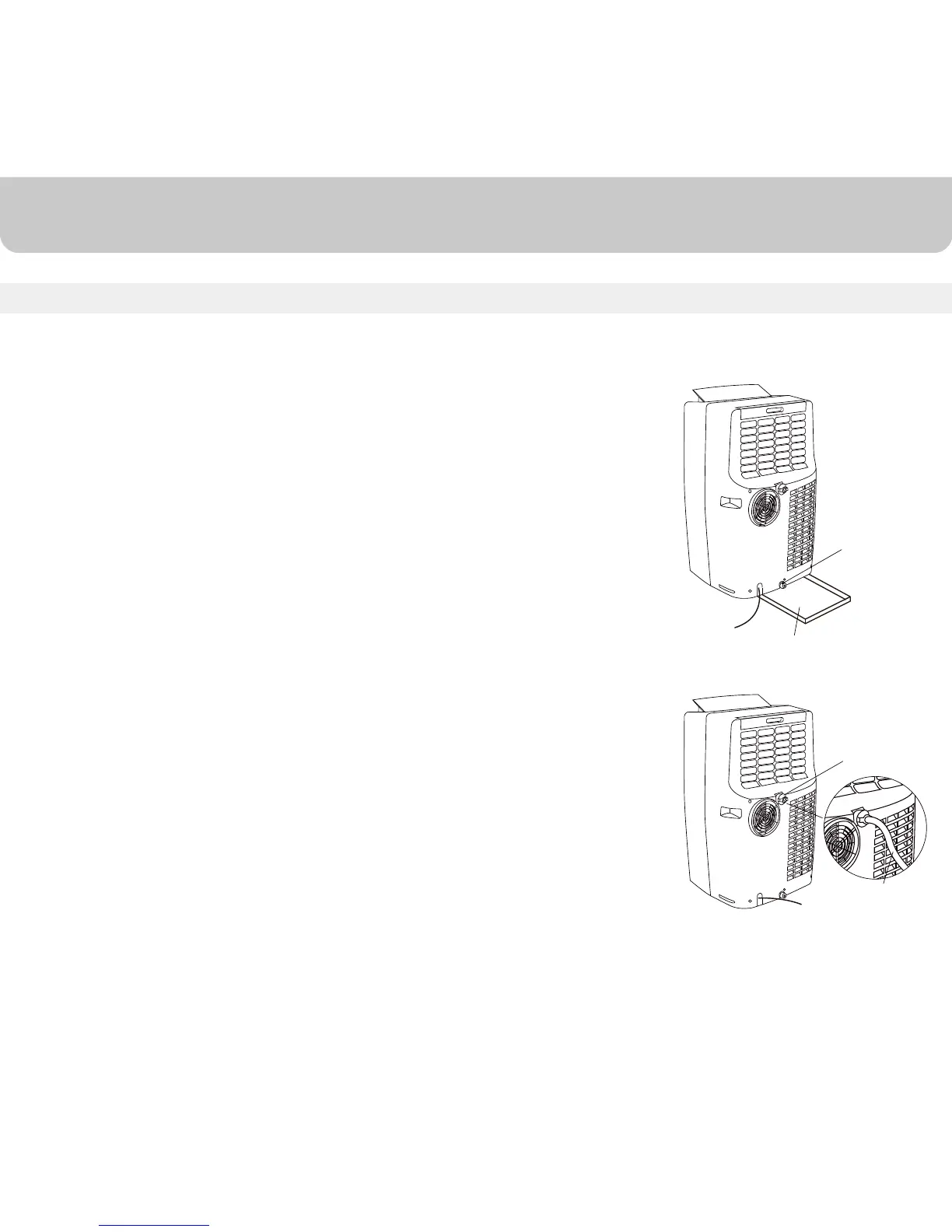
Place a shallow pan under the drain plug. See diagram.
Remove the drain plug.
Water will drain out and collect in the shallow pan.
After the water is drained, replace the cap firmly.
You can now turn on the unit.
Air Conditioning Mode
Water Condensation Drainage
1.
2.
3.
4.
5.
6.
Unplug the unit from power source.
Remove the drain plug.
Connect the drain connector to a ¾” hose(not included). See diagram.
Drain the water condensation into a bucket or a floor drain.
After the water is drained, replace the cap firmly.
You can now turn on the unit.
1.
2.
3.
4.
5.
6.
Drain Plug
(AC Mode)
Water Drain Pipe
Water may need to be drained in high humidity areas
Shallow Pan
(Not included)


 To Next Page
 Loading...