HS-NCM Installation Document — P/N 54014:C1 12/15/2020 11
6.2 Interconnecting the HS-NCM-W/W-2
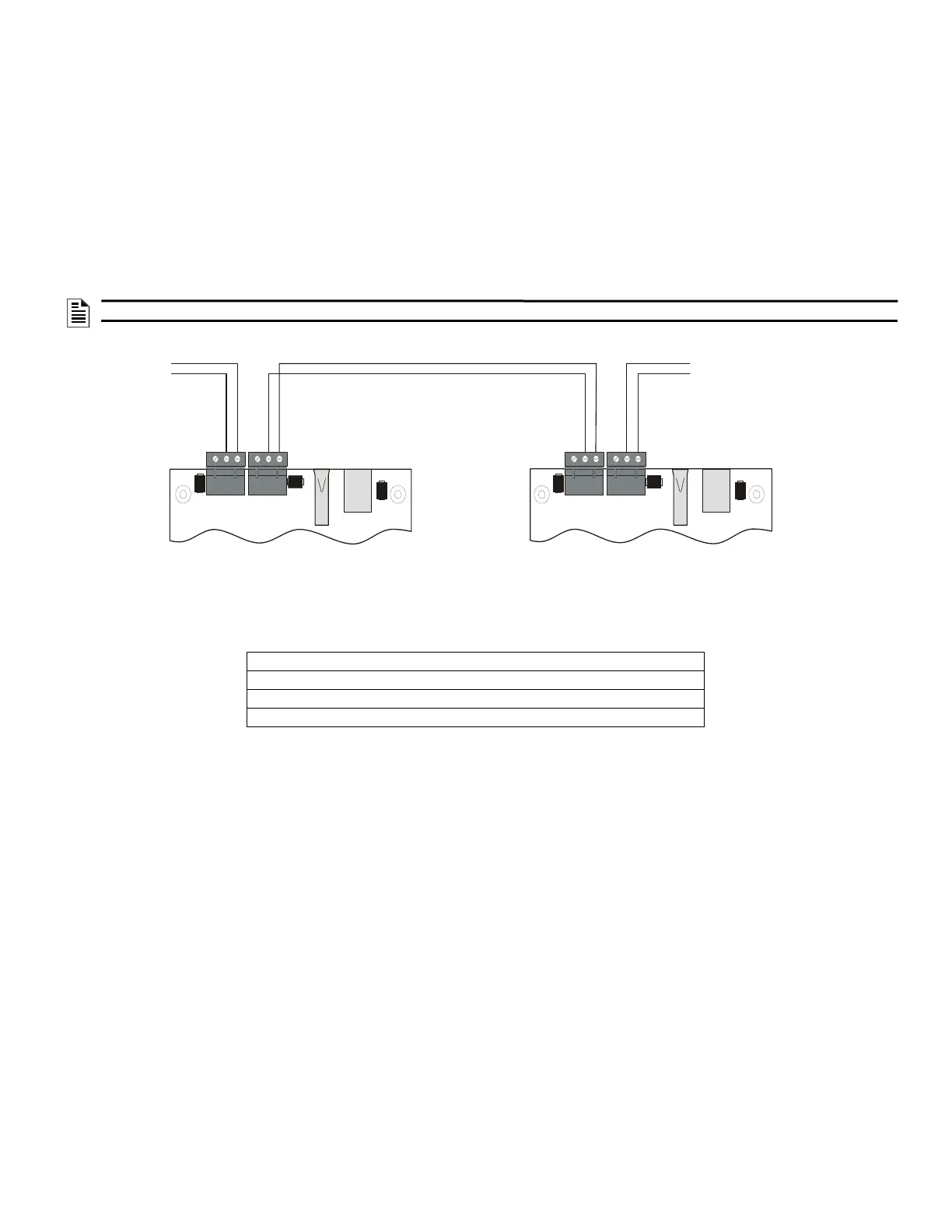
When wiring consecutive HS-NCM-W/W-2 boards, note that wiring may enter or exit at Port A or Port B as shown in Figure 11. HS-NCM-W/W-2
port-to-port wiring is port sensitive. Port A must be connected to Port B of the next HS-NCM-W. A HS-NCM-W may be connected to any of the fol-
lowing devices:
• HS-NCM-W (in another panel)
• HS-NCM-WSF/HS-NCM-WMF (in another panel)
• ONYXWORKS-HNW
A HS-NCM-W-2 may be connected to any of the following devices:
• HS-NCM-W-2 (in another panel)
• HS-NCM-WMF-2 (in another panel)
• HS-NCM-WSF-2 (in another panel)
• ONYXWORKS-HNW-2
For information regarding these devices, refer to the documentation listed in Table 7, “Supplemental Documentation”.
NOTE: HS-NCM-W to HS-NCM-W-2 cannot be connected directly through wire connection Must be bridged through Ethernet port
TB4-1 CH-A (+) Channel-A Driver/Receiver
TB4-2 CH-A (-) Channel-A Driver/Receiver
TB5-1 CH-B (+) Channel-B Driver/Receiver
TB5-2 CH-B (-) Channel-B Driver/Receiver
Table 2 Noti•Fire•Net Connections: HS-NCM-W and HS-NCM-W-2
Note: Wiring from the HS-NCM-W that is installed outside the building:
• Cannot exceed 1000m (3280 ft.).
• Must be in conduit and is to be buried in a trench separate from any power lines.
• Cannot cross any power lines.
From previous
node, Port B
To next node,
Port A
SHLD
SHLD
SHLD
SHLD
– +
– +
– +
– +
TB4
CH. A
TB5
CH. B
TB4
CH. A
TB5
CH. B
Figure 11 HS-NCM-W/W-2 Connections


 To Next Page
 Loading...