14.
Instructions for Use (continued)
Functions Introduction of Remote Controller
SPEED selection
• Press “SPEED” button on the Remote controller, you can choose fast or slow running speed.
fast speed slow speed
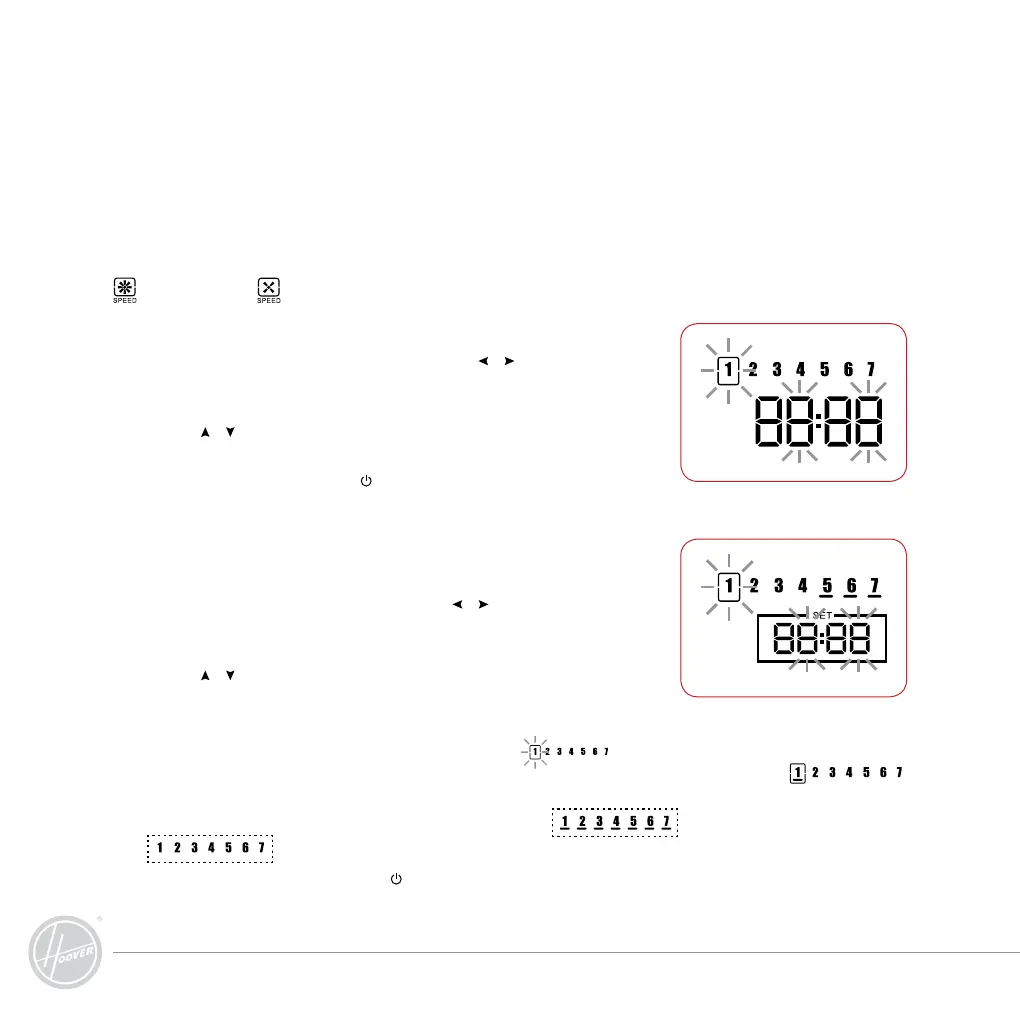
TIMER (Current TIMER Setting)
• Press “TIMER” button first and then press “
” “ ” buttons, you can
see a shining spot on the screen of the Remote controller switching
among hour, minute & weekday (as shown on Pic 1)
• Press “
” “ ” buttons to change the parameter and set the hour,
minute&weekday respectively.
Tip: During the setting, press “
” button to quit; press
• “TIMER” button to save the current setting.
SET (pre-set cleaning):
A. Pre-set TIMER
• Press “SET” button first and then press “
” “ ” buttons, the shining
spot on the screen of the Remote controller will switch among hour,
minute & weekday.
• Press “
” “ ” buttons to change the parameter to a idea TIMER that
you want the machine work.
B: Pre-set weekday:
• During pre-setting, when the shining happens to “
” press “OK” button; the presently
shining spot will have a “beam” shining or extinguished; the weekday with the “beam”
shining is the present pre-setting.
• Press “ ALL” button to switch between selection of all
or no selection of all
Tip: During the setting, press the “ ” button to quit; press the “SET” button to save the
present setting.




 To Next Page