Troubleshooting
23.
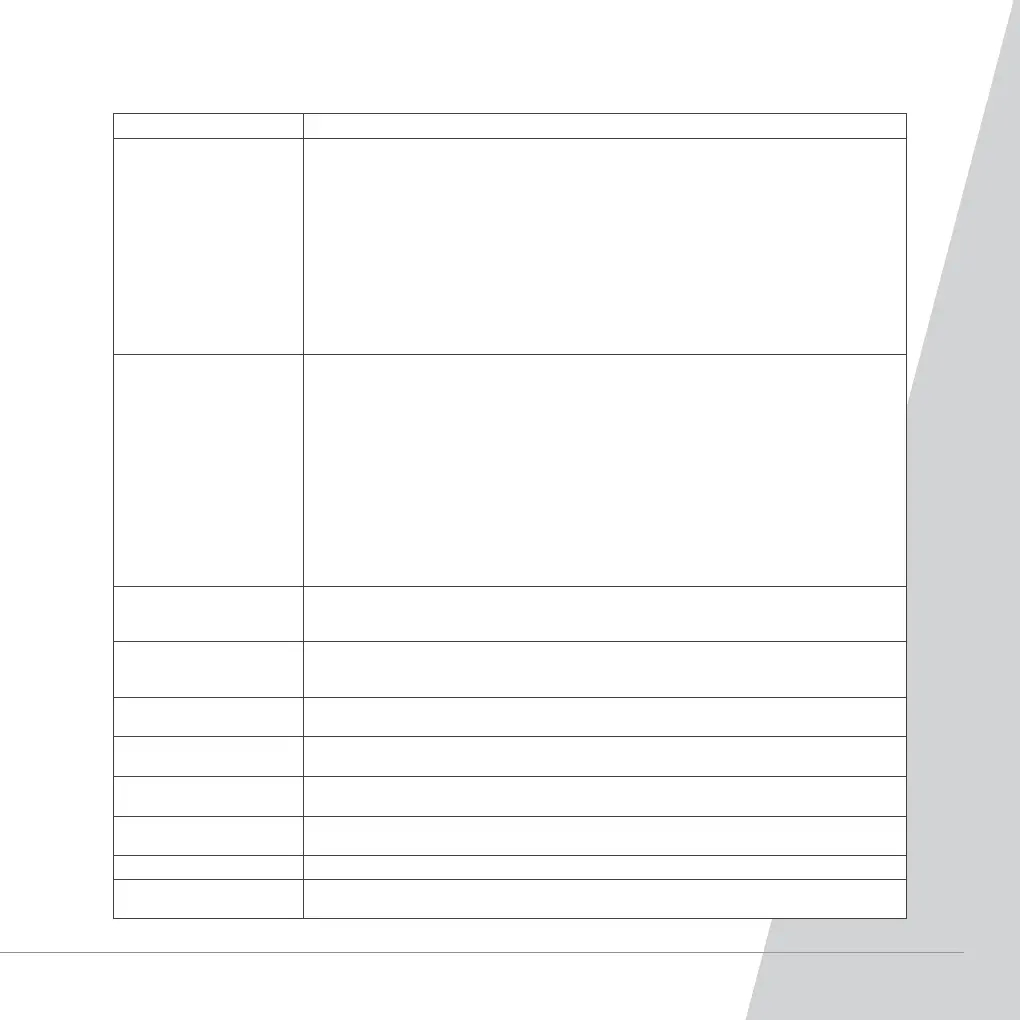
Problem Solutions
The cleaner goes across the
virtual wall.
1. Check the virtual wall is turned on.
2. Check the correct battery is used and fitted to the virtual wall properly. Ensure the power of the
virtual wall is enough.
3. Ensure the direction of the virtual wall is placed properly.
4. Ensure the signal receiver window is not blocked.
5. Move the virtual wall closer to the cleaner, ensure the distance of the virtual wall is less than 5 metres.
6. Switch off the cleaner and clean the signal transmitter window on the cleaner.
7. Recode the virtual wall to pair with the cleaner.
- Turn off the cleaner.
- Turn on the virtual wall.
- Keep holding the code check button on the virtual wall (the code check button is inside the hole).
Turn on the cleaner. After the cleaner beeps 2 or 3 times, release the check button, then the code
check is finished successfully.
The cleaner can’t find the
docking station.
1. Ensure the correct charger has been used.
2. Ensure the docking station is connected to the charger properly and the charger is connected to
the mains power supply properly.
3. Ensure the virtual wall is not installed near the docking station or facing the docking station.
4. Clean the infrared signal transmitting window and ensure the window is not covered and blocked.
5. Disconnect the docking station and ensure there is no foreign substance on the charging electrode.
6. Relocate the docking station to an open area following the instruction section “Automatic Charging”.
7. Cleaner runs out of battery due to too much obstacles on the way that the cleaner goes back to the
docking station. It is recommend to locate the docking station in the area to be cleaned.
8. Recode the docking station to pair the cleaner.
- Turn off the cleaner.
- Keep holding the code check button on the virtual wall (the code check button is inside the hole).
Turn on the cleaner. After the cleaner beeps 2 or 3 times, release the check button, then the code
check is finished successfully.
The cleaner stops working
and the failure code is
displayed on the remote.
Please refer to the failure information and follow the instructions.
The cleaner keeps
going backward.
1. Clean the cliff sensor and wall sensor.
2. Ensure there is no blockage to both sensors.
3. Ensure there is nothing stuck to the rubber bumper button.
The cleaner keeps operating
in a small area.
Ensure there is no virtual wall near the cleaner, if yes, move the cleaner away from the direction of
the virtual wall.
The cleaner is falling down
the stairs.
Clean the cliff sensor.
The cleaner can’t be
switched on.
1. Check connection of the battery.
2. Connect the cleaner straight to the adaptor for charging and leave it charged for 3-4 hours.
Battery cover of the cleaner
can’t be installed.
Ensure the battery is installed in the right direction.
Abnormal noise. Clean the brush and empty the bin following the instruction.
The operation hour of the
cleaner is not enough .
The power of the cleaner is not enough, charge the cleaner for 3-4 hours to fully charge the cleaner.



 To Next Page