LED Colour / Couleur LED
/ LED-Farbe / Colore LED
/ color del LED
Light Off
/ Lumière éteinte
/ Licht aus
/ Luce spenta
/ Luz apagada
Green
/ vert
/ grün
/ verde
/ verde
Yellow
/ jaune
/ gelb
/ giallo
/ amarillo
Red
/ rouge
/ rot
/ rosso
/ rojo
Purple
/ pourpre
/ lila
/ Porpora
/ Morado
Blue
/ bleu
/ blau
/ blu
/ azul
Light Blue
/ Bleu clair
/ hellblau
/ Azzurro
/ Azul claro
White
/ blanc
/ weiss
/ bianco
/ blanco
Horizontal Direction / Direction Horizontale
/ Horizontale Richtung / Piano orizzontale
/ Plano horizontal
Vertical Direction / Direction Verticale
/ Vertikale Richtung / Piano verticale
/ Plano vertical
ADS Acceleration
/ Accélération ADS
/ ADS Beschleunigung
/ Accelerazione
/ Aceleración
■ How to reset to default settings / Comment réinitialiser les paramètres par défaut /
Auf Standardeinstellung zurücksetzen / Come ripristinare le default settings /
Cómo restablecer la configuración predeterminada
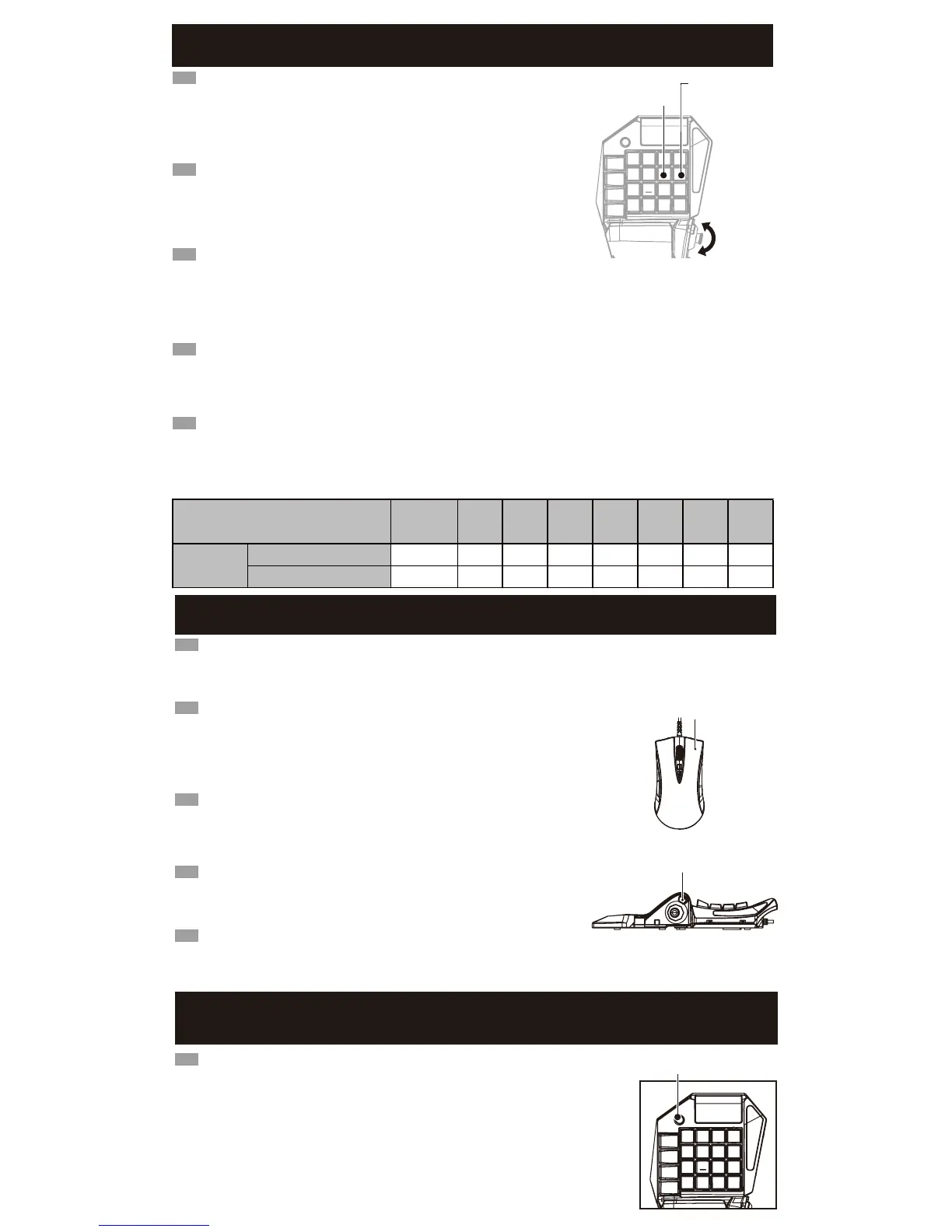
■ ADS Mouse Acceleration Adjustment / Ajustement de l'accélération de la souris ADS
/ ADS Mausbeschleunigung Einstellung / Regolare modalità di accelerazione del mouse in ADS
/ Ajuste de la aceleración del ratón en modo ADS
1. Posizionare la configurazione dello switch ADJUST.
2. Per regolare l'accelerazione nel piano orizzontale, premere i pulsanti su / giù lo stick analogico sinistro, mentre il tasto L1.
Per regolare la sensibilità sul piano verticale, premere i pulsanti su / giù lo stick analogico di sinistra mentre il pulsante □.
3. Il display cambia il colore del pannello a seconda dell'accelerazione (vedi tabella).
4. Re-regolare l'interruttore di impostazione in posizione OFF.
IT
1. Coloca el interruptor de configuración en ADJUST.
2. Para ajustar la aceleración en el plano horizontal, pulsa los botones Up/Down del joystick analógico izquierdo al mismo tiempo
que el botón L1.
Para ajustar la sensibilidad en el plano vertical, pulsa los botones Up/Down del joystick analógico izquierdo al mismo tiempo que
el botón □.
3. El color del panel de visualización cambiará según la aceleración (ver tabla abajo).
4. Vuelve a ajustar el interruptor de configuración a la posición OFF.
ES
1. Schalten Sie den Tasteneinstellungsschalter auf "ADJUST".
2. Um die horizontale Beschleunigung anzupassen, drücken Sie die Auf-/Ab-Tasten auf dem linken Analog-Stick, während Sie die
L1-Taste gedrückt halten.
Um die vertikale Beschleunigung anzupassen, drücken Sie die Auf-/Ab-Tasten auf dem linken Analog-Stick, während Sie die □-Taste
gedrückt halten.
3. Die Farbe auf dem Anzeigefeld verändert sich mit der Beschleunigung.
4. Schalten Sie den Tasteneinstellungsschalter auf "OFF".
DE
1. Placez l'interrupteur de configuration sur la position "ADJUST".
2. Pour régler l'accélération dans le sens horizontal, orientez le stick analogique vers
Haut ou Bas tout en appuyant sur la touche L1.Pour régler l'accélération dans le sens
vertical, orientez le stick analogique vers Haut ou Bas tout en appuyant sur la touche □.
3. La couleur du panneau d'affichage change en fonction de l'accélération choisie
(Reportez-vous au tableau ci-dessous).
4. Placez l'interrupteur de configuration sur la position "OFF".
FR
1.Turn the Config Switch to “ADJUST”.
2.To adjust the acceleration in the horizontal direction, press up or down on the analog
stick while pressing the L1 button.
To adjust the sensitivity in the vertical direction, press up or down on the analog stick
while pressing the □ button.
3.The color of the Display Panel will change according to the acceleration
(Refer to chart below.)
4.Turn the Config Switch to “OFF”.
EN
L1 button / Touche L1
/ L1-Taste / Tasto L1
/ Botón L1
□ button / Touche □
/ □-Taste / Tasto □
/ Botón □
EN
The following steps will allow you to reset all button configurations to the default settings.
These steps must be completed for each Profile setting.
(i.e. If Profile 1 in PS4 Mode is reset to default setting, then Profile 2, 3 in PS4 Mode and Profile
1~3 in PS3 Mode are not affected.)
※Button Setting Profiles cannot be reset to default setting all at once. Reset must be done for each
Profile separately.
1.Turn the Config Switch to “ASSIGN”.
2.Press and hold the PS button for 3 seconds. All LEDs will light up
and the button configuration will be reset to default.
3.Turn the Config Switch to “OFF”.
PS button / Touche PS
/ PS-Taste / Tasto PS / Botón PS
■ ADS Lock Feature / Fonction de verrouillage ADS / ADS Sperrfunktion
/ Blocco di la modalità ADS / Bloqueo del modo ADS
Plutôt que de maintenir le clic droit pour rester en mode ADS (Aim Down Sight),
vous pouvez configurer la souris pour rester dans ce mode après un seul clic.
1. Placez l'interrupteur de configuration sur la position "ADJUST".
2. Tout en appuyant sur la touche
×
, veuillez maintenir le clic droit. Une des LED pour la
fonction ADS (L1, L2, R1 ou R2) va s'allumer.※La fonction ADS par défaut peut être différente
selon le jeu ou sa configuration.
3. Placez l'interrupteur de configuration sur la position "OFF".
FR
Sie können den ADS (Aim Down Sight)-Modus auf der rechten Maustaste sperren
(An/aus mit einem Klick, ohne Halten).
1. Schalten Sie den Tasteneinstellungsschalter auf "ADJUST".
2. Drücken und halten Sie die
×
- und die rechte Maustaste gleichzeitig.
Das LED mit der ADS-Funktion (L1, L2, R1 oder R2) leuchtet auf.
※Die Standard-ADS-Funktion kann sich je nach Software, rsp. in-game Einstellung ändern.
3.Schalten Sie den Tasteneinstellungsschalter auf "OFF".
DE
È possibile bloccare gli annunci della modalità (Aim Down Sight) con un clic secondario.
1. Posizionare la configurazione dello switch ADJUST.
2. Fare clic con il pulsante destro del mouse mentre si tiene premuto il tasto
×
.Esso si
accende uno dei LED per la funzione ADS (L1, L2, R1 o R2).La funzione di regolazione
a partire ADS può variare di software o impostazioni di gioco.
3. Re-regolare l'interruttore di impostazione in posizione OFF.
IT
Puedes bloquear el modo ADS (Aim Down Sight) con un clic secundario.
1. Coloca el interruptor de configuración en ADJUST.
2. Pulsa el botón derecho del ratón mientras mantienes apretado el botón
×
.
Se encenderá uno de los LED para la función ADS (L1, L2, R1 o R2).
El ajuste de partida de la función ADS puede variar según el software o la configuración del juego.
3. Vuelve a ajustar el interruptor de configuración a la posición OFF.
ES
You can lock into ADS (Aim Down Sight) mode with a right-click.
1.Turn the Config Switch to “ADJUST”.
2.While pressing down on the
×
button, hold Right-click.
One of the LED for ADS function (L1, L2, R1 or R2) will turn on.
※Default ADS function may differ by software or in-game setting.
3.Turn the Config Switch to “OFF”.
EN
Right-click
/ Faites un clic droit
/ mit der rechten Maustaste
/ Pulsante destro del mouse
/ Con el botón derecho
EDIT
OFFONPROFILE
123
×
button / Touche
×
/
×
-Taste / Tasto
×
/ Botón
×
UP
DOWN
×0.25 ×0.5 ×0.75 ×1 ×1.5 ×2 ×4 ×8
×0.25 ×0.5 ×0.75 ×1 ×1.5 ×2 ×4 ×8



 To Next Page
 Loading...