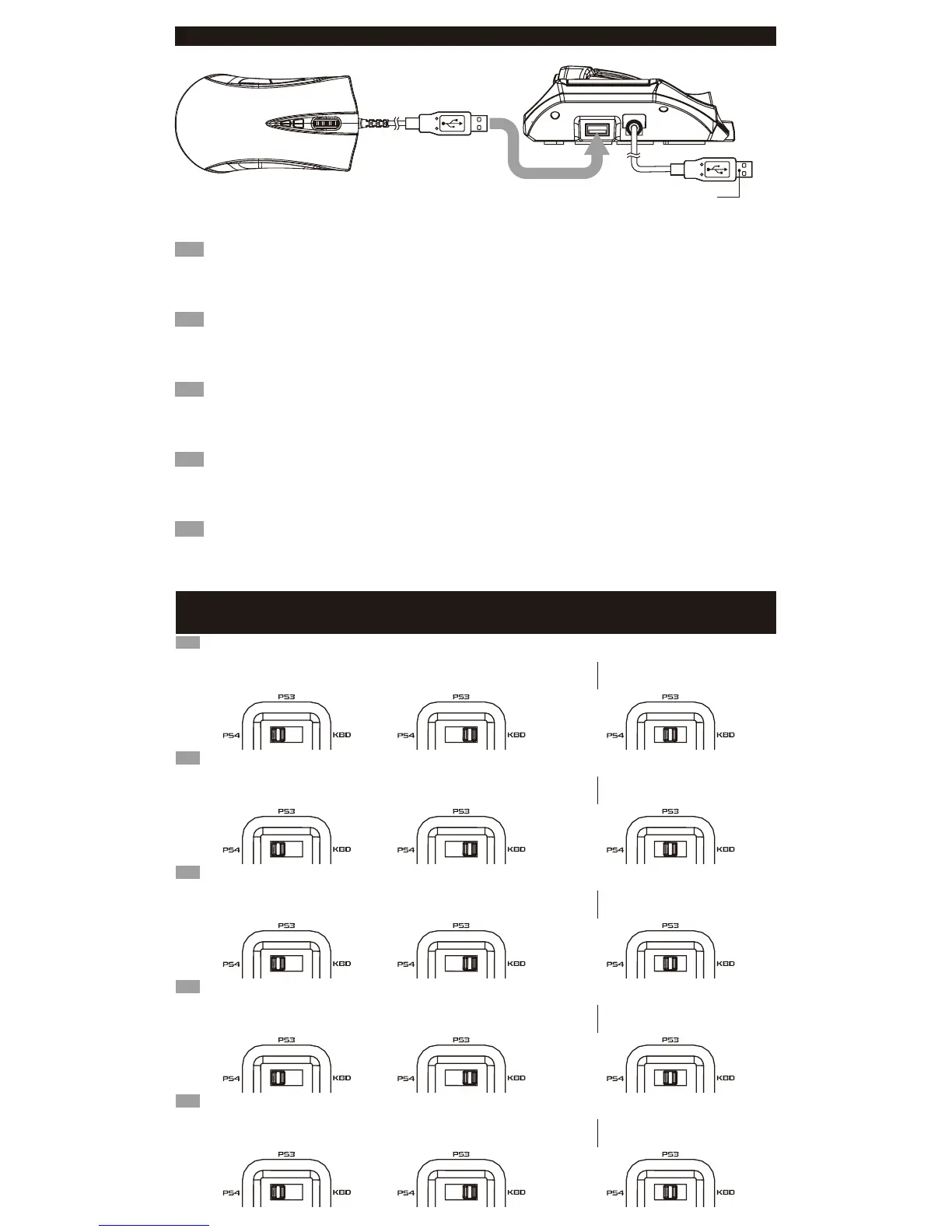
■ How to connect / Comment se connecter / Wie wird eingeschaltet / Cómo conectarlo / Come connettersi
EN
1.Insert the USB connector of the mouse into the USB port of the keyboard controller.
In addition to the included mouse, other USB compliant mice may be used*.
※Not compatible with all mice. *Compatibility not tested nor endorsed by Sony Interactive Entertainment Europe.
2. Please insert the USB connector of the controller into the USB port of the PlayStation®4.
※ Please set the PS4
TM
/PS3
TM
System Toggle Switch to the desired console before connecting the product.
FR
1.Insérez le connecteur USB de la souris dans le port USB du contrôleur du clavier.
En plus de la souris fournie, toute autre souris conforme USB peut être utilisée
※Non compatible avec toutes les souris. * Compatibilité non-testée ni approuvée par Sony Interactive Entertainment Europe.
2.Merci de bien vouloir insérer la prise USB du contrôleur à l'intérieur du port USB de la PlayStation®4.
※ Régler le commutateur système PS4
TM
/PS3
TM
sur la console souhaitée avant de brancher le produit.
DE
1.Stecken Sie den USB-Stecker des Maus am USB-Anschluss der Tastatur-Controller.
Zusätzlich zu der mitgelieferten Maus, können andere USB-kompatible Mäuse verwendet werden.
※ Nicht kompatibel mit allen Mäusen. * Kompatibilität nicht geprüft noch von Sony Interactive Entertainment Europe unterstützt.
2.Stecken Sie bitte den USB-Stecker des Controllers in den USB-Anschluss der PlayStation®4.
※ bitte korrigieren Sie die PS4
TM
/ PS3
TM
-System umschalten auf die gewünschte Konsole wechseln, bevor Sie das Produkt.
IT
1.Inserire il connettore USB del mouse alla porta USB del controller tastiera.
Oltre al mouse inclusi, può essere utilizzato topi conformi altro USB.
※ Non è compatibile con tutti i mouse. * La compatibilità non testato né approvato da Sony Interactive Entertainment Europe.
2. Inserte el conector USB del mando en el puerto USB de la PlayStation®4.
※ Si prega di impostare la PS4
TM
/ PS3
TM
-System Toggle Switch alla console desiderata prima di collegare il prodotto.
ES
1.Inserte el conector USB del ratón en el puerto USB del controlador de teclado.
Además del ratón incluido, se puede utilizar otros ratones compatibles de USB.
※ No es compatible con todos los ratones. * Compatibilidad no probado ni aprobado por Sony Interactive Entertainment Europe.
2.Si prega di inserire la presa USB del controller nella porta USB della PlayStation®4.
※ Por favor, ajuste el interruptor de Toggle de sistema PS4
TM
/PS3
TM
en la consola deseada antes de conectar el producto.
To PlayStation®4 / PlayStation®3 USB Port / Port USB PlayStation®4 / PlayStation®3
/ Zum PlayStation®4 / PlayStation®3 USB-Port / PlayStation®4 / PlayStation®3 USB Port
/ Para el Puerto de PlayStation®4 / PlayStation®3
■ PlayStation®4/ PlayStation®3 System Toggle Switch / Interrupteur système PlayStation®4 / PlayStation®3
/ PlayStation
®4 / PlayStation®3 System Schalter / Interruttore PlayStation®4 / PlayStation®3 sistema
/ Interruptor de Toggle de sistema PlayStation
®4 / PlayStation®3
Le commutateur plate-forme permet de basculerde compatibilité entre 4 et
PlayStation
®4 et PlayStation®3. Assurez-vous que le commutateur plate-forme est bien placé avec de conencter votre console.
FR
The Platform Toggle Switch toggles between PlayStation®4 and PlayStation®3 compatibility.
Switch the toggle switch to the desired platform before connecting.
EN
Connecting to
the PlayStation
®4 system
Connecting to
the PlayStation®3 system
(Use it as keyboard)
Connection à
la PlayStation
®4 système
Connection à
la PlayStation®3 système
(L’utiliser comme clavier)
(Verwenden Sie es als Tastatur)
Verbinden mit dem
PlayStation
®4 system
Verbinden mit dem
PlayStation®3 system
Die Plattform Kippschalter schaltet zwischen PlayStation
®4 und PlayStation®3 Kompatibilität.
Bitte stellen Sie sicher, dass Sie den Kippschalter auf die gewünschte Plattform vor dem Anschluss umzuschalten.
DE
(Usarlo come tastiera)
Collegamento al
PlayStation
®4 sistema
Collegamento al
PlayStation®3 sistema
Lo Switch Platform Toggle alterna tra PlayStation
®4 e compatibilità PlayStation®3.
Assicurati di cambiare l'interruttore per la piattaforma desiderata prima di collegare.
IT
(Usarlo como teclado)
Conexión al
PlayStation
®4 sistema
Conexión al
PlayStation®3 sistema
El interruptor de palanca plataforma alterna entre PlayStation
®4 y PlayStation®3 compatibilidad.
Por favor, asegúrese de apagar el interruptor de palanca a la plataforma deseada antes de conectar.
ES













 To Next Page