9
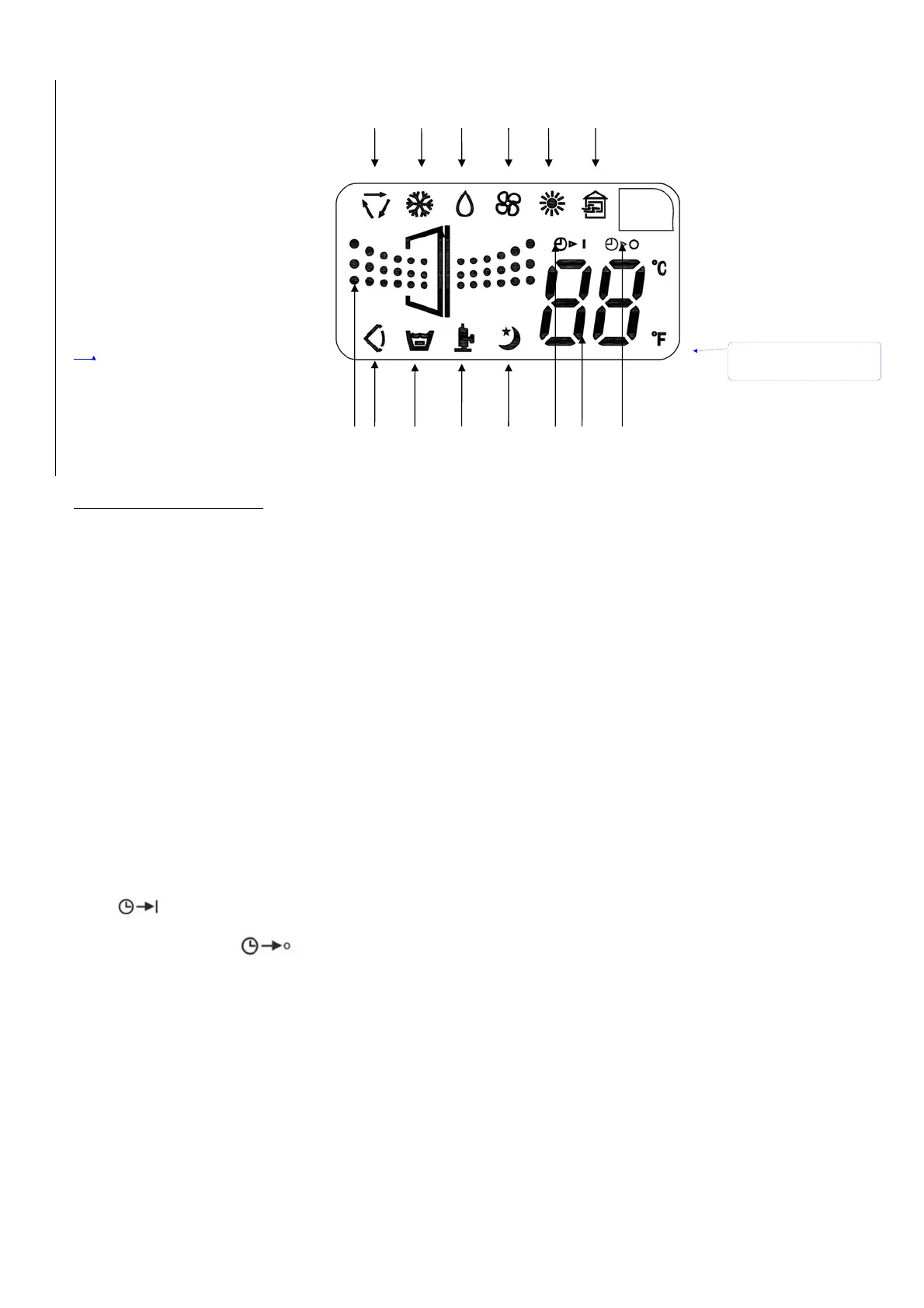
MULTI-COLOR DISPLAY
A. Auto Mode
B. Cool Mode
C. Dehumidify Mode
D. Fan Mode
E. Heat Mode(if only cooling not work)
F. Fan Speed (Low, High, Medium)
G. Compressor is on F
H. Swing Mode
I. Sleep Mode
J. Temperature and Timer
K. Timer On
L. Timer Off
M. Water full
N.
Purify
ABCDEN
FHMG I KJL
CONTROL PANEL FUNCTIONS
ON/OFF BUTTON
Starts or stops the unit.
MODE BUTTON
Press to select the operating mode:
Fan Mode
Air Conditioning Mode
Dehumidifying Mode
Auto Mode
FAN BUTTON
Press to select the fan speed: High, Medium, and Low.
The fan speed can be visually distinguished by the numb e r of the digital air segments flow out from the
windmill fan image on the multi-color display.
TEMPERATURE
When in cooling or heating mode, the desired temperature can be selected by pressing the ∧ and ∨
buttons. T he multi-color display flashes the temperature while it is being set. The multi-color display
shows the set temperature when it is not in temperature setting mode.
The multi-color display can show either Celsius or Fahrenheit. Press the ∧ and ∨ buttons
simultaneously to change the display from Celsius to Fahrenheit or vice versa.
TIMER
To set the auto start time, press the Timer on button until the multi-color display shows a flashing
“
”. Press the ∧ and ∨ buttons to change the clock to the desired time for the unit to
automatically start. To set the auto stop time, press the Timer Off button and the multi-color display
will show a flashing “
”. Press the ∧ and ∨ buttons to change the clock to the desired time
for the unit to automatically stop. The light will flash for 3 seconds to activate the timer you
programmed.
项目符号和
编号
带格式的
[
微
]:


 To Next Page