Water
12
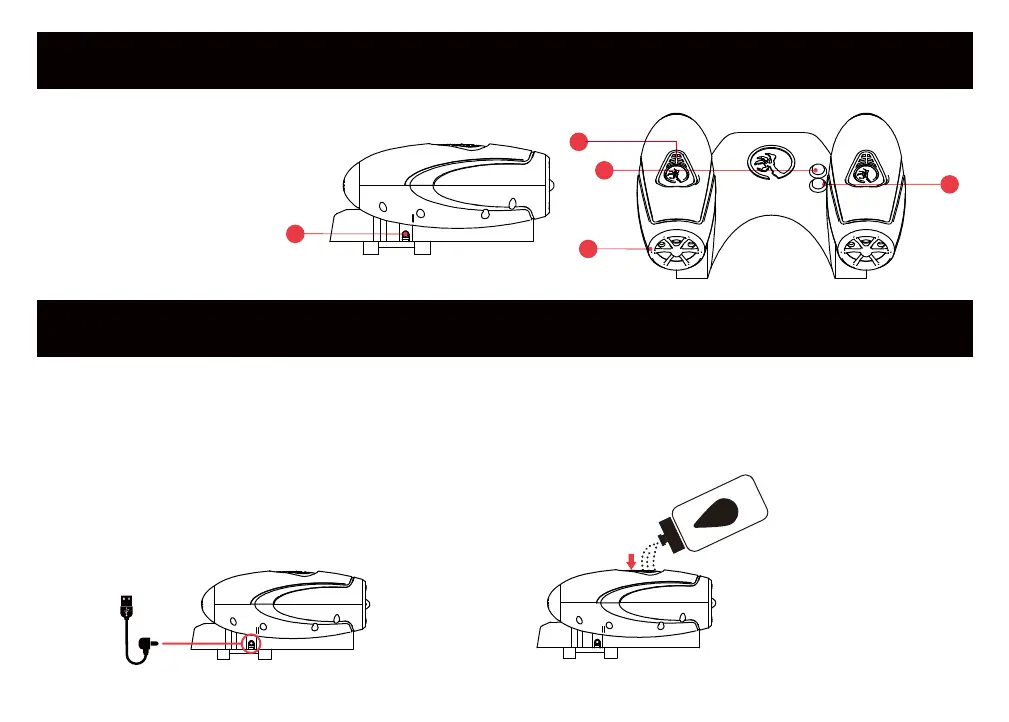
FOG BLASTER DIAGRAM
USING & MAINTAINING YOUR FOG BLASTER
1. Charging Port
2. Water Tank
3. Power Button
4. LED Lights & Sound Effects
Button
5. Fog Vent & LED Lights
5
3
Before using the fog blaster, connect the included charging cable to the fog blaster’s charging port and a
USB outlet (Figure 1). A red light will appear on the fog blaster while charging. When the light turns off, your
fog blaster is fully charged. A full change may take up to 4 hours. Unplug the charging cable. Next, press and
hold down the water tank buttons while pouring water into the water tank (Figure 2). Release the buttons
when the tanks are filled. Do not overfill!
Hold down the button to open
the water tank and pour
water into it
(Figure 1) (Figure 2)
1
2
4


 To Next Page