18
Chapter 2
D82008204 REV B 1/14/04
Charging Your Batteries
Your chair is equipped with one of several different chargers.
Please follow the operating instructions for the appropriate charger.
The recharging time for the batteries will vary based on the amount of use the
chair has had. It may take up to 8 hours for a full recharge.
We recommend an overnight charge after the day’s use of the chair.
1. Select a clean, dry, cool, well ventilated area to use the charger.
2. Make sure the charger is switched to the off position, if so equipped, and the
joystick controller is off.
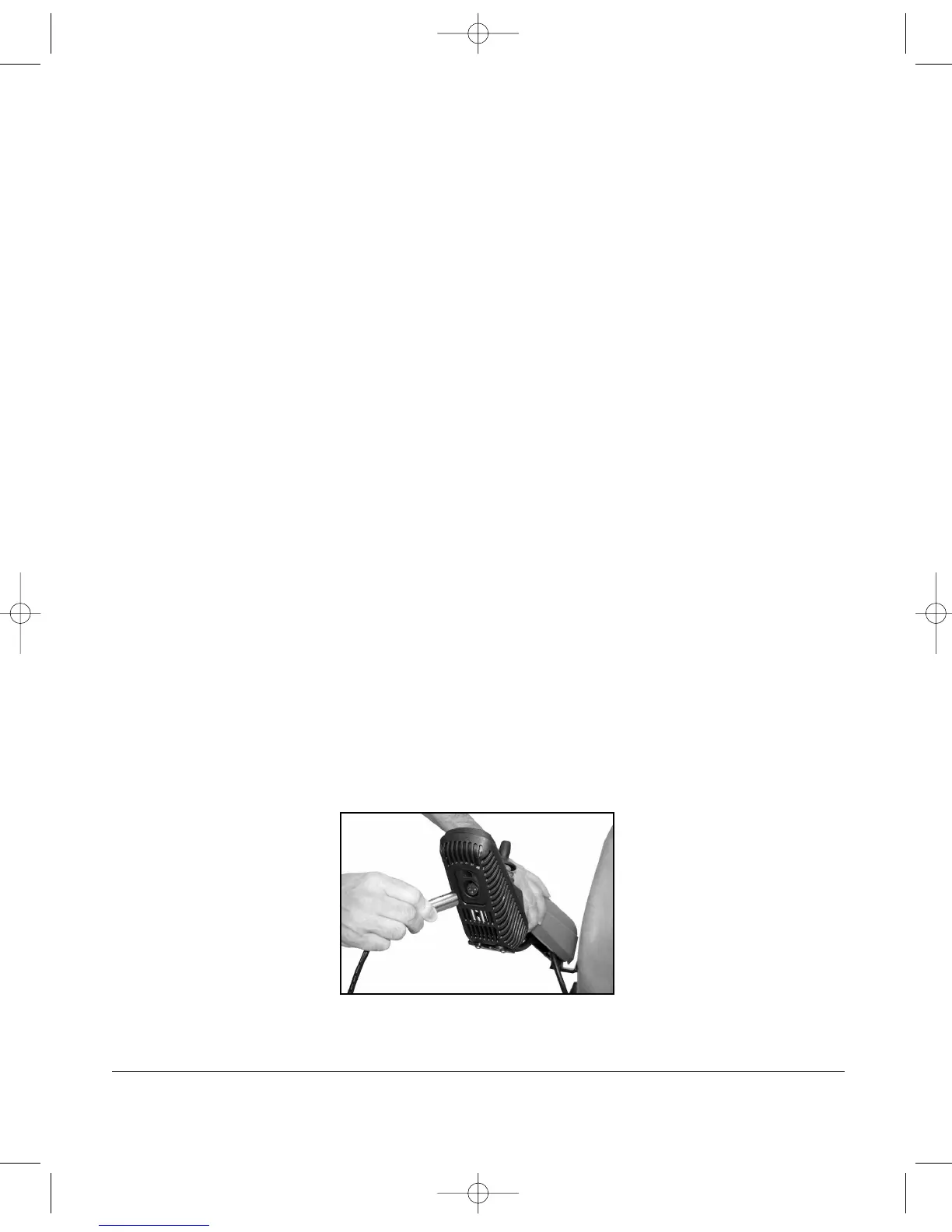
3. Connect the charger output cord into the charger port located on the front of
the joystick controller. (see Figure 2A, below) Align the three pins on the plug
with the three holes on the port and push the plug in place. Make sure the
plug is fully seated in the charger port. If it is not pushed in far enough the
batteries will not charge or the plug may become hot.
4. Plug the AC power cord into the back of the charger.
5. Plug the other end of the AC power cord into a grounded,
household power receptacle.
6. Follow the specific instructions for your charger from the following pages.
7. When the batteries are charged, or you are ready to use the chair,
a. If there is a power switch on your charger, turn it off.
b. Unplug the charger from the household outlet.
c. Unplug the charger from the joystick controller.
Figur
e 2A - Charger Port, Typical Location


 To Next Page