26 Chapter 2 D82008753M 10/13
1. Select a clean, dry, cool, well ventilated area to use
the charger.
2. If your charger is equipped with an off button, ensure that the
charger is in the OFF position, along with the joystick controller
in the OFF position.
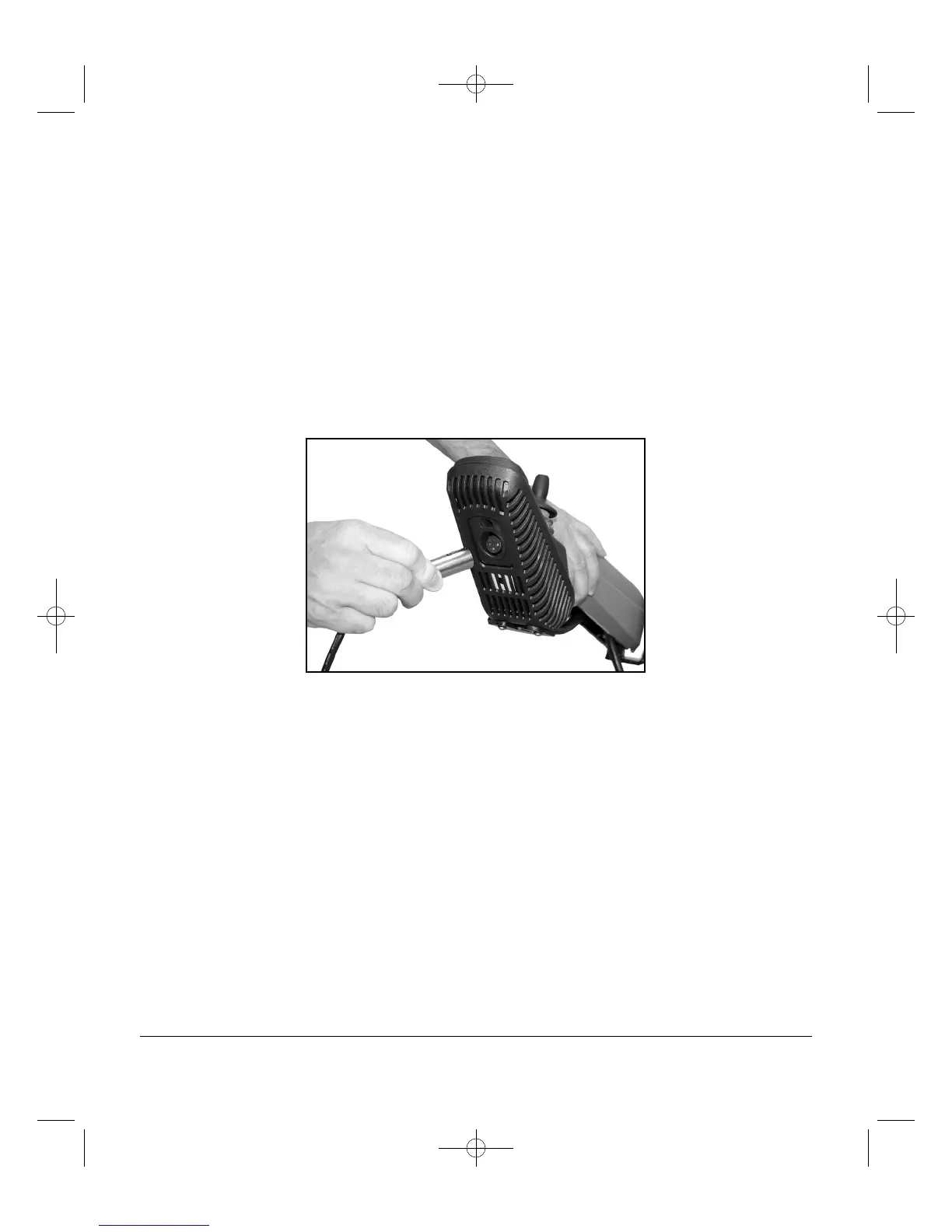
3. Connect the charger output cord into the charger port
located on the front of the joystick controller. Refer to Figure 2A
below. Align the three pins on the plug with the three holes on
the port and push the plug in place. Make sure the plug is fully
seated in the charger port. If it is not pushed all the way, the
batteries will not charge or the plug may become hot.
Figure 2A - Charger Port, Typical Location
4. Plug the AC power cord into the back of the charger.
5. Plug the other end of the AC power cord into a 120-volt
grounded household power outlet.
6. Follow the specific instructions for your charger.
Charger instructions begin on page 24.
7. When the batteries are charged, and/or you are ready to use
the chair:
A. If your charger is equipped with an off button,
turn OFF the power switch on your charger.
B. Unplug the charger from the household power outlet.
C. Unplug the charger from the joystick controller.


 To Next Page