Appendix C:
Locking Feature
Your MPV5 is equipped with a locking feature. Please refer to the
appropriate instructions for the controller on your MPV5.
Lock Sequence System
D82008753M 10/13 Chapter 9 59
1. Turn the controller on.
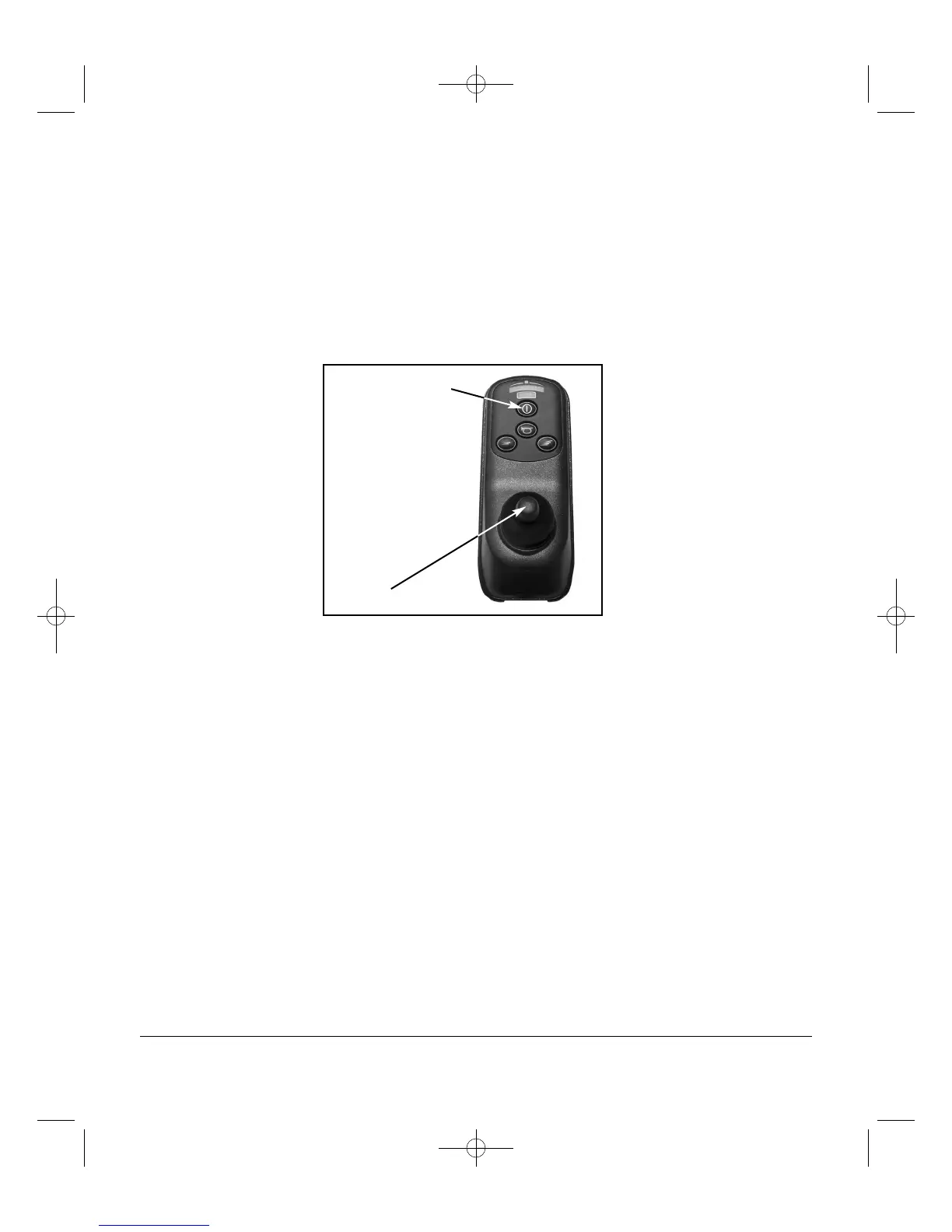
2. To lock the chair, depress and hold the ON/OFF button. After
one second the controller will beep. Release the ON/OFF
button. Move the joystick forward until the controller beeps.
Move the joystick in reverse until the controller beeps. Release
the joystick. There will be a long beep that indicates the
controller is locked.
3. To unlock, turn the controller on. The speed/response indicator
will be rippling up and down. Move the joystick forward until
the controller beeps. Then move the joystick in reverse until the
controller beeps. Release the joystick. There will be a long
beep that indicates the controller is unlocked.
ON / OFF Button
Joystick
Figure 9A - VSI Controller and new VSI Controller


 To Next Page