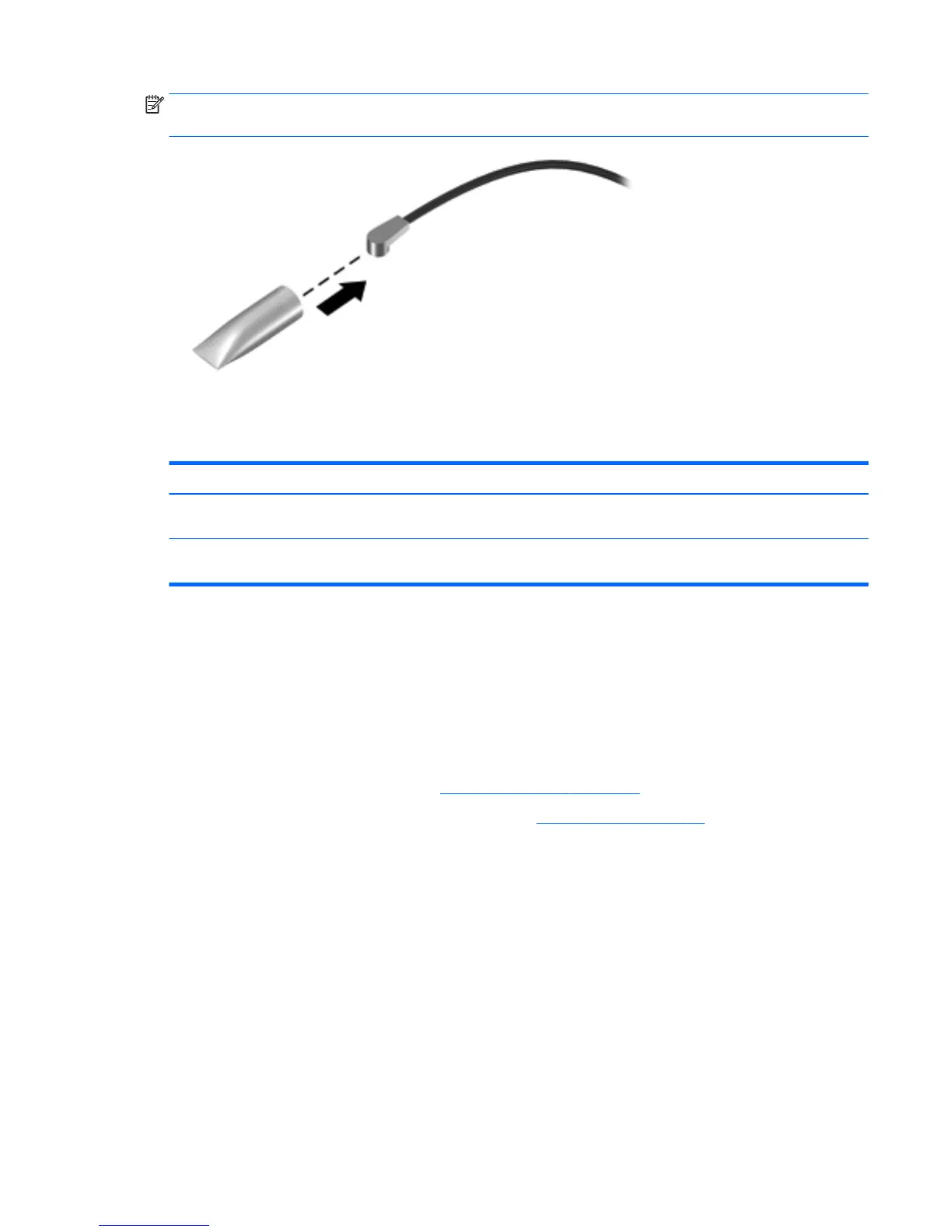
NOTE: If the WWAN antenna is not connected to the terminal on the WWAN module, a protective sleeve
must be installed on the antenna connector, as shown in the following illustration.
Reverse this procedure to install the WWAN module.
Connector board
Description Spare part number
For use only on computer models equipped with WWAN capability (includes SD Card Reader slot, SIM
slot, and cable)
785884-001
For use only on computer models not equipped with WWAN capability and HP Chromebook
computer models (includes SD Card Reader slot and cable)
783087-001
Before removing the connector board, follow these steps:
1. Shut down the computer. If you are unsure whether the computer is o or in Hibernation, turn
the computer on, and then shut it down through the operating system.
2. Disconnect all external devices connected to the computer.
3. Disconnect the power from the computer by rst unplugging the power cord from the AC outlet and then
unplugging the AC adapter from the computer.
4. Remove the keyboard/top cover (see Keyboard/top cover on page 24).
5. Remove the WWAN module (select models only, see WWAN module on page 34).
Remove the connector board:
1. Release the ZIF connector (1) to which the connector board cable is attached, and then disconnect
the connector board cable from the system board.
2. Remove the two Philllips PM1.9×4.2 screws (2) that secure the connector board to the base enclosure.
Component replacement procedures 35




 To Next Page