Display assembly
NOTE: The display assembly is spared at the subcomponent level only. For more display assembly spare
part information, see the individual removal subsections.
Before removing the display assembly, follow these steps:
1. Turn o the computer. If you are unsure whether the computer is o or in Hibernation, turn
the computer on, and then shut it down through the operating system.
2. Disconnect the power from the computer by unplugging the power cord from the computer.
3. Disconnect all external devices from the computer.
4. Remove the keyboard/top cover (see Keyboard/top cover on page 24).
Remove the display assembly:
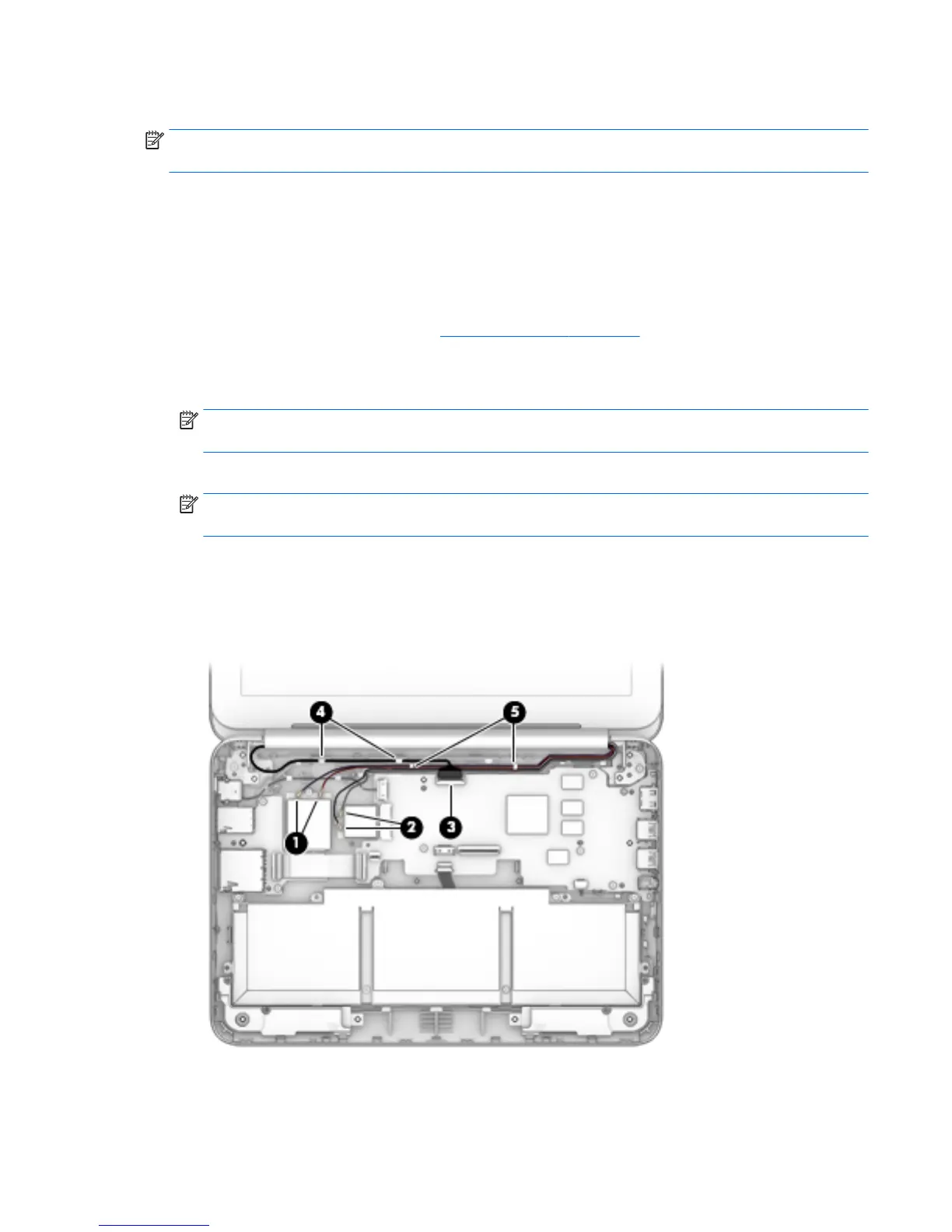
1. Disconnect the WWAN antenna cables (1) from the terminals on the WWAN module (select models only).
NOTE: The #5/red WWAN antenna cable connects to the WWAN module #5/Main terminal. The #6/blue
WWAN antenna cable connects to the WWAN module #6/Aux terminal.
2. Disconnect the WLAN antenna cables (2) from the terminals on the WLAN module.
NOTE: The #1/white WLAN antenna cable connects to the WLAN module #1/Main terminal. The #2/
black WLAN antenna cable connects to the WLAN module #2/Aux terminal.
3. Release the ZIF connector (3) to which the display panel cable is attached, and then disconnect
the display panel cable from the system board.
4. Release the display panel cable from the routing clips (4) and channel built into the base enclosure.
5. Release the WLAN antenna cables from the routing clips (5) and channel built into the base enclosure.
6. Remove the two Phillips PM2.4×5.7 screws (1) that secure the display assembly to the base enclosure.
Component replacement procedures 43




 To Next Page