ENWW Connecting Monitor Cables 7
Connecting Monitor Cables
Connecting the VGA (Analog) Cable or DVI-D (Digital) Cable or HDMI (Digital)
Cable
Use a VGA video cable or a DVI-D cable or a HDMI cable
to connect your monitor to
your computer. To use DVI, you must have a DVI-compliant graphic card. Connectors
are located on the back of the monitor. Be sure the computer and monitor are turned
off and unplugged.
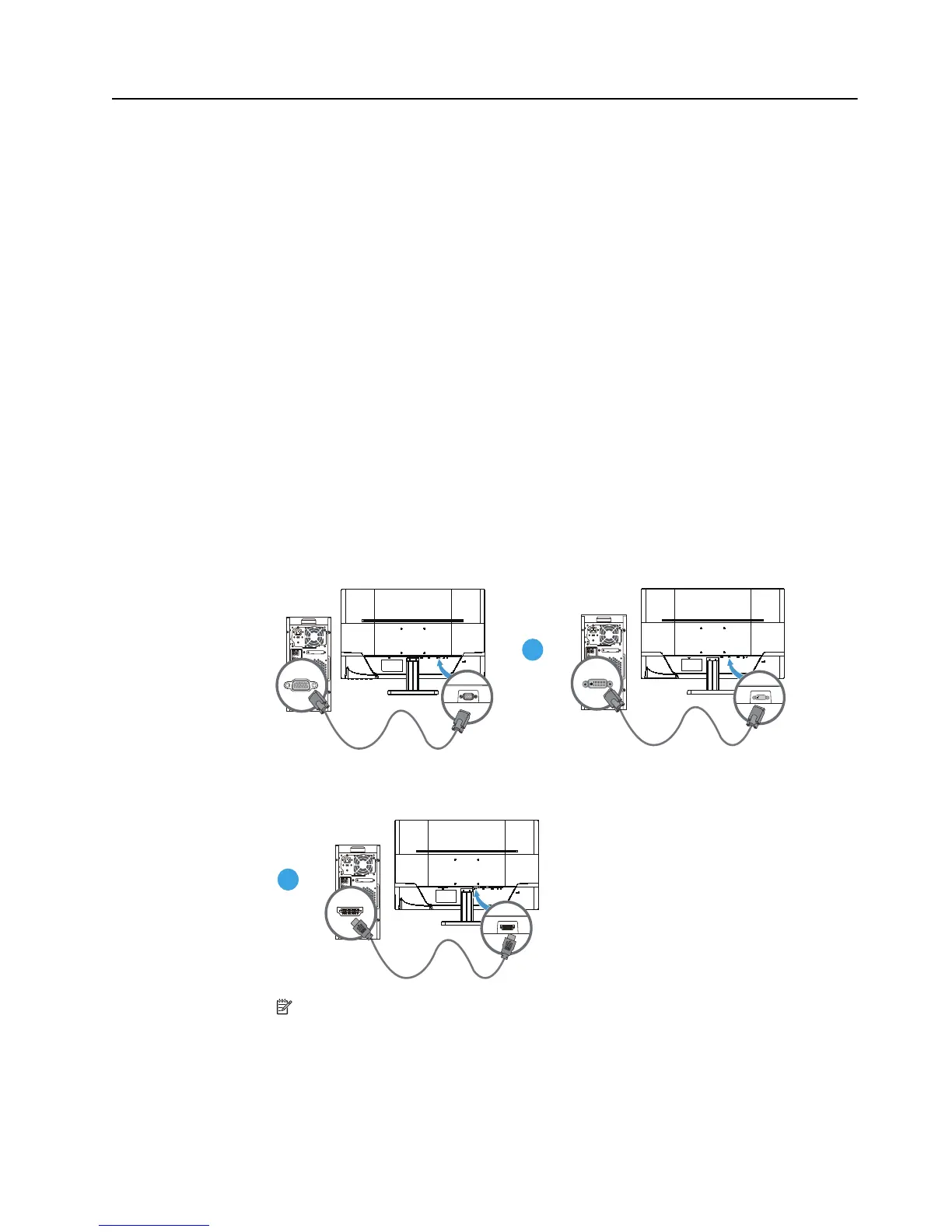
1.To connect the VGA cable:
Connect one end of the VGA video cable to the back of the monitor and the other end
to the VGA video
connector on the computer.
2.To connect the DVI-D cable:
Connect one end of the DVI-D video cable to the back of the monitor and the other
e
nd to the DVI-D video connector on the computer. You can use this cable only if your
computer has a DVI compliant graphics card installed. The monitor DVI-D connector
and cable are included.
3. To connect the HDMI cable:
Connect one end of the HDMI cable to the back of the monitor and the other end to
the
HDMI connector on the computer.
Figure 3-4 Connecting the VGA or a DVI-D or a HDM
I cable- connector locations
may vary
NOTE: When using a VGA or DVI or HDMI signal, you must connect your audio
separately because a VGA or DVI o
r HDMI signal converts only video data, not audio
data.


 To Next Page