EasyManua.ls Logo

HP 3468A - Page 11

HP 3468A
114 pages
Print Icon
To Next Page IconTo Next Page
To Previous Page IconTo Previous Page
Loading...
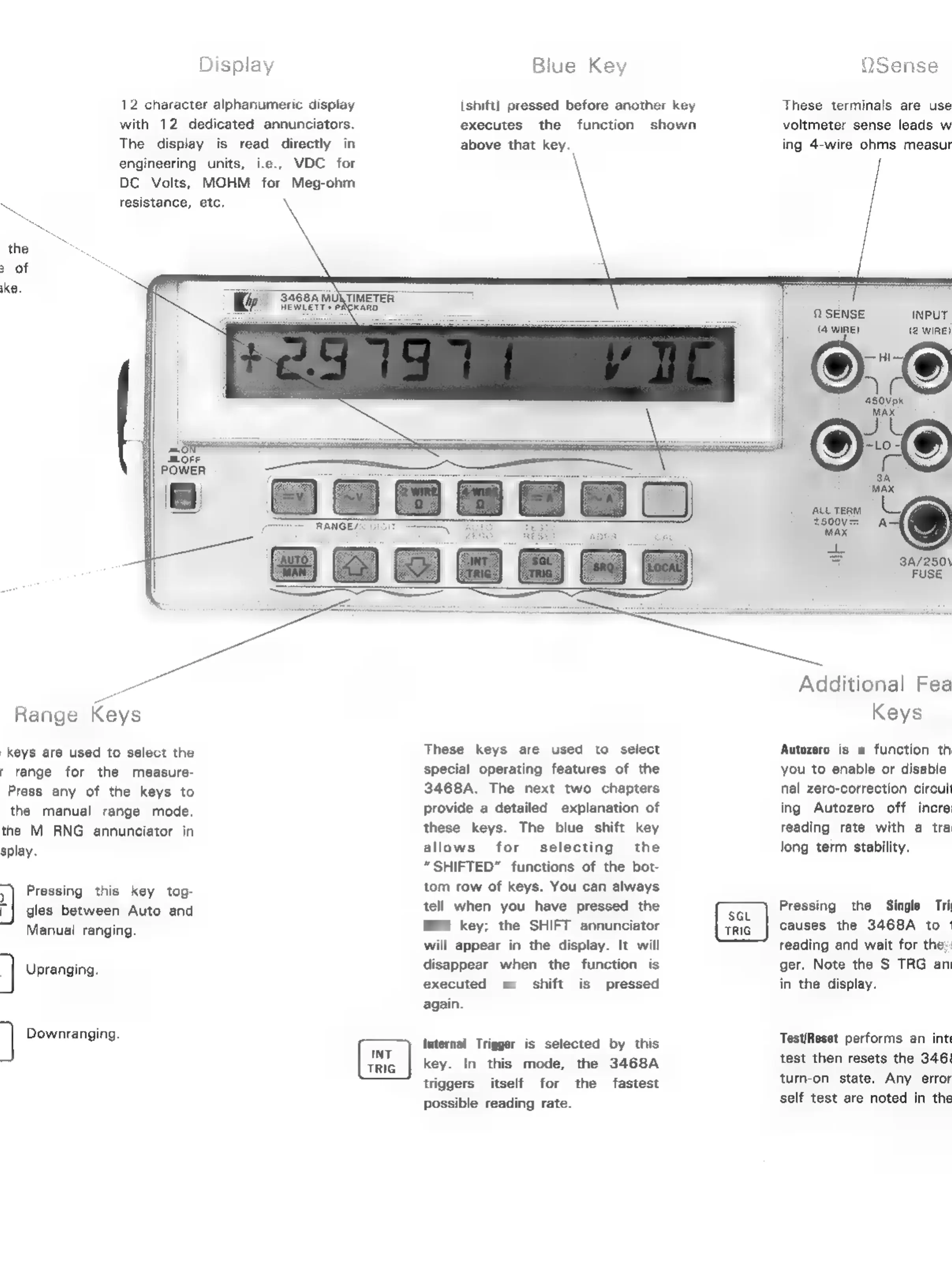
Display
12
character
alphanumeric
display
with
12
dedicated
annunciators.
The
display
is
read
directly
engineering
units,
i.e.,
DC
Volts,
MOHM
for
Meg-ohm
resistance,
etc.
Range
Keys
keys
are
used
to
select
the
f
range
for
the
measure-
Press
any
of
the
keys
to
the
manual
range
mode.
the
M
RNG
annunciator
in
splay.
]
5
]
]
Pressing
this
key
tog-
gles
between
Auto
and
Manual
ranging.
Upranging.
Downranging.
Blue
Key
ishitt]
pressed
before
another
key
executes
the
function
shown
above
that
key.
These
keys
are
used
to
select
special
operating
features
of
the
3468A.
The
next
two
chapters
provide
a
detailed
explanation
of
these
keys.
The
blue
shift
key
allows
for
selecting
the
SHIFTED”
functions
of
the
bot-
tom
row
of
keys.
You
can
always
tell
when
you
have
pressed
the
Shift
key;
the
SHIFT
annunciator
will
appear
in
the
display.
It
will
disappear
when
the
function
is
executed
or
shift
is
pressed
again.
Internal
Trigger
is
selected
by
this
key.
In
this
mode,
the
3468A
triggers
itself
for
the
fastest
possible
reading
rate.
OSense
These
terminals
are
use
voltmeter
sense
leads
w
ing
4-wire
ohms
measur
OQ
SENSE
INPUT
(aire)
(2
WIRE)
©;o
Kk
3A/250\
FUSE
Additional
Fea
Keys
Autozero
is
a
function
th
you
to
enable
or
disable
nal
zero-correction
circuit
ing
Autozero
off
incre
reading
rate
with
a
tra
long
term
stability.
Pressing
the
Single
Tri
causes
the
3468A
to
|
reading
and
wait
for
the
|
ger.
Note
the
S
TRG
an
in
the
display.
Test/Reset
performs
an
inte
test
then
resets
the
346!
turn-on
state.
Any
error
self
test
are
noted
in
the

Related product manuals