EasyManua.ls Logo

HP 3468A - Rear Panel Overview

HP 3468A
114 pages
Print Icon
To Next Page IconTo Next Page
To Previous Page IconTo Previous Page
Loading...
vVnat
IS
on
the
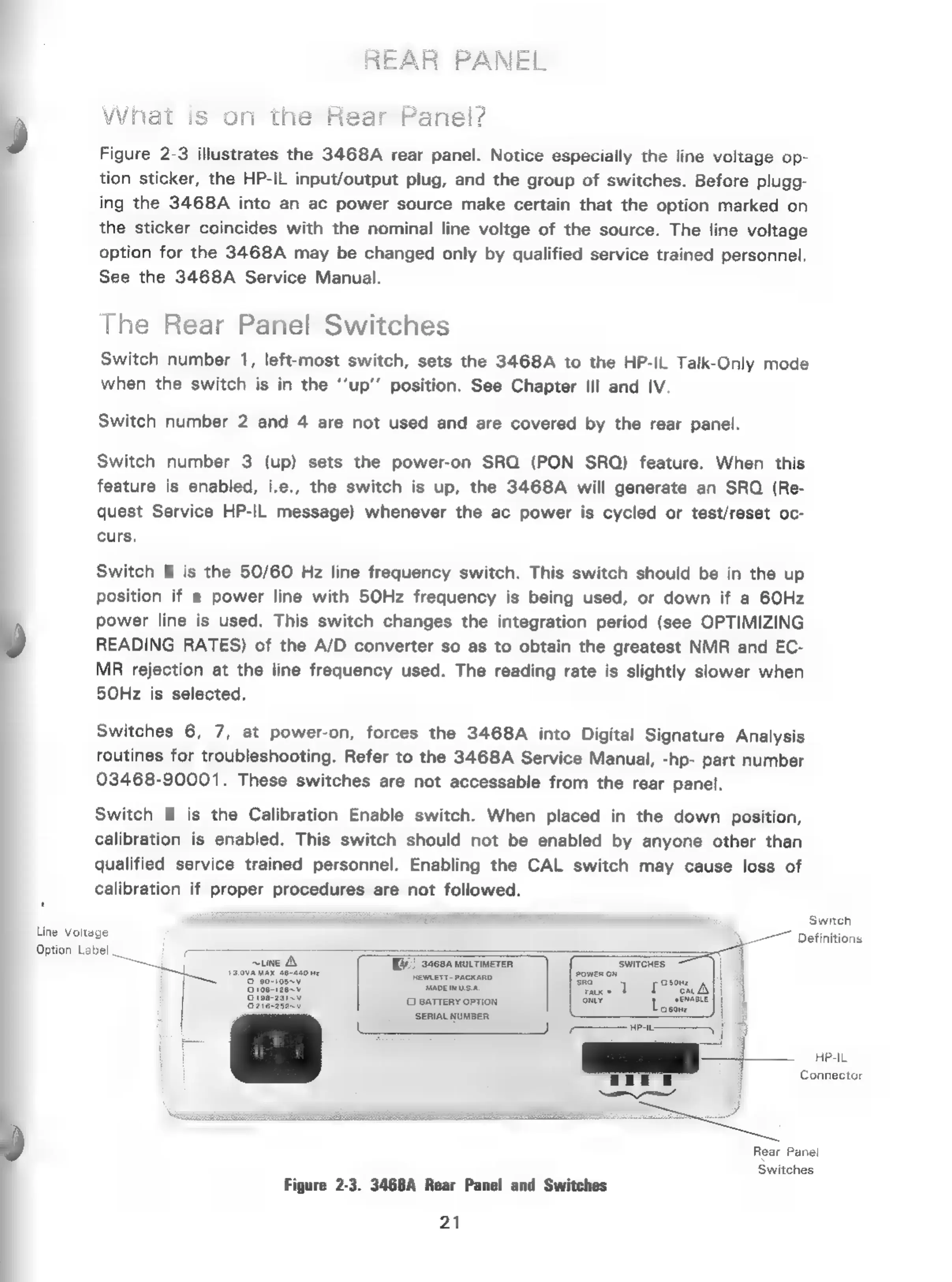
Figure
2-3
illustrates
the
3468A
rear
panel.
Notice
especially
the
line
voltage
op-
tion
sticker,
the
HP-IL
input/output
plug,
and
the
group
of
switches.
Before
plugg-
ing
the
3468A
into
an
ac
power
source
make
certain
that
the
option
marked
on
the
sticker
coincides
with
the
nominal
line
voltge
of
the
source.
The
line
voltage
option
for
the
3468A
may
be
changed
only
by
qualified
service
trained
personnel.
See
the
3468A
Service
Manual.
The
Rear
Panel
Switches
Switch
number
1,
left-most
switch,
sets
the
3468A
to
the
HP-IL
Talk-Only
mode
when
the
switch
is
in
the
‘‘up’’
position.
See
Chapter
Ill
and
IV.
Switch
number
2
and
4
are
not
used
and
are
covered
by
the
rear
panel.
Switch
number
3
(up)
sets
the
power-on
SRO
(PON SRQ)
feature.
When
this
feature
is
enabled,
i.e.,
the
switch
is
up,
the
3468A
will
generate
an
SRO
(Re-
quest
Service
HP-IL
message)
whenever
the
ac
power
is
cycled
or
test/reset
oc-
curs.
Switch
5
is
the
50/60
Hz
line
frequency
switch.
This
switch
should
be
in
the
up
position
if
a
power
line
with
50Hz
frequency
is
being
used,
or
down
if
a
6OHz
power
line
is
used.
This
switch
changes
the
integration
period
(see
OPTIMIZING
READING
RATES)
of
the
A/D
converter
so
as
to
obtain
the
greatest
NMR
and
EC-
MR
rejection
at
the
line
frequency
used.
The
reading
rate
is
slightly
slower
when
50Hz
is
selected.
Switches
6,
7,
at
power-on,
forces
the
3468A
into
Digital
Signature
Analysis
routines
for
troubleshooting.
Refer
to
the
3468A
Service
Manual,
-hp-
part
number
03468-90001.
These
switches
are
not
accessable
from
the
rear
panel.
Switch
8
is
the
Calibration
Enable
switch.
When
placed
in
the
down
position,
calibration
is
enabled.
This
switch
should
not
be
enabled
by
anyone
other
than
qualified
service
trained
personnel.
Enabling
the
CAL
switch
may
cause
loss
of
calibration
if
proper
procedures
are
not
followed.
t
= B
Switch
Line
Voltage
,
Definitions
Option
Label
ee
=
=
j
ae
~une
A
WH)
sce
murtimeren
‘SWITCHES
|
a
LL
tia
aeaso
ne
ences
Ghee
Aes
owen
ow
\4
9
30710
Aes
Fa
posal)
|
ony
efunce
||
BATTERY
OPTION
Loco
j
a
|
|
SERIAL
NUMBER
|
i
|
On:
Connector
Rear
Panel
Switches
Figure
2-3.
3468A
Rear
Panel
and
Switches
21

Related product manuals