EasyManua.ls Logo

HP 3468A - Voltage Measurement Guide

HP 3468A
114 pages
Print Icon
To Next Page IconTo Next Page
To Previous Page IconTo Previous Page
Loading...
Whether
you
use
your
3468A
on
the
bench
or
as
part
of
a
sophisticated
test
system,
probably
most
of
your
measurements
will
be
voltage
measurements.
If
you
have
special
requirements
in
taking
voltage
measurements,
be
sure
to
read
the
sections
on
Optimizing
Reading
Rates,
Display,
Autozero,
and
Triggering
modes.
A
complete
Table
of
Specifications
is
given
in
Chapter
V
of
this
manual.
DC
Voltage
Measurements
DC
voltages
measured
on
the
3468A
are
both
simple
and
straightforward.
Press
the
DC
Voltage
key
and
either
select
the
appropriate
range
or
allow
the
multimeter
to
autorange.
Read
the
display
directly
(no
multiplying
the
reading
by
the
range,
etc.)
for
the
measured
voltage.
e
Command
:
F1
Selects
the
DC
Volts
mode
AC
Voltage
Measurements
Like
DC
voltage
measurements,
AC
measurements
are
very
straightforward.
Press
the
AC
Voltage
key
and
appropriate
range
key(s).
The
display
is
read
directly
for
the
measured
voltage.
The
3468A
uses
a
True
RMS
AC
to
DC
converter
for
AC
voltage
and
current
measurements.
Unlike
multimeters
that
use
an
average
detector,
the
True
RMS
converter
allows
accurate
measurement
of
voltages
that
are
often
noisy,
non-
periodic
or
non-sinusoid,
The
RMS
converter
will
accurately
measure
the
True
RMS
value
of
sawtooth
or
triangle
waveforms;
squarewaves;
or
low
repetition
rate,
high
crest
factor
(ratio
of
peak
to
RMS)
pulse
trains.
RMS
measurements
are
made
by
calculating
the
instantaneous
square
of
the
input
signal,
averaging
it
and
taking
the
square
root
of
the
result.
This
provides
a
DC
voltage
that
is
proportional
to
the
RMS
value
of
the
waveform.
SENSE
INPUT
(a
wine}
(2
wine?
Command
F2
Selects
the
AC
Volts
mode
DC
OR
AG
VOLTAGE
SOURCE
3a/250V
FUSE
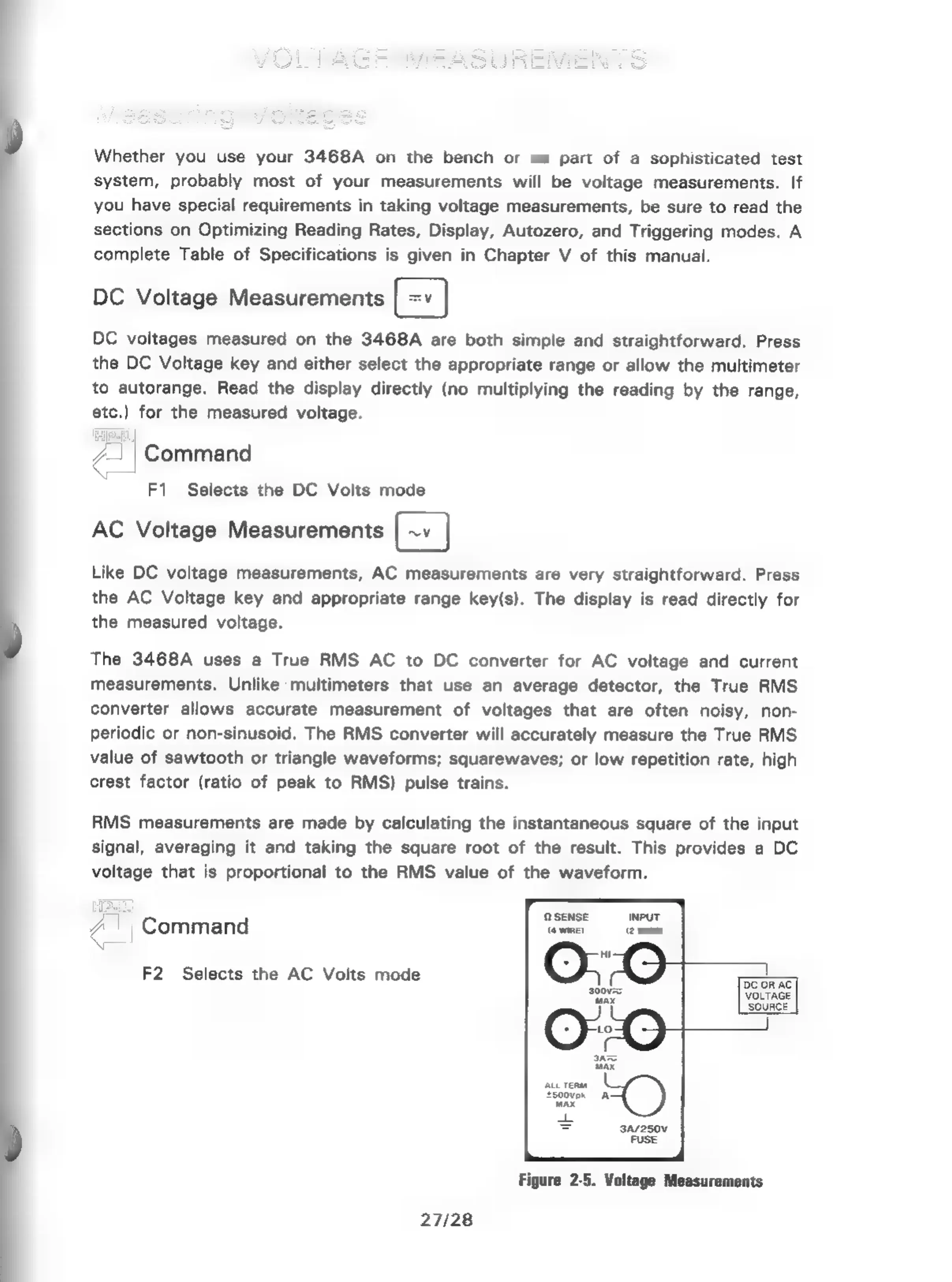
Figure
2-5.
Voltage
Measurements
27/28

Related product manuals