EasyManua.ls Logo

HP 3468A - Status Register; Status Byte and SRO Mask

HP 3468A
114 pages
Print Icon
To Next Page IconTo Next Page
To Previous Page IconTo Previous Page
Loading...
The
status
register
is
used
to
monitor
the
seven
possible
interrupt
conditions.
It
is
possible
for
one
or
more
bits
of
the
Status
Register
to
be
true
without
the
3468A
causing
an
interrupt.
The
interrupt
will
only
occur
when
the
SRQ
mask
has
been
set
for
particular
conditions.
Refer
to
Figure
4-2.
If
the
SRO
mask
is
set
for
certain
conditions
and
one
or
more
of
those
conditions
occur,
bit
6
of
the
status
register
will
go
true
(true
being
a
”1”).
The
SRQ
annunciator
in
the
display
will
turn
on,
and
the
HP-IL
SRQ
message
will
be
sent.
The
controller
must
be
programmed
to
respond
to
the
SRO
message.
For
a
more
complete
description
of
the
Status
Byte
bits,
refer
to
SPOLL
(Serial
Poll).
The
Status
Byte
is
an
8-bit
byte
that
may
be
used
to
determine
the
current
status
of
the
3468A
regardless
of
whether
an
interrupt
(SRQ)
has
occurred.
The
Status
Byte
comes
from
the
status
register
and
is
output
in
response
to
a
serial
poll
which
is
described
in
the
next
section.
Bit
7
Bit
6
Bit
5
Bi
4
Bit
3
Bit
2
Bit
1
Bit
O
Power-on
Ras
Cal
Front
Hardware
‘Syntax
Invalid
Data
Reset
Failed
|
Panel
Error
Error
Range
Ready
SRO
Figure
4-2.
Status
Register
The
SRQ
mask
can
only
be
set
to
mask
bits
0-5
on
the
Status
Register.
Default
mask
value
is
00.
To
set
the
mask
first
determine
which
conditions
you
want
to
interrupt
the
controller,
e.g.,
data
ready,
calibration
procedure
failed,
syntax
error,
etc.
Determine
the
two
digit
octal
code
for
those
conditions.
Then,
output
the
“M”
instruction
mnemonic
followed
by
the
octal
code
as
the
qualifier,
that
is:
“Mbb”,
where
bb
is
the
octal
code.
Think
of
the
SRQ
mask
as
a
mask
that
sits
over
the
lower
six
bits
of
the
status
register
and
masks
out
those
conditions
you
don’t
want
to
cause
an
interrupt.
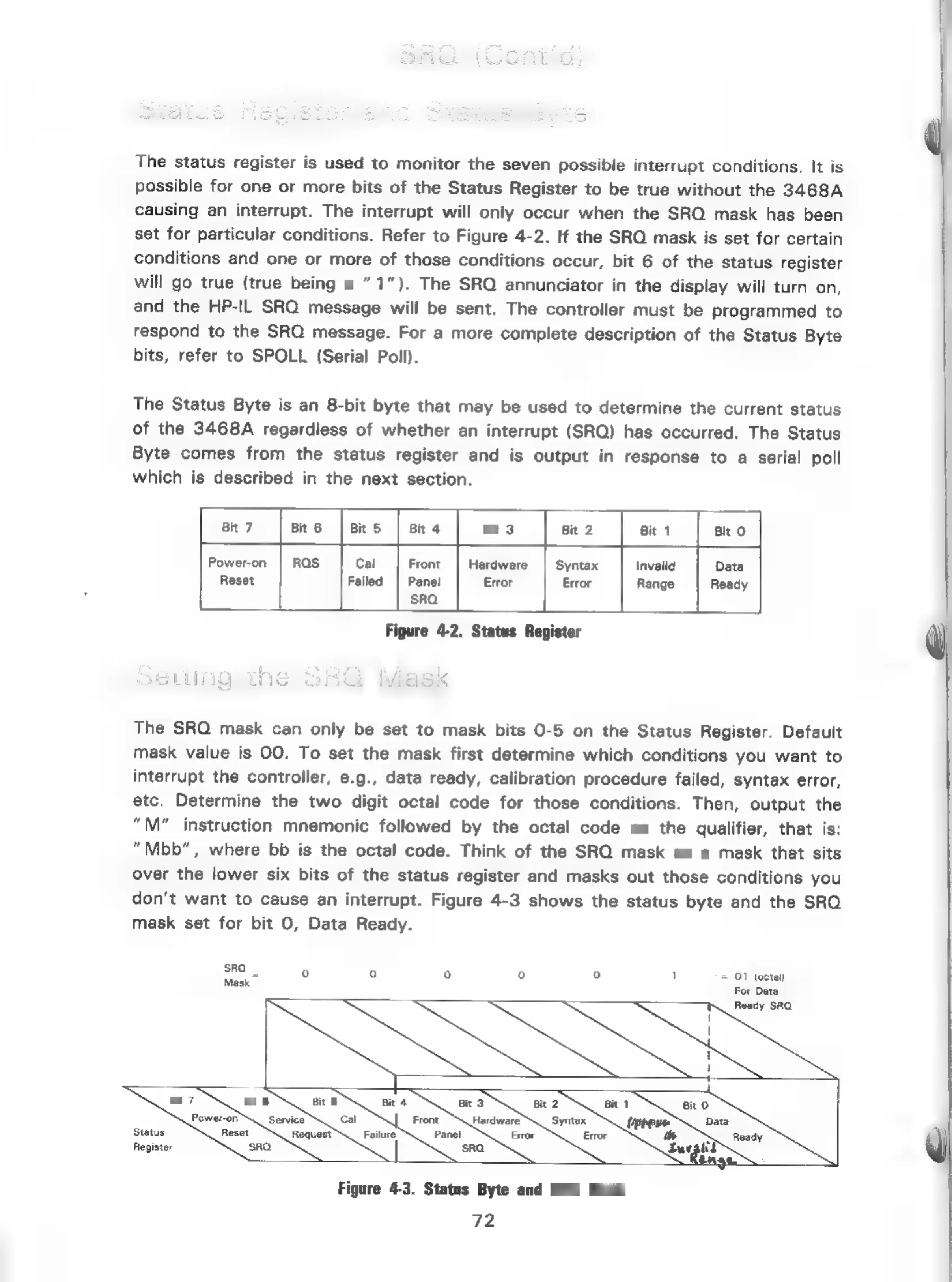
Figure
4-3
shows
the
status
byte
and
the
SRO
mask
set
for
bit
0,
Data
Ready.
SRO
_
es
°
°
°
°
1
=
01
(octal
Mask
For
Data
Ready
SR
Bit
7
Bit
6
Bit
5
Power-on
\__
Service
cal
Status
Reset
Request
Register
sRa
Figure
4-3.
Status
Byte
and
SRO
Mask
72

Related product manuals