EasyManua.ls Logo

HP 3468A - Page 63

HP 3468A
114 pages
Print Icon
To Next Page IconTo Next Page
To Previous Page IconTo Previous Page
Loading...
1)
A}
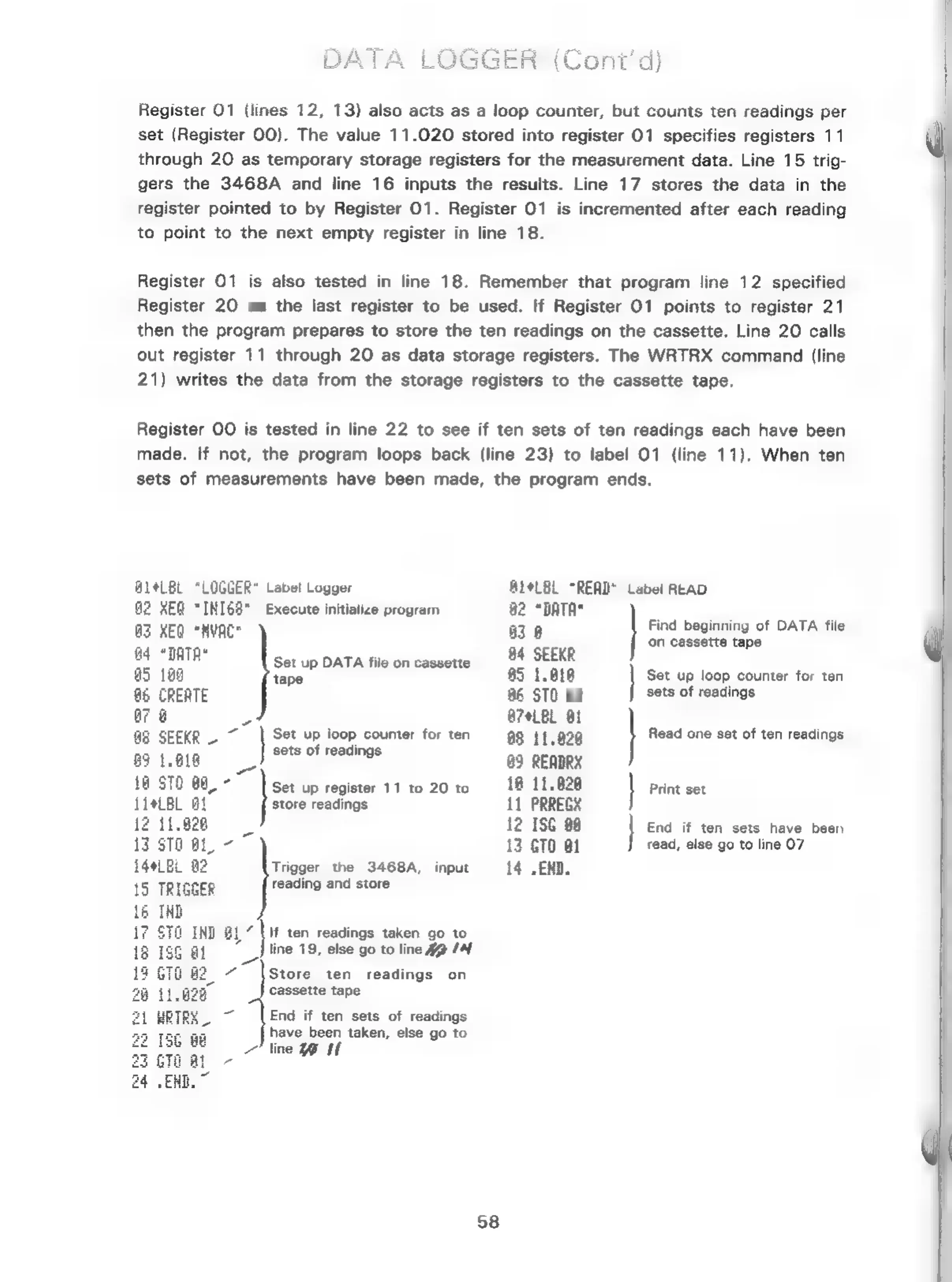
Register
01
(lines
12,
13)
also
acts
as
a
loop
counter,
but
counts
ten
readings
per
set
(Register
00).
The
value
11.020
stored
into
register
01
specifies
registers
11
through
20
as
temporary
storage
registers
for
the
measurement
data.
Line
15
trig-
gers
the
3468A
and
line
16
inputs
the
results.
Line
17
stores
the
data
in
the
register
pointed
to
by
Register
01.
Register
01
is
incremented
after
each
reading
to
point
to
the
next
empty
register
in
line
18.
Register
01
is
also
tested
in
line
18.
Remember
that
program
line
12
specified
Register
20
as
the
last
register
to
be
used.
If
Register
01
points
to
register
21
then
the
program
prepares
to
store
the
ten
readings
on
the
cassette.
Line
20
calls
out
register
11
through
20
as
data
storage
registers.
The
WRTRX
command
(line
21)
writes
the
data
from
the
storage
registers
to
the
cassette
tape.
Register
OO
is
tested
in
line
22
to
see
if
ten
sets
of
ten
readings
each
have been
made,
If
not,
the
program
loops
back
(line
23)
to
label
01
(line
11).
When
ten
sets
of
measurements
have
been
made,
the
program
ends.
AL4LBL
“LOGGER*
Label
Logger
B14LBL
“READY
Label
READ
G2
REG
“INI68"
Execute
initialize
program
82
“DATA"
;
eHyoce
3
Find
beginning
of
DATA
file
te
Eg
|
ein
a5
128
ee
a
es
dO
Set
up
loop
counter
for
ten
&6
CREATE
86
STO
808
sets
of
readings
a7
@
o
A74LBL
Bi
a3
SEEKR
-
7
|
Set
up
loop
counter
for
ten
88
11.020
Read
one
set
of
ten
readings
89
tare
—__)
Sets
of
readings
83
READRX
18
870
88°"
set
up
register
11
to
20
to
~—«18
11.828
|
Print
set
LI*LBL
Ot
store
readings
11
PRREGX
12
ISG
88
|
End
if
ten
sets
have
been
read,
else
go
to
line
07
15
TRIGGER
reading
and
store
If
ten
readings
taken
go
to
line
19,
else
go
to
line
Hm
(4
Store
ten
readings
on
cassette
tape
i
ba
13
GTO
81
i44LBL
a2
Trigger
the
3468A,
input
i4
.
EXD.
End
if
ten
sets
of
readings
have been
taken,
else
go
to
line
Wit
58

Related product manuals