EasyManua.ls Logo

HP 8481A - Page 24

HP 8481A
40 pages
Print Icon
To Next Page IconTo Next Page
To Previous Page IconTo Previous Page
Loading...
HP
8481A/82
A/83
A
08481-90049
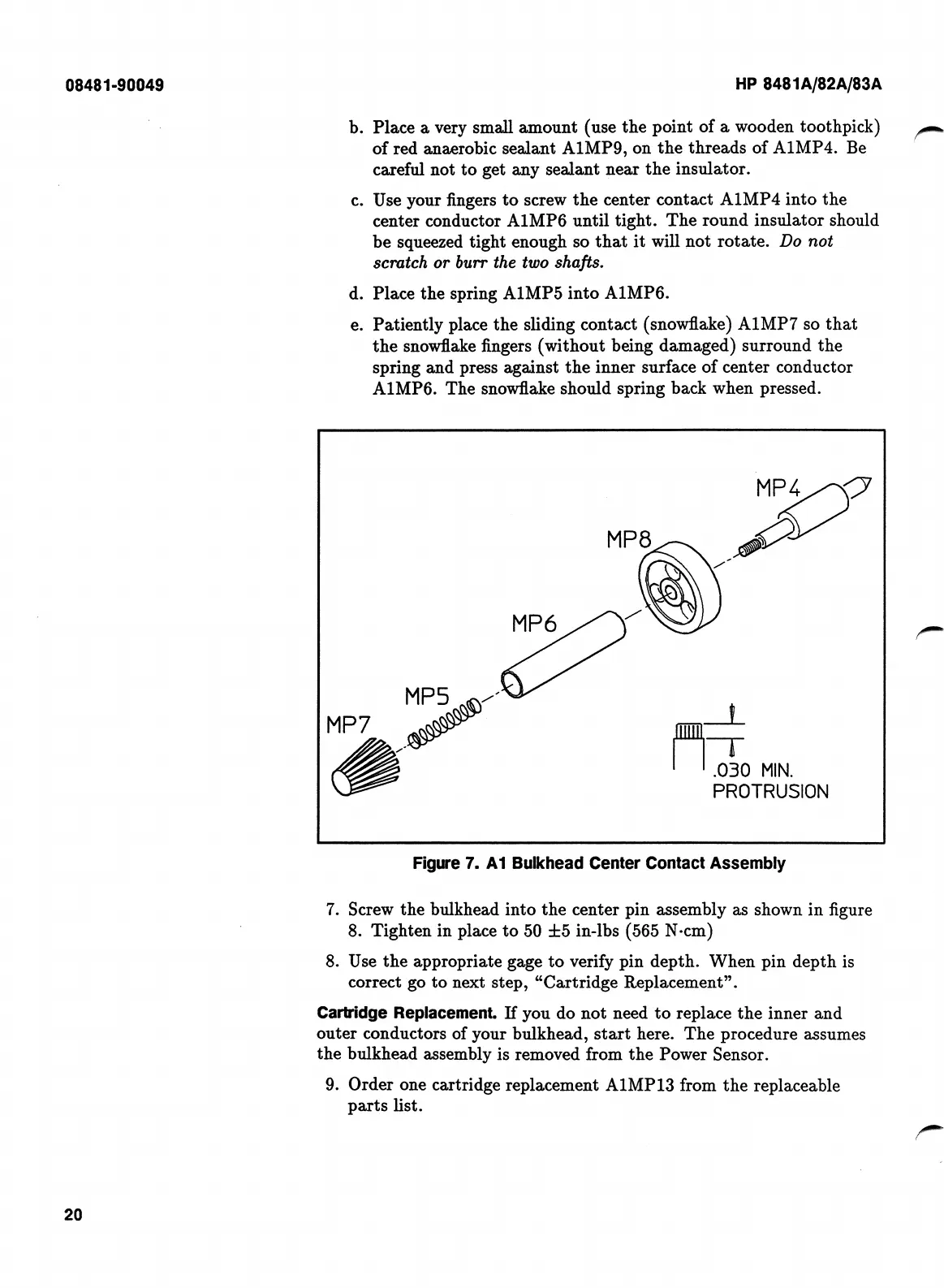
Place
a
very
small
amount
(use
the
point
of
a
wooden
toothpick)
of
red
anaerobic
sealant
A1MP9,
on
the
threads
of
A1MP4.
Be
careful
not
to
get
any
sealant
near
the
insulator.
Use
your
fingers
to
screw
the
center
contact
A1MP4
into
the
center
conductor
A1MP6
until
tight.
The
round
insulator
should
be
squeezed
tight
enough
so
that
it
will
not
rotate.
Do
not
scratch
or
burr
the
two
shafts.
Place
the
spring
A1MP5
into
A1MP6.
Patiently
place
the
sliding
contact
(snowflake)
A1MP7
so
that
the
snowflake
fi
ngers
(without
being
damaged)
surround
the
spring
and
press
against
the
inner
surface
of
center
conductor
A1MP6.
The
snowflake
should
spring
back
when
pressed.
b.
c.
d.
e.
Figure
7.
A1
Bulkhead
Center
Contact
Assembly
7.
Screw
the
bulkhead
into
the
center
pin
assembly
as
shown
in
fi
gure
8.
Tighten
in
place
to
50
±5
in-lbs
(565
N-cm)
8.
Use
the
appropriate
gage
to
verify
pin
depth.
When
pin
depth
is
correct
go
to
next
step,
“Cartridge
Replacement”.
Cartridge
Replacement.
If
you
do
not
need
to
replace
the
inner
and
outer
conductors
of
your
bulkhead,
start
here.
The
procedure
assumes
the
bulkhead
assembly
is
removed
from
the
Power
Sensor.
9.
Order
one
cartridge
replacement
A1MP13
from
the
replaceable
parts
list.
20

Related product manuals