EasyManua.ls Logo

HP 8481A - Page 25

HP 8481A
40 pages
Print Icon
To Next Page IconTo Next Page
To Previous Page IconTo Previous Page
Loading...
HP
8481A/82A/83A
08481-90049
10.
Place
the
bulkhead
on
its
face,
connector
side
down
with
the
gold
wires
pointing
up.
Using
a
5/8
in
(16
mm)
open
end
wrench,
remove
the
cap
nut
AlMPll.
11.
Turn
the
bulkhead
assembly
upside
down
and
shake
out
the
old
parts.
Watch
where
the
polyiron
slug
A1MP12
rolls
to
and
keep
it
for
the
new
cartridge
unit.
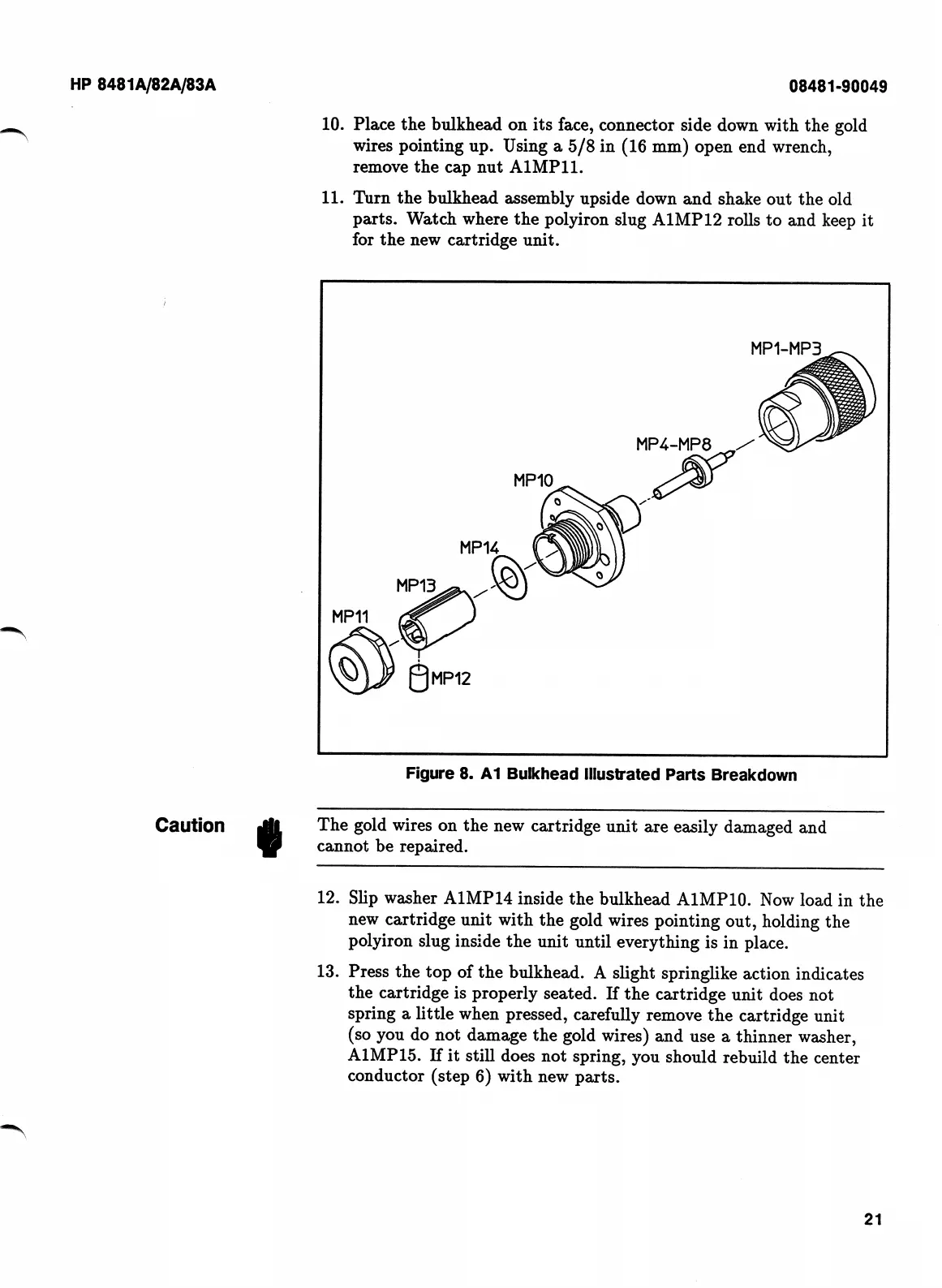
Figure
8.
A1
Bulkhead
Illustrated
Parts
Breakdown
Caution
«
The
gold
wires
on
the
new
cartridge
unit
are
easily
damaged
and
cannot
be
repaired.
Slip
washer
A1MP14
inside
the
bulkhead
AIMPIO.
Now
load
in
the
new
cartridge
unit
with
the
gold
wires
pointing
out,
holding
the
polyiron
slug
inside
the
unit
until
everything
is
in
place.
Press
the
top
of
the
bulkhead.
A
slight
springlike
action
indicates
the
cartridge
is
properly
seated.
If
the
cartridge
unit
does
not
spring
a
little
when
pressed,
carefully
remove
the
cartridge
unit
(so
you
do
not
damage
the
gold
wires)
and
use
a
thinner
washer,
A1MP15.
If
it
still
does
not
spring,
you
should
rebuild
the
center
conductor
(step
6)
with
new
parts.
12.
13.
21

Related product manuals