Need help?
Do you have a question about the HP ENVY 34 and is the answer not in the manual?
Step to pick up and orient the display head unit for disassembly.
Detailed steps for disassembling the main display head assembly.
Instructions for dismantling the front cover of the display.
Steps to remove and disassemble the rear cover assembly.
Procedure for taking apart the mid-cover assembly.
Guide for removing the bracket assembly components.
Steps to dismantle the stand and base components.
Instructions for disassembling the display panel components.
This document outlines the disassembly process for the HP ENVY 34 34-inch Curved Display, providing instructions for end-of-life recyclers and treatment facilities to remove components and materials requiring selective treatment as defined by EU directive 2002/96/EC (WEEE). The primary function of this document is to ensure environmentally responsible disposal and recycling of the product.
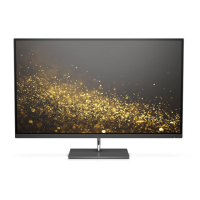
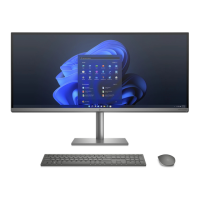
The HP ENVY 34 34-inch Curved Display is a monitor designed for visual output, likely catering to users who require a large, immersive viewing experience, such as for professional work, gaming, or multimedia consumption. Its curved design aims to enhance the user's field of view and reduce eye strain by providing a more uniform viewing distance across the screen. As a display unit, its core function is to render images and video from a connected source, offering a high-quality visual interface. The inclusion of various ports like Type-C, HDMI, USB, and DisplayPort suggests broad compatibility with different devices, enabling it to serve as a central display hub for multiple peripherals. The presence of a webcam indicates integrated video conferencing capabilities, making it suitable for remote work or communication. The internal structure, comprising multiple printed circuit boards (PCBs) for power, interface, and control, along with an LCD panel, speakers, and a stand, collectively supports its function as a comprehensive display solution. The disassembly instructions focus on isolating these components for proper recycling, highlighting the environmental considerations embedded in the product's lifecycle management.
The HP ENVY 34 34-inch Curved Display offers several features that enhance its usability. The curved screen is a significant usage feature, providing a more engaging and comfortable viewing experience, especially for wide-screen content or multitasking across multiple windows. The variety of input ports (Type-C, HDMI, USB, DP) allows for flexible connectivity with a wide range of devices, from laptops and desktop PCs to gaming consoles and other multimedia sources. This versatility means users can easily switch between different inputs without needing additional adapters. The integrated webcam facilitates video calls and online meetings, adding convenience for users who frequently engage in virtual communication. The presence of speakers, though not explicitly detailed in quality, suggests an all-in-one audio-visual experience without the need for external speakers. The stand and base assembly are designed to support the large display, likely offering ergonomic adjustments such as tilt, swivel, or height adjustment to optimize viewing angles and user comfort. The overall design aims to provide a premium and functional display for various applications, from productivity to entertainment. The selective treatment items listed, such as PCBs, LCDs, and electrolytic capacitors, are integral to these usage features, as they power and control the display's operations, image rendering, and connectivity.
While the document primarily focuses on end-of-life disassembly rather than routine user maintenance, it implicitly reveals aspects related to the product's maintainability from a service perspective. The detailed disassembly steps, which involve removing various covers, screws, cables, and internal components, suggest that the device is designed to be opened and serviced by trained technicians. The identification of specific components like PCBs, the LCD panel, speakers, and the webcam indicates that these parts could potentially be replaced or repaired if they malfunction, extending the product's lifespan. The mention of "Remove Mid-cover Screws (26 PCS) and 2 Front cover screws" and other numerous fasteners implies a modular construction, where different sections of the display can be accessed and separated. This modularity is a key maintenance feature, as it allows for targeted repairs rather than requiring the replacement of the entire unit for a single component failure. The instructions on removing cables (speaker cable, back light cable, earphone cable, LVDS cable, key BD cable, web-cam cable) highlight the interconnectedness of components and the need for careful handling during any service operation. The focus on selective treatment items also serves as a guide for future maintenance, ensuring that if any of these components need to be replaced, the old parts are disposed of responsibly. For instance, the instruction to remove electrolytic capacitors greater than 2.5 cm in diameter or height suggests that these are critical components that might require specific handling during repair or replacement due to their potential environmental impact. The document, therefore, provides a blueprint for how the device can be taken apart, which is fundamental to any in-depth maintenance or repair process.
 General
| Aspect Ratio | 21:9 |
|---|---|
| Refresh Rate | 60 Hz |
| Color Support | 1.07 billion colors |
| Color Gamut | 98% DCI-P3 |
| Screen Size | 34 inches |
| Panel Type | IPS |
| Response Time | 5ms (gray to gray) |
| Brightness | 400 cd/m² |
| Connectivity | 1x DisplayPort 1.4, 4x USB-A, 1x 3.5mm audio out |
| VESA Mount | 100 x 100 mm |
| Adjustability | Height, Tilt, Swivel |
| Weight | 9.9 kg (without stand) |
| Dimensions | 815.6 x 253.5 x 540.9 mm (with stand) |

 To Next Page