Setting Up Your HP Firebird 9
Setting Up a Wired (Ethernet) Connection
The Ethernet connection, which may be called network interface adapter, Network Interface
Card, or NIC, provides a high-speed or broadband connection to an Ethernet network. After
you connect this interface to a network, such as a LAN, you can connect to the Internet
through the network.
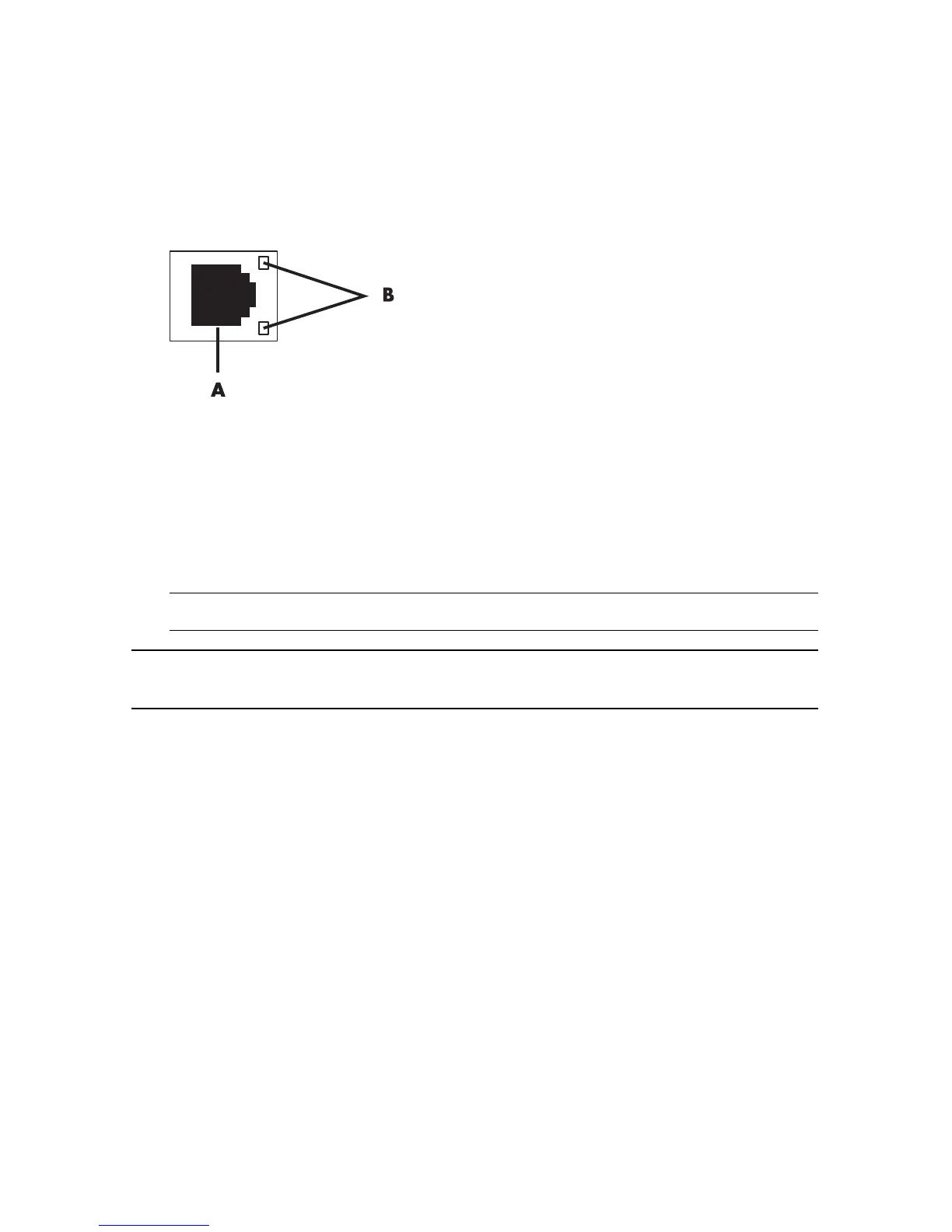
1 Connect an Ethernet cable to the Ethernet connector (A) on the back of the computer,
and to the network router or LAN device.
A Ethernet connector (RJ-45 port)
B Ethernet indicator lights
2 With the computer turned on, check the indicator lights (B) next to the Ethernet connector
for the status:
ACTIVITY — Lit yellow during network data transfer activity
LINK — Lit green when there is a valid network connection
NOTE: Your Ethernet connector may have only one indicator light.
NOTE: For optimum performance, all of your network connections—computer, wiring, and
router—must support the maximum speed of your network.




 To Next Page