Setting Up Your HP Firebird 3
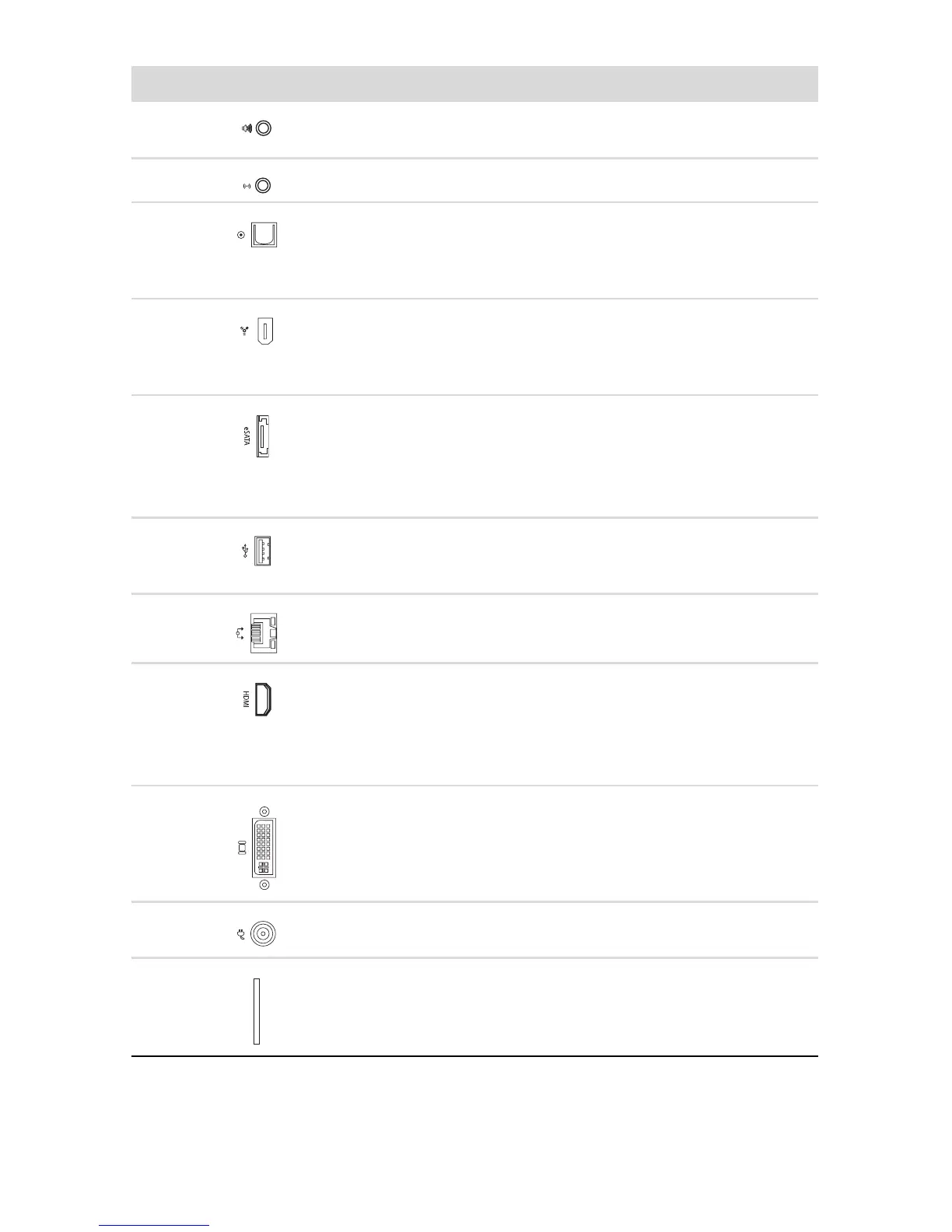
Connector/LED/Button Description and function
(A) Audio Out connector for audio to powered speakers or
headphones.
(B) Mic In connector.
(C) Optical Out connector. Optical S/PDIF output provides
a digital audio signal to connect to the Optical In on a set of
digital speakers. The digital speakers split up the audio
signal to the correct speaker (select models only).
(D) IEEE 1394 connector. This 6-pin connector provides
high-speed connectivity for audio/video devices, storage
peripherals, PCs, or portable devices with very fast transfer
rates.
(E) External Serial Advanced Technology Attachment
(eSATA) connectors for connecting external SATA hard disk
drives.
NOTE: An eSATA connection requires that the drive have
its own power connector.
(F) 4-pin Universal Serial Bus (USB) connectors for
connecting USB 2.0 devices, such as a mouse, keyboard,
or digital camera.
(G) Ethernet LAN (RJ-45) connector. This connector allows
connection to a local area network (LAN).
(H) High definition multimedia interface (HDMI) connector
to connect a TV or monitor. You may need to use an adapter
(VGA-to-DVI or HDMI-to-DVI) to connect the display to the
system.
See the documentation that came with your display device.
(I) DVI (Digital video output) connector to connect a TV or
monitor. You may need to use an adapter (VGA-to-DVI or
HDMI-to-DVI) to connect the display to the system.
See the documentation that came with your display device.
(J) Power connector to connect the external power supply
provided with the computer.
(K) ExpressCard/54 expansion slot for attaching optional
accessories.




 To Next Page