Twisted-Pair Cable/Connector Pin-Outs
Twisted-Pair Cable for 100VG LAN Ports
To connect PCs and other devices to the 100VG LAN ports, use a
“straight-through” 4-pair twisted-pair cable. The twisted-pair wires must be
twisted through the entire length of the cable.
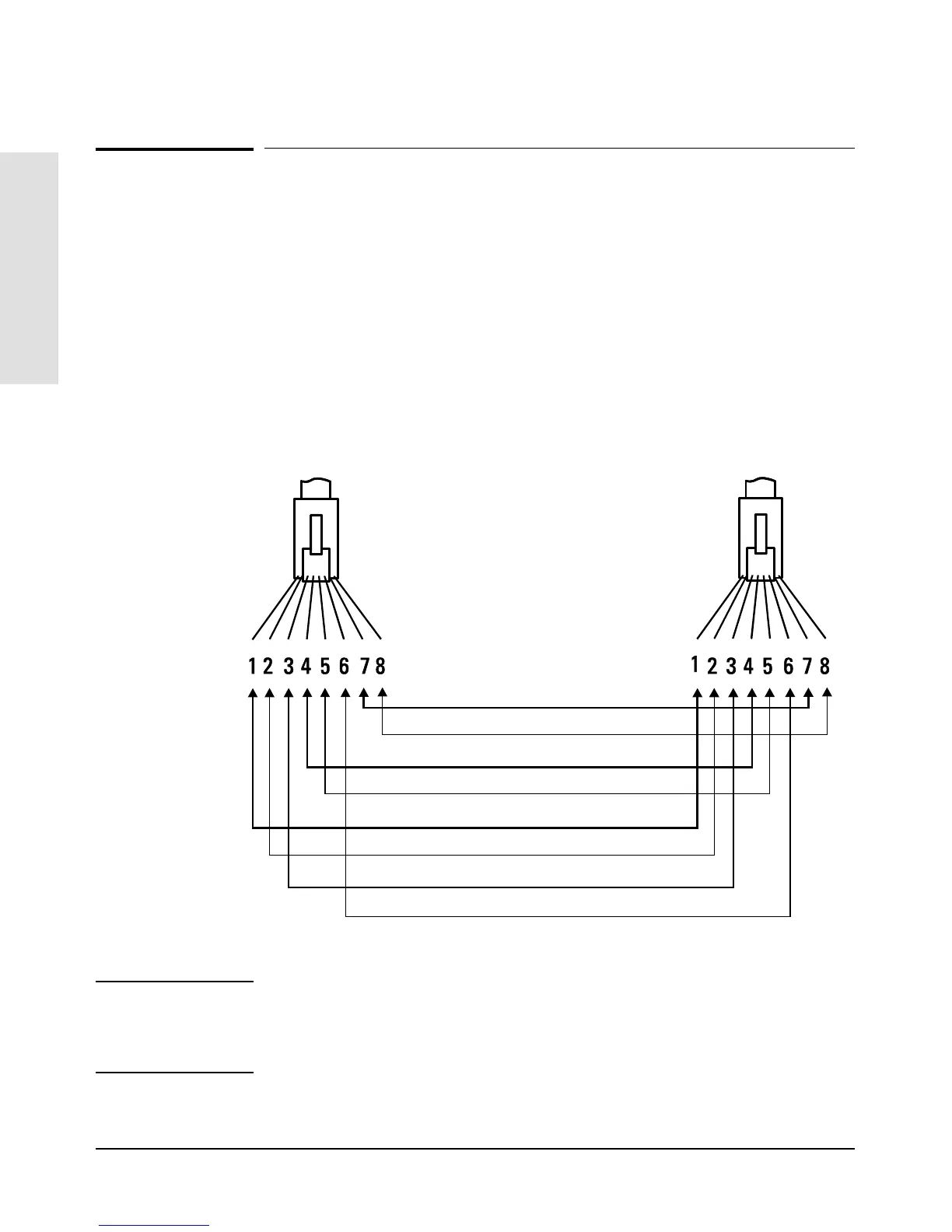
The illustration below shows the RJ-45 pin connections, color code, and pair
configuration for an 100VG LAN cable (unbundled) that conforms to the
EIA/TIA 568B wiring standard for a straight-through cable.
Note Pins 1 and 2 must be wired to a twisted pair.
Pins 3 and 6 must be wired to a twisted pair.
Pins 4 and 5 must be wired to a twisted pair
Pins 7 and 8 must be wired to a twisted pair.
Straight-through cable
Pair 2
blue/white
white/blue
Pair 4
brown/white
white/orange
Pair 3
Pair 1
orange/white
white/green
green/white
white/brown
Cables and Connectors
Cables and Connectors
A-4



 To Next Page