Home
HP
All in One Printer
M377
Page 40
HP M377 - Page 40
154 pages
Manual
Save Page as PDF
To Next Page
To Next Page
To Previous Page
To Previous Page
Loading...
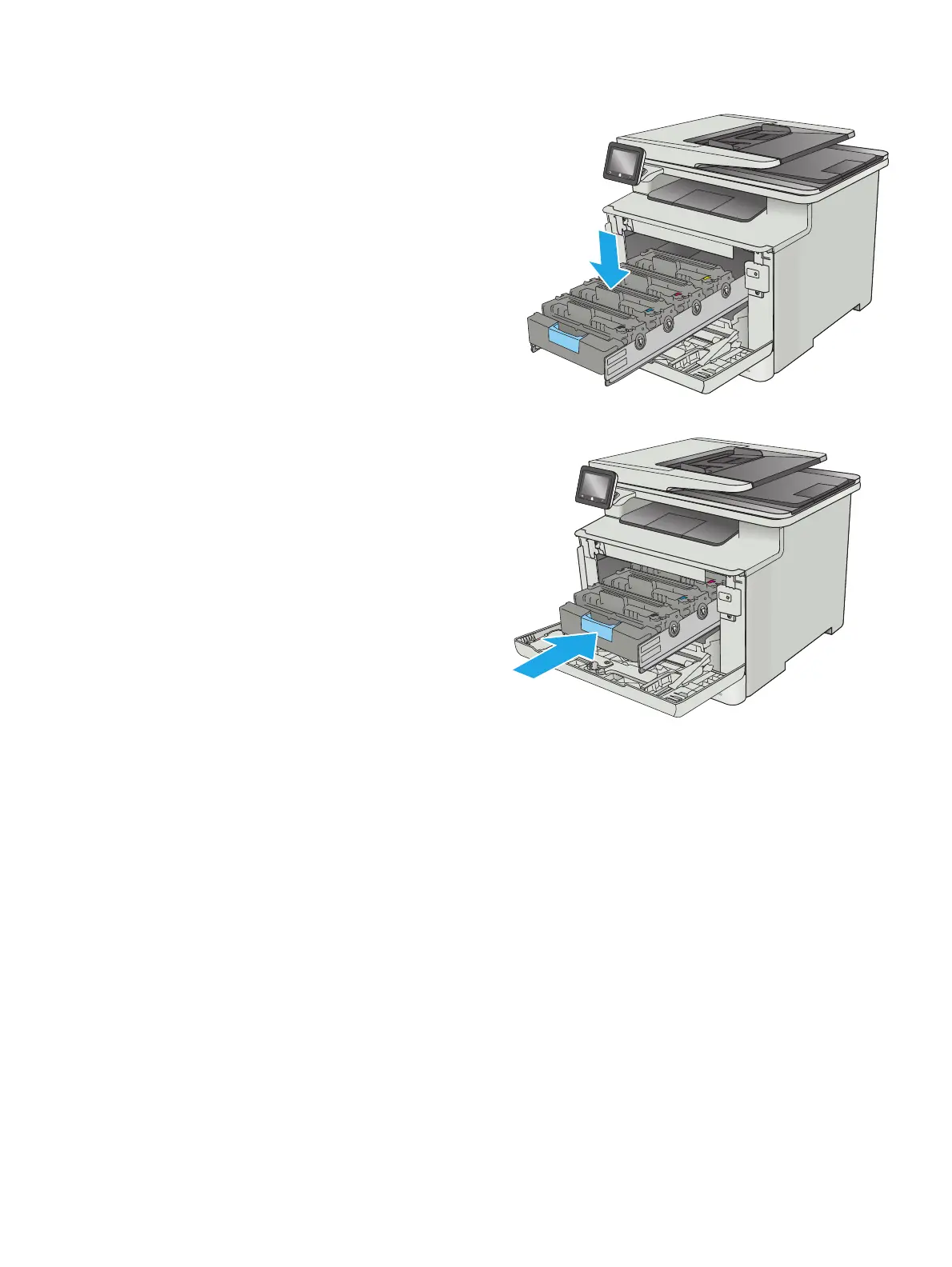
8.
Insert the ne
w toner cartridge into the
drawer.
Make sure that the color chip on the cartridge
matches the color chip on the drawer.
9.
Close th
e toner cartri
dge draw
er.
30
Chapter 3
Supplies, acce
ssories, and
parts
ENWW
39
41
Table of Contents
Main Page
Product overview
11
Product views
12
Printer front view
12
Printer back view
13
Control-panel view
14
Home screen layout
15
How to use the touchscreen control panel
16
Printer hardware setup and software installation
22
Paper trays
23
Load paper into Tray 1 (multipurpose tray)
24
Introduction
24
Load paper into Tray 1 (multipurpose tray)
24
Tray 1 paper orientation
26
Load paper into Tray 2
27
Introduction
27
Load paper into Tray 2
27
Tray 2 paper orientation
30
Load and print envelopes
31
Introduction
31
Print envelopes
31
Envelope orientation
32
Supplies, accessories, and parts
33
Order supplies, accessories, and parts
34
Ordering
34
Supplies and accessories
34
Customer self-repair parts
34
Replace the toner cartridges
36
Introduction
36
Remove and replace the toner cartridges
37
Print
43
Print tasks (Windows)
44
How to print (Windows)
44
Automatically print on both sides (Windows)
45
Manually print on both sides (Windows)
45
Print multiple pages per sheet (Windows)
47
Select the paper type (Windows)
47
Additional print tasks
47
Print tasks (OS X)
49
How to print (OS X)
49
Automatically print on both sides (OS X)
49
Manually print on both sides (OS X)
49
Print multiple pages per sheet (OS X)
50
Select the paper type (OS X)
50
Additional print tasks
50
Store print jobs on the product to print later or print privately
52
Introduction
52
Before you begin
52
Set up the printer for job storage
52
Step one: Install the USB storage device
52
Step two: Update the print driver
53
Create a stored job (Windows)
53
Print a stored job
55
Delete a stored job
55
Mobile printing
56
Introduction
56
Wi-Fi Direct (wireless models only)
56
Enable or disable Wi-Fi Direct
56
Change the printer Wi-Fi Direct name
57
HP ePrint via email
57
HP ePrint software
58
AirPrint
58
Android embedded printing
59
Use walk-up USB printing
60
Introduction
60
Step one: Access USB files on the printer
60
Step two: Print USB documents
60
Option one: Print documents
60
Option two: Print photos
61
Copy
63
Make a copy
64
Copy on both sides (duplex)
65
Copy on both sides manually
65
Additional copy tasks
66
Scan
67
Scan by using the HP Scan software (Windows)
68
Scan by using the HP Scan software (OS X)
69
Scan to a USB flash drive
70
Set up the Scan to Network Folder feature
71
Introduction
71
Before you begin
71
Method one: Use the Scan to Network Folder Wizard (Windows)
71
Method two: Set up the Scan to Network Folder feature via the HP Embedded Web Server (Windows)
73
Step one: Access the HP Embedded Web Server (EWS)
73
Step two: Configure the Scan to Network Folder feature
73
Set up the Scan to Network Folder feature on a Mac
74
Step one: Access the HP Embedded Web Server (EWS)
74
Method one: Use a Web browser to open the HP Embedded Web Server (EWS)
74
Method two: Use the HP Utility to open the HP Embedded Web Server (EWS)
75
Step two: Configure the Scan to Network Folder feature
75
Scan to a network folder
77
Set up the Scan to E-mail feature
78
Introduction
78
Before you begin
78
Method one: Use the Scan to Email Wizard (Windows)
78
Method two: Set up the Scan to Email feature via the HP Embedded Web Server (Windows)
79
Step one: Access the HP Embedded Web Server (EWS)
80
Step two: Configure the Scan to E-mail feature
80
Step three: Add contacts to the E-mail Address Book
82
Step four: Configure the default E-mail Options
82
Set up the Scan to E-mail feature on a Mac
83
Step one: Access the HP Embedded Web Server (EWS)
83
Method one: Use a Web browser to open the HP Embedded Web Server (EWS)
83
Method two: Use the HP Utility to open the HP Embedded Web Server (EWS)
83
Step two: Configure the Scan to E-mail feature
83
Step three: Add contacts to the E-mail Address Book
85
Step four: Configure the default E-mail Options
85
Scan to email
87
Additional scan tasks
88
Manage the product
89
Use HP Web Services applications
90
Change the product connection type (Windows)
91
Advanced configuration with HP Embedded Web Server (EWS) and HP Device Toolbox (Windows)
92
Advanced configuration with HP Utility for OS X
95
Open HP Utility
95
HP Utility features
95
Configure IP network settings
97
Introduction
97
Printer sharing disclaimer
97
View or change network settings
97
Rename the printer on a network
97
Manually configure IPv4 TCP/IP parameters from the control panel
98
Link speed and duplex settings
98
Product security features
100
Introduction
100
Assign or change the system password using the Embedded Web Server
100
Energy-conservation settings
101
Introduction
101
Print with EconoMode
101
Set the Sleep/Auto Off After setting
101
Set the Shut Down After delay and configure the printer to use 1 watt or less of power
102
Set the Delay Shut Down setting
102
HP Web Jetadmin
103
Update the firmware
104
Method one: Update the firmware using the control panel
104
Method two: Update the firmware using the Firmware Update Utility
104
Solve problems
107
Customer support
108
Control panel help system
109
Restore the factory-set defaults
110
A “Cartridge is low” or “Cartridge is very low” message displays on the printer control panel
111
Change the “Very Low” settings
111
Order supplies
111
Product does not pick up paper or misfeeds
112
Introduction
112
The printer does not pick up paper
112
The printer picks up multiple sheets of paper
114
The document feeder jams, skews, or picks up multiple sheets of paper
117
Clean the pickup rollers and separation pad in the document feeder
118
Clear paper jams
120
Introduction
120
Experiencing frequent or recurring paper jams?
120
Paper jam locations
121
Clear paper jams in the document feeder
122
Clear paper jams in Tray 1
124
Clear paper jams in Tray 2
127
Clear paper jams in the rear door and the fuser area
128
Clear paper jams in the output bin
130
Clear paper jams in the duplexer (duplex models only)
131
Improve print quality
132
Introduction
132
Print from a different software program
132
Check the paper-type setting for the print job
132
Check the paper type setting (Windows)
132
Check the paper type setting (OS X)
133
Check toner-cartridge status
133
Clean the product
134
Print a cleaning page
134
Check the scanner glass for dirt and smudges
134
Visually inspect the toner cartridge
134
Check paper and the printing environment
135
Step one: Use paper that meets HP specifications
135
Step two: Check the environment
135
Step three: Set the individual tray alignment
135
Adjust color settings (Windows)
136
Calibrate the printer to align the colors
137
Check the EconoMode settings
137
Try a different print driver
138
Improve copy and scan image quality
140
Introduction
140
Check the scanner glass for dirt and smudges
140
Eliminate lines or streaks when using the document feeder
141
Check the paper settings
141
Check the image adjustment settings
141
Optimize for text or pictures
142
Check the scanner resolution and color settings on the computer
142
Resolution and color guidelines
142
Color
143
Edge-to-edge copying
143
Clean the pickup rollers and separation pad in the document feeder
143
Solve wired network problems
145
Introduction
145
Poor physical connection
145
The computer is using the incorrect IP address for the printer
145
The computer is unable to communicate with the printer
145
The printer is using incorrect link and duplex settings for the network
146
New software programs might be causing compatibility problems
146
The computer or workstation might be set up incorrectly
146
The printer is disabled, or other network settings are incorrect
146
Solve wireless network problems
147
Introduction
147
Wireless connectivity checklist
147
The printer does not print after the wireless configuration completes
148
The printer does not print, and the computer has a third-party firewall installed
148
The wireless connection does not work after moving the wireless router or printer
148
Cannot connect more computers to the wireless printer
148
The wireless printer loses communication when connected to a VPN
149
The network does not appear in the wireless networks list
149
The wireless network is not functioning
149
Perform a wireless network diagnostic test
149
Reduce interference on a wireless network
149
Index
151
Related product manuals
HP LASERJET PRO 300 M375
26 pages
HP Color LaserJet Pro M377
20 pages
HP LASERJET PRO 300 COLOR M375
40 pages
HP Color LaserJet Pro MFP M377
24 pages
HP LaserJet M3027
268 pages
HP LaserJet M3027 MFP
50 pages
HP Laserjet,Color Laserjet M3027
36 pages
M3027 - LaserJet MFP B/W Laser
268 pages
M3035 - LaserJet MFP B/W Laser
368 pages
HP M276
238 pages
HP M525
294 pages
HP M806
20 pages



 To Next Page