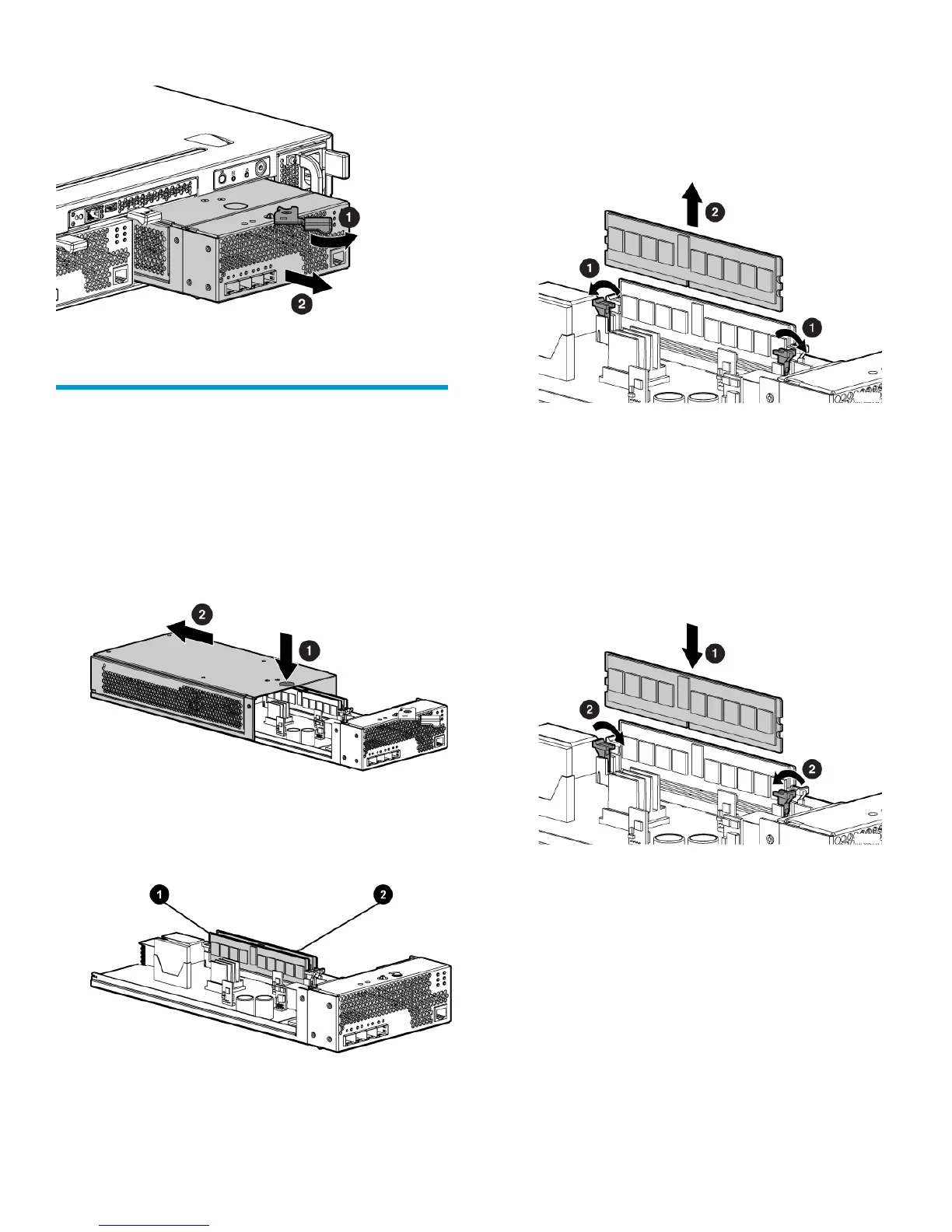
Figure 2 Removing a controller
Replace the controller enclosure cache
DIMMs
Removing a DIMM
1. Push the button on top of the controller module
(1), Figure 3 (page 3) and slide off the cover
(2).
Figure 3 Removing the controller cover
Figure 4 (page 3) shows the location of the
DIMMs.
Figure 4 Location of controller DIMMs
2. Slot 2 (cache memory)1. Slot 1 (policy memory)
2. Press the retaining clips outward to unlock the
DIMM socket. See Figure 5 (page 3). This action
releases the module and partially lifts the module
out of the socket.
Figure 5 Removing a DIMM
3. Lift out the DIMM.
4. Repeat the procedure to remove the second
DIMM.
Installing a DIMM
1. Align a new DIMM with the DIMM socket and
press it in place. See Figure 6 (page 3).
Figure 6 Installing a DIMM
2. Press the retaining clips inward to lock the DIMM
into the socket.
3. Repeat the procedure to install the second DIMM.
Page 3




 To Next Page