c.
Optical drive (see
Optical drive on page 52)
d. Hard drive (see
Hard drive on page 55)
e.
Keyboard (see
Keyboard on page 57)
f. Top cover (see
Top cover on page 60)
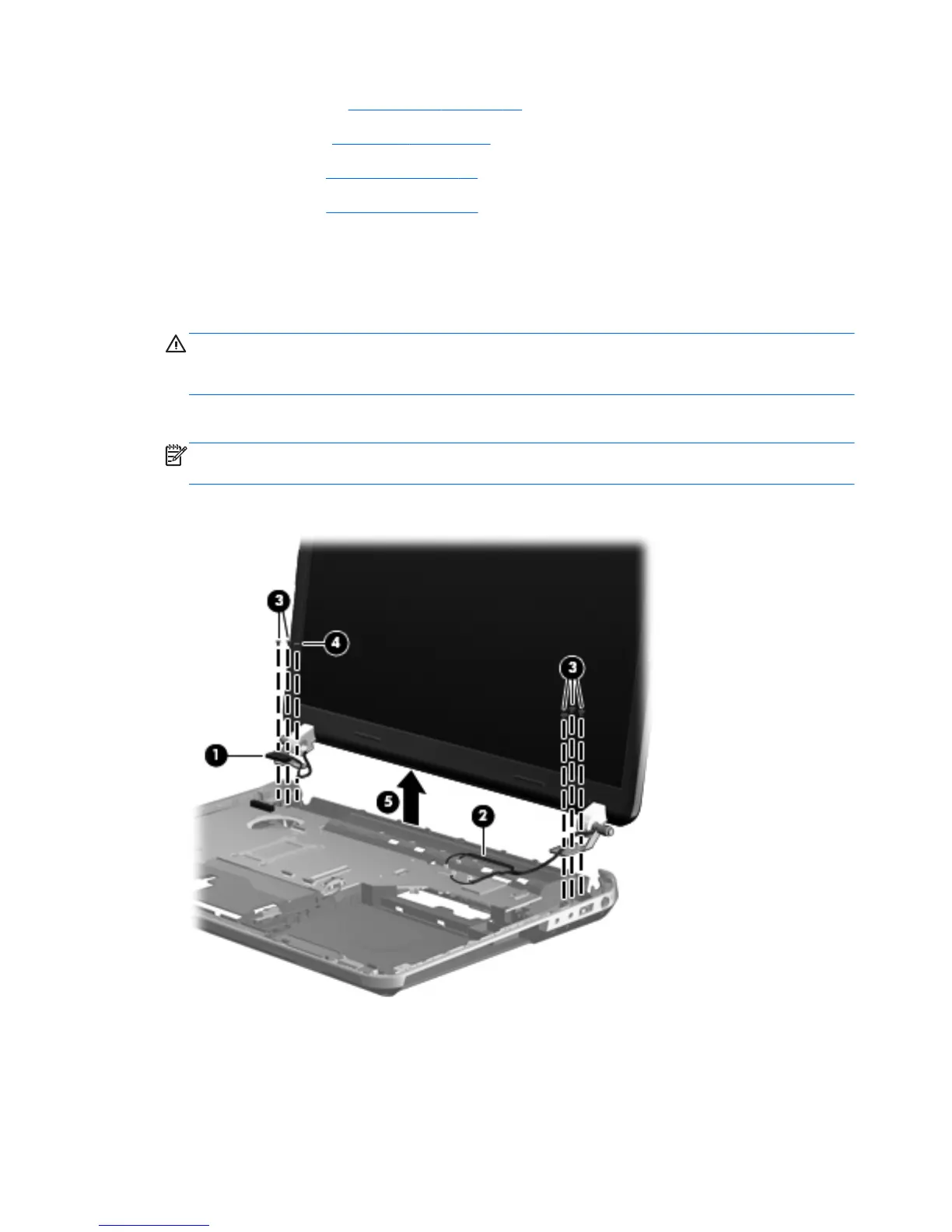
Remove the display assembly:
1. Disconnect the display panel cable (1) from the system board.
2. Release the wireless antenna cables from the clips (2) built into the base enclosure.
CAUTION: Support the display assembly when removing the following screws. Failure to
support the display assembly can result in damage to the display assembly and other
computer components.
3. Remove the six Phillips PM2.5×7.0 screws (3) that secure the display assembly to the computer.
NOTE: The right-most screw (4) on the left display hinge secures a ground loop on the display
panel cable.
4. Remove the display assembly (5).
92 Chapter 4 Removal and replacement procedures








 To Next Page