2
Descriptions
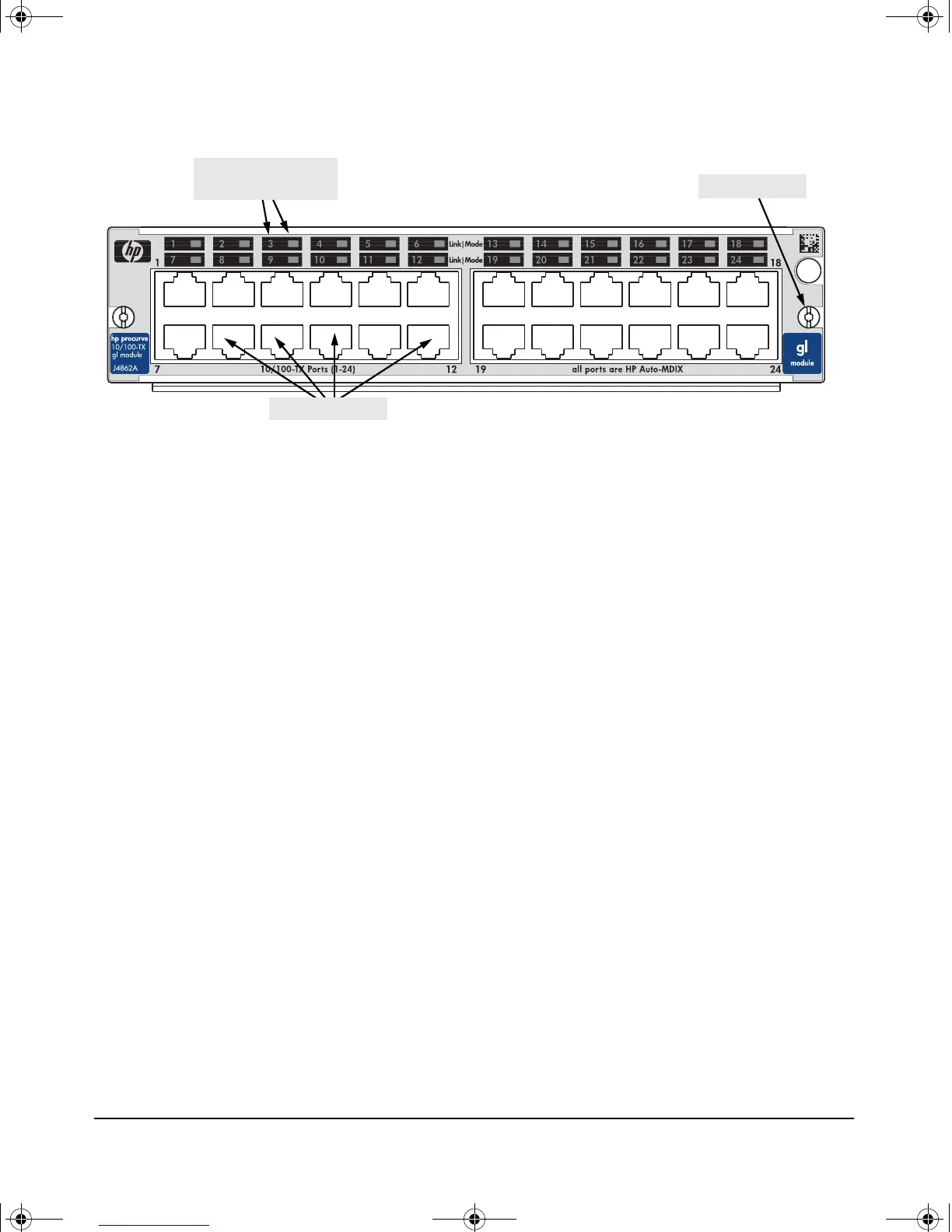
Example: The HP Procurve 24-Port 10/100-TX GL Module
Features: The HP Procurve Switch GL Modules have the following features:
■ auto-enabled ports—the ports are all configured to be ready for network
operation as soon as a viable network cable is connected
■ auto-configuration—a default configuration is applied to the module
when the switch is powered on and the module passes self test; this default
configuration works well for most network installations
■ LEDs that provide information on the link status, network activity,
connection bandwidth, and communication mode (half or full duplex)
■ “hot swap” operation—you can add a module or replace a module without
having to shut down the switch (changing the module type in a given slot
does require a switch reset)
■ the ports on the 10/100-TX GL Module have the HP Auto-MDIX feature,
and the ports on the 100/1000-T GL Module have the IEEE 802.3ab Auto
MDI/MDI-X feature. These features operate the same way and allow you
to use either “straight-through” or “crossover” twisted-pair cables for all
the twisted-pair network connections. Please see the note on “Automatic
Cable Sensing” on page 7.
■ standards adherence:
• the 10/100-TX GL Module is compatible with the IEEE 802.3
10Base-T and IEEE 802.3u 100Base-TX standards
• the 100/1000-T GL Module is compatible with the IEEE 802.3ab
1000Base-T and IEEE 802.3u 100Base-TX standards
• the ports on the transceivers that are installed in the Gigabit Trans-
ceiver GL Module are compatible with their appropriate standards.
See the Installation Guide the comes with the transceivers.
retaining screw
network ports
Link and Mode LEDs
(one pair per port)
gamma-mod.book Page 2 Friday, April 6, 2001 10:23 PM










 To Next Page