◦ Verify your site Red Hat Networks (RHN) registration status and your Customer Center
registration status.
◦ Obtain your RHN login.
◦ Obtain your RHN password.
• For SLES installations, do the following:
◦ Determine the email address you want to use when you register with the SUSE Customer
Center.
◦ (Optional) Obtain the activation code for SLES components.
◦ (Optional) Determine the system name or description.
5. Familiarize yourself with the hardware components in the rack.
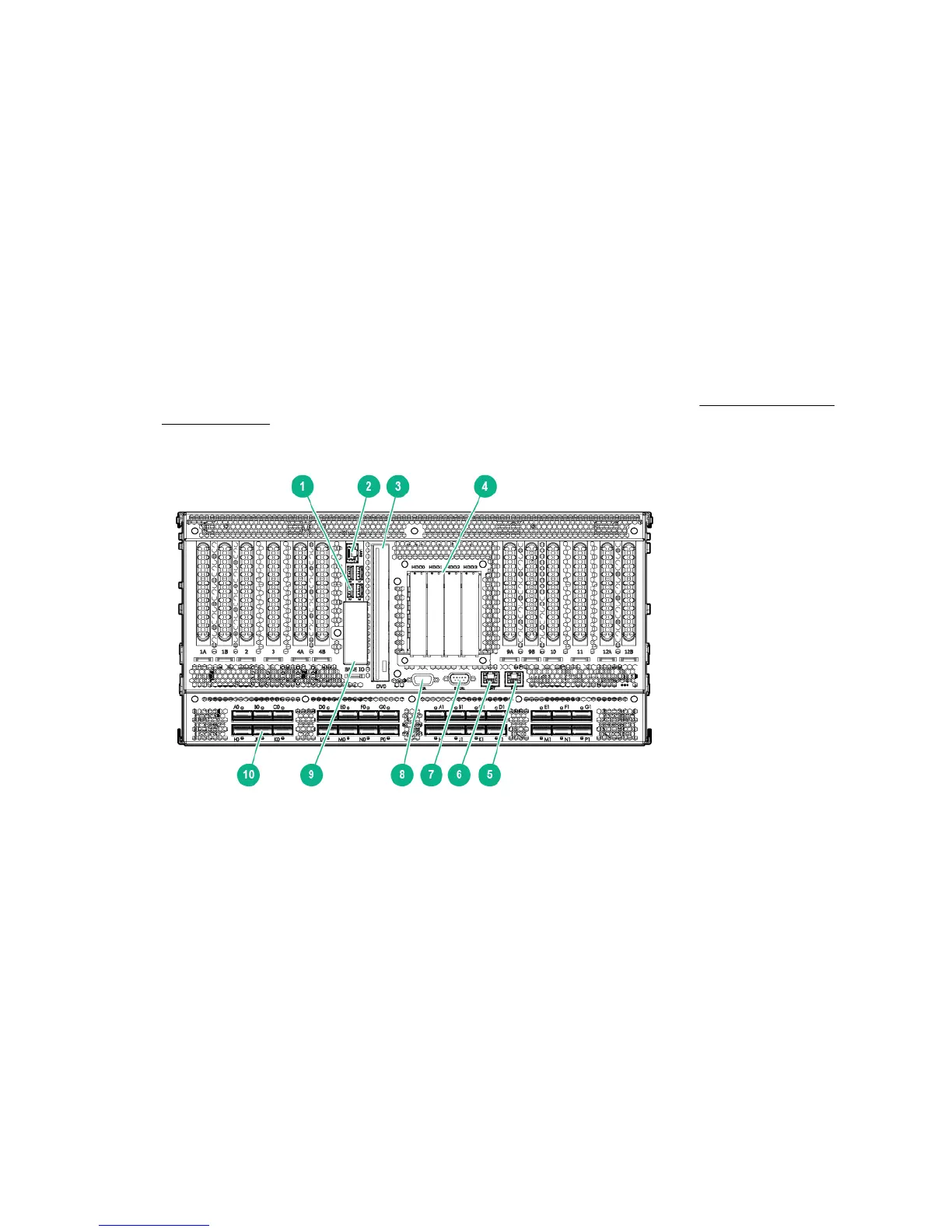
Identify the base server chassis in the rack and the DVD drive on the chassis. Figure 1: MC990 X
server chassis on page 8 shows the location of the DVD drive, along with other components and
ports, on the MC990 X server chassis.
Figure 1: MC990 X server chassis
1. USB ports (4) 2. ETH0
3. DVD drive 4. System drive assembly
5. RMC port 6. MGMT port
7. Serial port 8. VGA port
9. Optional 1.8-inch SSD drive bays 10. NUMAlink ports (28)
6. Proceed to one of the following:
8 Integrity MC990 X system software installation











 To Next Page