Need help?
Do you have a question about the HPE R1500 and is the answer not in the manual?
Manual contains critical instructions for installation and maintenance of UPS and batteries.
Lists the various certification standards the UPS complies with, such as UL and IEC.
Provides information on accessing regulatory notices for HPE products online.
Details common symbols used in the manual to indicate warnings or important information.
Covers system voltage hazards, grounding, battery toxicity, and handling precautions.
Outlines safe usage of the UPS, installation requirements, and environmental considerations.
Advises on operations requiring multiple people and battery storage/maintenance.
Discusses eco-design, substances, packing, and end-of-life product management.
Details recycling of cardboard, polyethylene bags, and other packing components.
Explains HPE's process for managing products at the end of their service life.
Specifies that lead-acid batteries require processing according to local regulations.
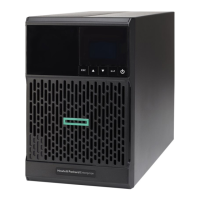
Provides physical specifications and weight for different HPE R1500 G5 UPS models.
Identifies and describes the connectors and ports located on the rear of the UPS units.
Details the five-button graphical control panel and the meaning of indicator lights.
Explains the LCD window's role in displaying UPS status, events, and settings.
Describes how to navigate through the UPS menu system using control panel buttons.
Lists configurable user settings such as language, LCD brightness, and audible alarms.
Covers settings for load segments, overload, cold start, auto restart, energy saving, and sleep mode.
Lists the items included in the UPS package and instructions for checking them.
Provides critical instructions and cautions for connecting the internal battery module.
Details the step-by-step process for installing the UPS unit into a rack using mounting rails.
Explains the essential steps for properly grounding the UPS for electrical safety.
Describes connecting RS-232/USB cables and installing optional communication cards.
Outlines the steps to power on the UPS and confirm it is operating normally.
Explains how to initiate UPS operation solely on battery power.
Provides instructions for safely powering down the UPS unit.
Details UPS behavior, indicators, and alarms when running on battery.
Describes alerts and actions for low battery conditions and imminent shutdown.
Explains the final stage of battery operation before the UPS shuts down.
Details the UPS's automatic restart behavior when AC power is restored.
Explains ROO and RPO functions and how to connect them for remote control.
Lists common UPS statuses, their causes, and recommended troubleshooting steps.
Guides users to the HPE website for downloading and installing UPS firmware updates.
Provides detailed safety warnings and procedures for replacing the UPS battery module.
Covers critical safety information and guidelines for handling and storing batteries.
Offers advice on maintaining batteries and managing spare battery inventory.
Illustrates the steps for safely removing the battery tray and module from the UPS.
Instructs on re-installing a new battery module and securing connections properly.
Lists part numbers for UPS spares and accessories and provides ordering information.
Details technical specifications for the HPE R1500 G5 NA and JP/TWN UPS models.
Details technical specifications for the HPE R1500 G5 INTL UPS model.
Defines key terms, acronyms, and concepts used throughout the user guide.
Provides contact methods and website links for obtaining HPE technical support.
Guides users on accessing and downloading software updates and subscribing to alerts.
Explains the program allowing customers to perform self-repairs by replacing parts.
Details HPE's remote support services for intelligent diagnosis and automatic notifications.
Directs users to HPE websites for product warranty details and related compliance documents.
Provides links for chemical substance, environmental, and safety compliance information.
The HPE R1500 G5 UPS is an uninterruptible power system designed to provide backup power and protection for IT equipment. This user guide outlines its installation, operation, maintenance, and safety instructions, ensuring reliable power delivery and equipment longevity.
The HPE R1500 G5 UPS acts as a crucial safeguard for connected equipment, providing continuous power during AC input failures, voltage fluctuations, and other power disturbances. It features an internal battery that serves as a backup power source, allowing the UPS to continue energizing power outlets even when disconnected from the AC power source. The system is designed to power IT equipment exclusively, with a warning against plugging laser printers into its output receptacles due to potential overload.
The UPS operates in various modes, including Standby, Normal, and Automatic Voltage Regulation (AVR). In Normal mode, the UPS is actively powering and protecting equipment. During AVR mode, it continues to power equipment through an AVR device when utility voltage is outside normal thresholds, ensuring continued protection. When a utility failure occurs, the UPS automatically switches to Battery mode, supplying power from its internal battery. A low-battery warning alerts users when the remaining battery power is low, prompting the shutdown of connected applications to prevent data loss.
The UPS also incorporates remote control functions, including Remote ON/OFF (ROO) and Remote Power OFF (RPO). ROO allows for remote shutdown of the UPS, while RPO enables a remote contact to disconnect all connected equipment, requiring manual intervention for restart. These functions enhance flexibility in managing power to critical loads.
The HPE R1500 G5 UPS is equipped with a five-button graphical control panel and an LCD window that provides comprehensive information about the UPS, load status, events, measurements, and settings. The LCD displays a screen saver after five minutes of inactivity and dims its backlight after 10 minutes, conserving energy. Users can easily navigate through display functions and user settings to monitor the UPS's performance and configure various parameters.
Installation involves unpacking the UPS and verifying its contents, connecting the battery module, installing the UPS on rails, and establishing a proper ground connection. Communication ports, including RS-232 and USB, allow the UPS to communicate with HPE power management software, although these ports cannot operate simultaneously. An optional communication card can also be installed without powering down the UPS.
Starting the UPS involves verifying the power cord connection, pressing the On/Off button for at least two seconds, and checking the LCD for active alarms. The UPS should then enter Normal mode, indicating that loads are powered and protected. The UPS can also be started on battery power, a feature that can be enabled or disabled through the "Cold start" setting. Shutdown is initiated by pressing the On/Off button for three seconds, which transfers the UPS to Standby mode.
The UPS offers programmable output load segments, defined as Group 1, Group 2, and Primary Group. These groups can be configured via software or the unit's user interface. Load Groups 1 and 2 can be switched off/on independently, while the Primary Load Group controls critical loads and initiates unit shutdown. This segmentation allows for efficient power management and prioritization of critical equipment.
User settings provide extensive customization options, including language selection, LCD brightness, audible alarm settings, output voltage, and input thresholds. Advanced settings cover overload pre-alarm, cold start, forced reboot, auto restart, energy saving, sleep mode, and remote command options. Battery settings allow users to configure automatic battery tests, low battery warnings, restart battery levels, battery charge mode, and deep discharge protection.
Maintenance of the HPE R1500 G5 UPS primarily focuses on troubleshooting and battery management. The user guide provides a detailed troubleshooting section that addresses common issues such as "Batteries disconnected," "Overload," "End of battery life," "Event," and "UPS fault." For each status, possible causes and recommended actions are provided, guiding users to resolve problems or contact service representatives when necessary.
Battery module replacement is a critical maintenance task. The guide emphasizes that this operation should be performed by qualified service personnel knowledgeable about batteries and required precautions. It outlines safety directives, including wearing rubber gloves and boots, avoiding metal contact with batteries, and replacing batteries with the same type and number. The document also provides instructions for removing the battery tray, disconnecting the battery module, and installing a new one, stressing the importance of using only batteries supplied by Hewlett Packard Enterprise for safety and performance.
The guide also includes "Important battery safety information" and "Battery care and storage guidelines." These sections warn against recharging batteries after removal, disassembling or puncturing batteries, shorting external contacts, immersing batteries in water, or exposing them to high temperatures. For battery care, it advises minimizing battery power usage by matching UPS configuration with utility voltage and keeping the area around the UPS clean and dust-free.
Firmware updates for the UPS can be accessed through the Hewlett Packard Enterprise website, ensuring the system benefits from the latest enhancements and bug fixes. The document also provides information on ordering spare parts, accessing Hewlett Packard Enterprise support, obtaining software updates, and understanding warranty and regulatory information, ensuring comprehensive support throughout the UPS's lifecycle.
 General
| Power Capacity | 1.5 kVA |
|---|---|
| Rack Height | 2U |
| Output Voltage | 230V |
| Input Voltage | 230V |
| Battery Type | Sealed Lead-Acid (SLA) |
| Frequency | 50/60 Hz |
| Typical Recharge Time | 3 hours |
| Output Power Capacity | 1350 Watts |
| Interface | USB |
| Nominal Output Voltage | 230 V |
| Input Voltage Range | 160 - 286 V |
| Input Connection | IEC 60320 C14 |
| Operating Temperature | 0 - 40 °C |
| Storage Temperature | -15°C to 45°C |
| Humidity | 0% - 95% non-condensing |
| Output Connections | (6) IEC 60320 C13 |

 To Next Page