QUICKLAN 6055
EN - 7
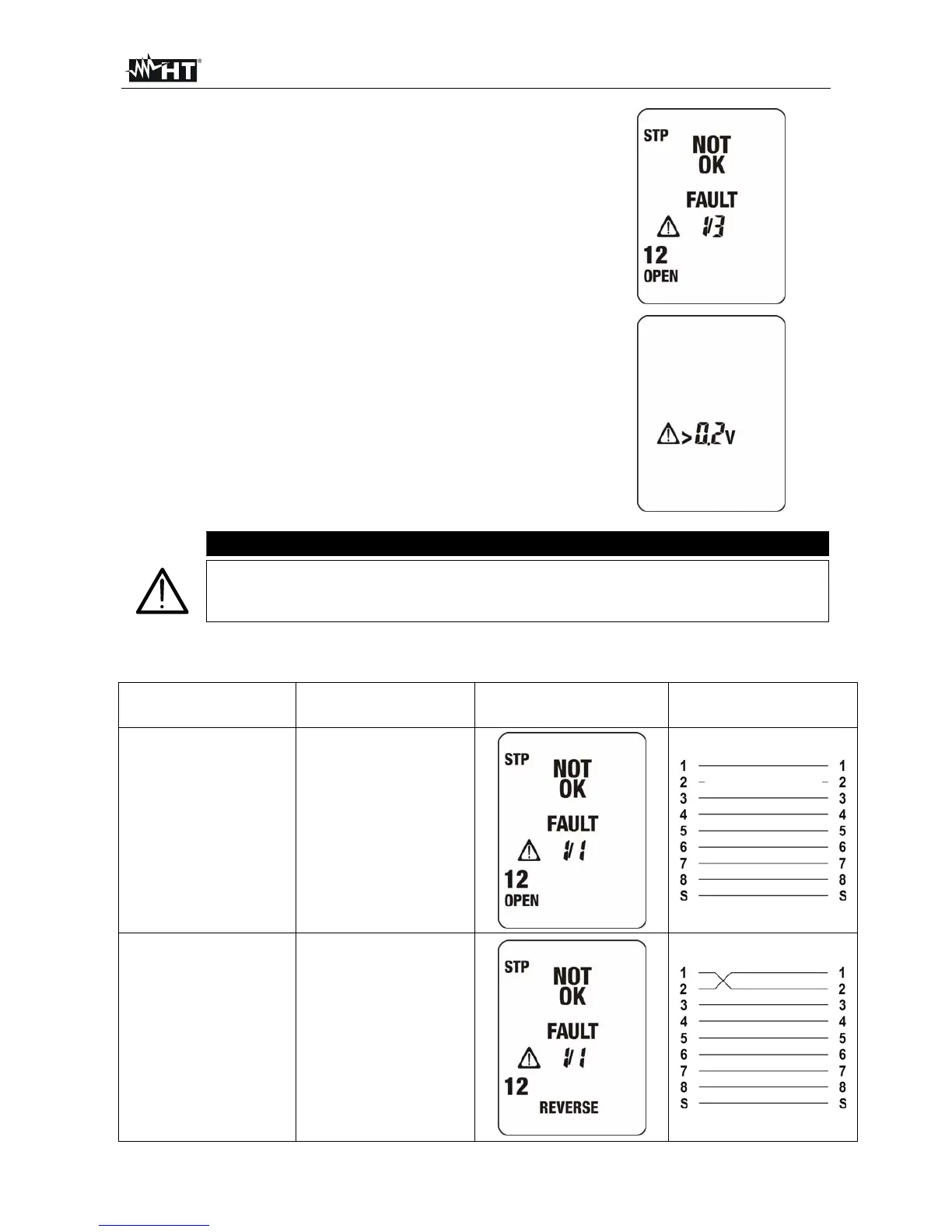
6. If cabling is not correct, a screen like this is
displayed. Referring to this example:
“NOT OK” indication and caution symbol means
that the test have given some errors
“FAULT 1/3” means that the detected errors are 3,
of which the first one is currently displayed. By
pressing or / keys it’s possible to run over the
remaining screens and display other cabling errors
Details on the detected error are given on the left
side: e.g: the couple 1-2 is OPEN
7. If the instrument detects the presence of a voltage >
0.2V on the RJ45 input, it shows the message in the
screen on the right and do not perform the test.
Eliminate the cause of the presence of voltage (e.g.:
coupling due to the presence of electrical cables
close to cable of LAN networks). The maximum
allowed voltage between inputs is 24V
CAUTION
It’s indispensable to select the right type of cable. If UTP is selected although
a STP cable is tested, test results may be not reliable due to the shield
affecting the measurement.
5.2. CABLING ERRORS
Cabling error Description Visualization Mapping
OPEN PAIR
One or both
conductors of the
pair are interrupted
(open)
REVERSED PAIR
The conductors of
the same pair are
reversed


 To Next Page