NEPTUNE
EN - 19
TMR mode
CAUTION
Check that the circuit being tested is not live and that all possible loads
normally connected to it are disconnected before carrying out insulation
measurement.
We recommend holding the alligator clip respecting the safety area created
by the hand protection.
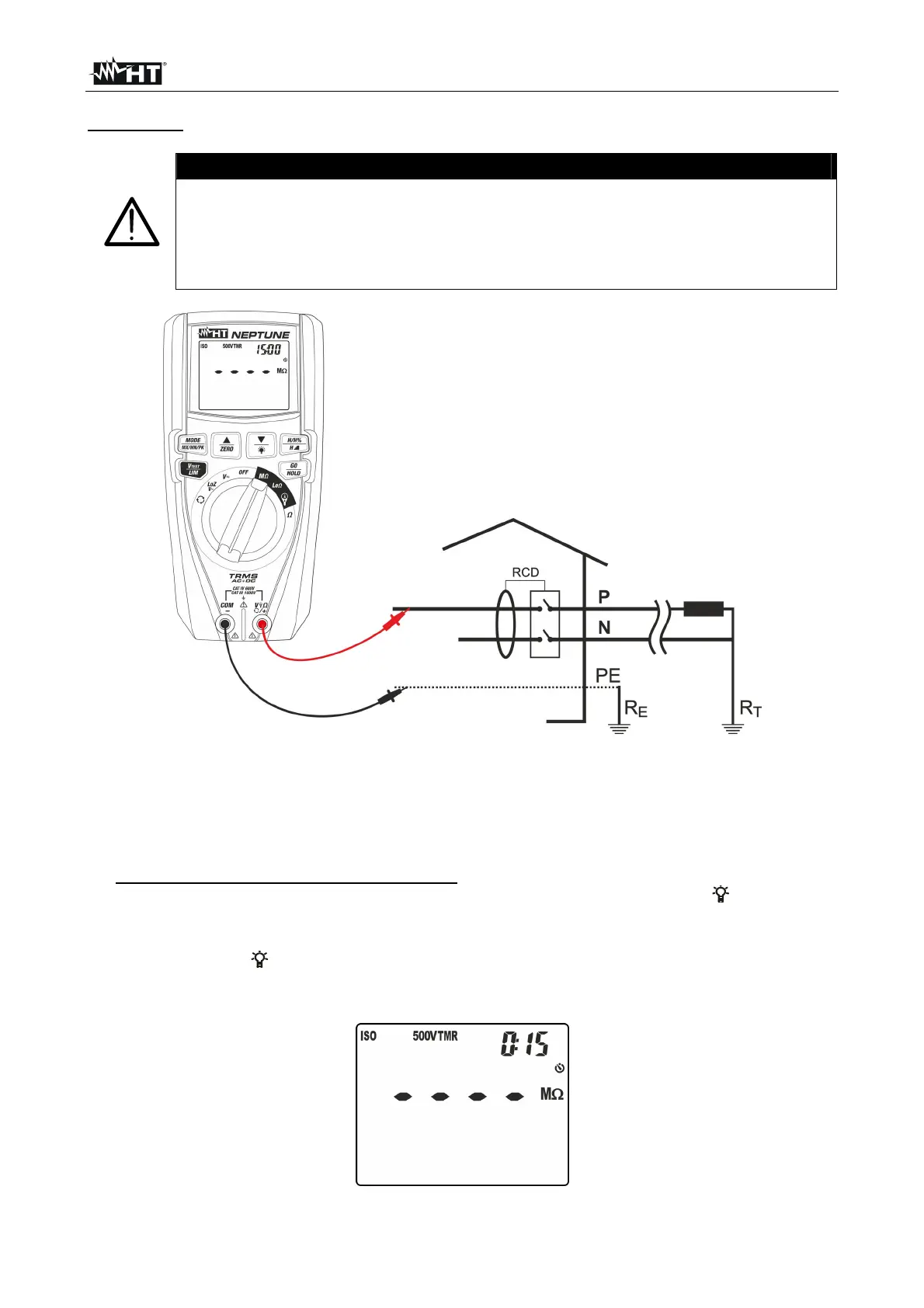
Fig. 19: Use of the instrument for insulation resistance measurement in TMR mode
1. Select position M
2. Press key MODE/MXMNPK and select option
“TMR”
3. Press key V
TEST/LIM to set the test voltage choosing among the values: 50V, 100V,
250V, 500V, 1000VDC. Please note the value in the top part of the display.
4. Press and hold key V
TEST/LIM (>2s) to set the minimum limit threshold for
measurement. The symbol “Set” flashes on the display. Press keys / or /ZERO
to select the value among the options: 0.10M, 0.230M, 0.50M, 1.00M, 100M,
no. Option “no” indicates that no threshold was set (see Fig. 16).
5. Press keys / or /ZERO to select the measuring time (timer) choosing among
the options: 15s, 30s, 1min, 5min, 10min. Please note the value in the top part of the
display on the right (see Fig. 20).
Fig. 20: Setting the measuring time in TMR mode



 To Next Page