NEPTUNE
EN - 28
measurement and comparing this new value to the compensated one. If the difference
between the values is ≤0.01, calibration is confirmed and the message “OK” is
displayed (see Fig. 33 – middle). Subsequently, the instrument goes back to the
measuring screen with the message “ZERO” displayed to indicate that cable
compensation is present.
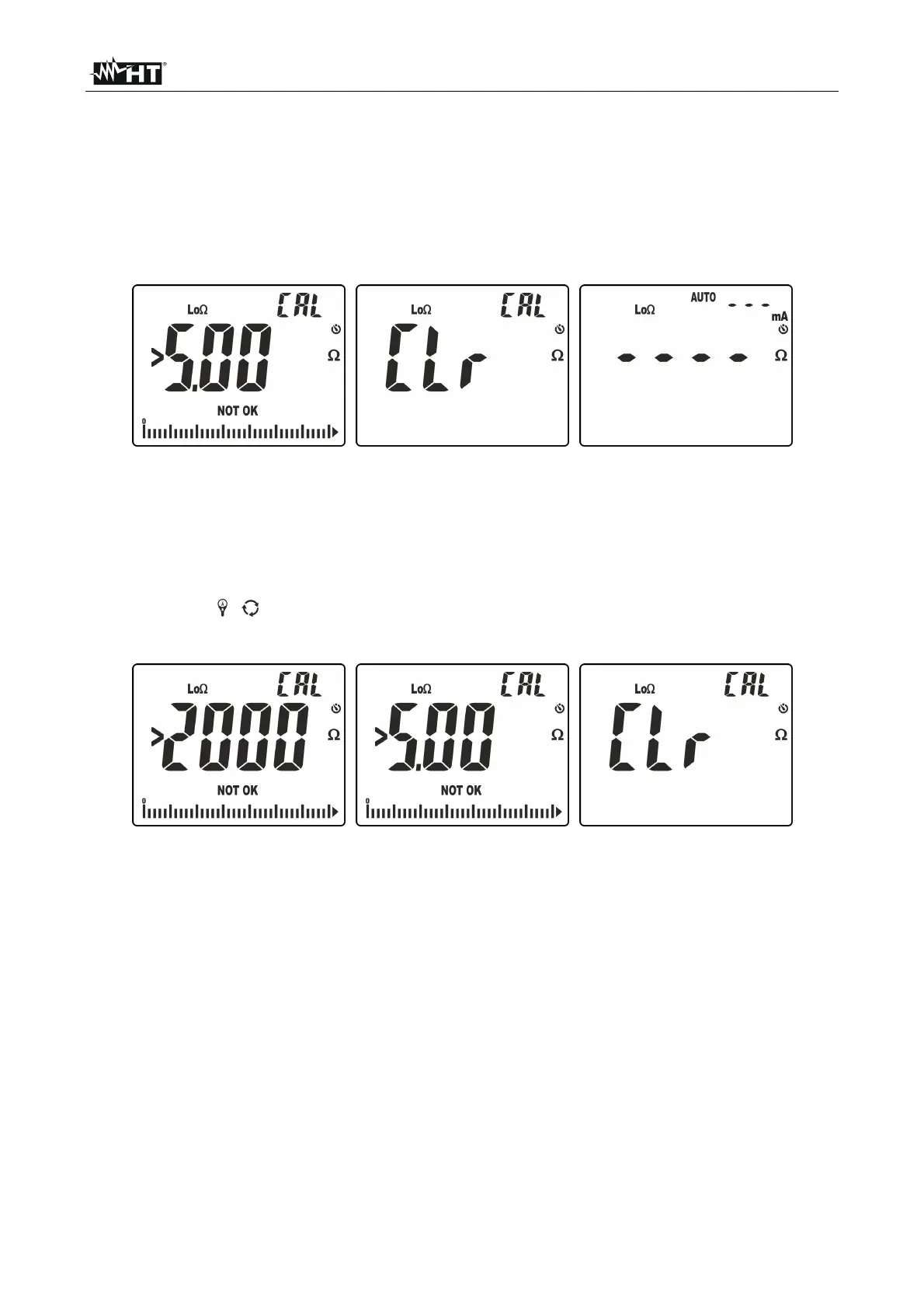
5. In case the first measurement detects a resistance of test cables >5.00, the
instrument shows the following screens in a quick sequence:
Fig. 34: Results of zeroing not correctly performed
6. Messages “>5.00” and “NOT OK” are initially shown on the display (see Fig. 34 – left
side). Subsequently, message “CLr” is shown, to indicate that calibration has been
cancelled (see Fig. 34 – middle) and the message “ZERO” is not shown in the
measuring screen (see Fig. 34 – right side).
7. To zero a cable calibration in the instrument, carry out the procedure with open input
terminals V /+ and COM/ and press and hold (>2s) key /ZERO. The following
screens are displayed in a quick sequence:
Fig. 35: Zeroing calibration



 To Next Page