NEPTUNE
EN - 31
Inrush current measurement (DIRC)
CAUTION
Maximum measurable current in this function is 3000A AC or 1000A DC.
Do not measure currents exceeding the limits given in this manual.
The instrument carries out the measurement both with flexible clamp
transducers (optional accessories) and with other standard clamp
transducers in the HT family (optional accessories). For inrush currents
containing a high DC component, the use of AC/DC clamps is
recommended. With transducers having an Hypertac output connector,
the optional adapter NOCANBA is necessary to obtain the connection.
1. Select the position.
2. Press key MODE/MXMNPK to select the type of clamp transducer among the options:
“ ” (flexible clamp transducer – only AC) or “ ” (standard clamp transducer – AC or DC).
3. Press the keys / or and, on the instrument, select the same range set on the
clamp, among the options: 30A, 300A, 3000A (AC current measurement with flexible
clamp) or: 1A, 10A, 30A, 40A, 100A, 200A, 300A, 400A, 1000A, 2000A, 3000A for AC
or AC+DC current measurement with standard clamp.
4. For flexible clamp transducers, set the relevant full scale value (see § 4.2.10).
5. Press key GO/HOLD to confirm settings.
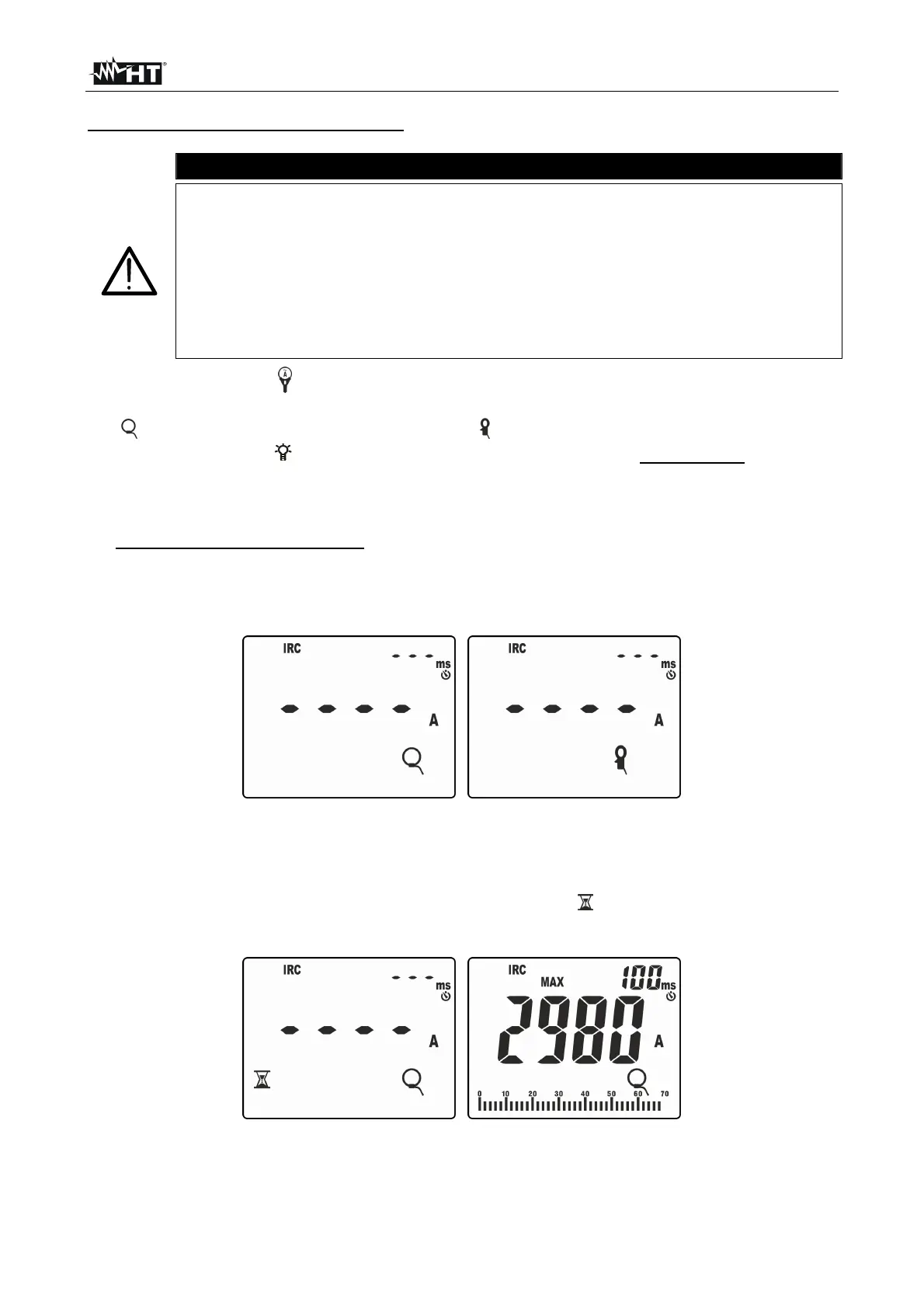
6. Press key MODE/MXMNPK to select “IRC” measurement. The following screens are
shown on the display according to the type of clamp used:
Fig. 40: Initial screens of inrush current measurement
7. Connect the clamps to the system to be tested as indicated in § 5.8
8. Press key GO/STOP to activate the function. The instrument waits for the event to be
recognized (measured value higher than the fixed trigger threshold equal to 1%FS
clamp: e.g. 30A with FS = 3000A) and shows symbol
“ ” on the display (see Fig. 41 –
left side).
Fig. 41: Recognition of inrush current event



 To Next Page