17
How to Connect
Connecting a Doorbell for System Mute
The Lync Controller can be connected to your home’s existing doorbell circuit. When your doorbell button is
pressed, the Lync system will MUTE the output in all zones for 7-seconds (unless a zone is in DND mode)
allowing you to hear the sound of your home’s doorbell chime .
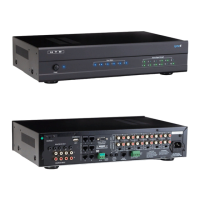
On the back of the Lync Controller (shown below) you will nd a green plastic connector for attaching wires
from your home’s doorbell circuit. For ease of connection, the green connector can be pulled out. There are
four small square openings in the green connector for insertion of wires from your doorbell circuit. On the
top of the green connector, there are four small screws that can be tightened down on the wires after they
have been inserted.
Although there are four connection points on the green connector, your existing doorbell will only require
connection into the two points above the “TRIGGER AC/DC 3-20V” label on the back of the Lync Controller
(shown above.) The other two connection points are for use with other types of triggering devices that close
a circuit without low voltage.
Your home’s doorbell circuit will look similar to the diagram shown below:
Here’s how to wire your Lync Controller into your doorbell circuit:
Splice 2 conductors of doorbell wire (or 2 of the wires in a Cat5e cable) from any point in the LOW VOLTAGE circuit to the green
connector on the Lync Controller, as shown below. Do NOT splice into or connect to the 120 volt AC power wires.
120 Volt
AC Power
Doorbell Transformer
(typically located
in the attic)
Doorbell
Chime Box
on wall
Doorbell
Button
Low Voltage Circuit
(typically 12-18 volts)
Power
123456 123456
789101112
Zone Status Source Signal Strength
AC 120V~60Hz
FUSE T2AL/250V
Power Consumption: 160W
ROUTED IR OUT
SOURCE INPUT
KEYPAD PORTS
7
8
9
10
11
12
MP3
L
ZONE 1 PREOUT
ZONE 2 PREOUT ZONE 3 PREOUT
ZONE 4 PREOUT ZONE 5 PREOUT ZONE 6 PREOUT
MONO STEREO
MONO STEREO MONO STEREO
MONO STEREO MONO STEREO MONO STEREO
R
LRLR
LRLR
LR LR LRLR
LRLRLR
R
L
43
2
1
56
IR IN
RS232
INTERFACE
GLOBAL
IR OUT
12V/DC
TRIGGER
DOOR
INTERF
ACE
System
TRIGGER
AC/DC 3-20V
Mute
Made in Ta iwan
CAUTION
To Prevent Electric Shock,
Do Not Remove Cover. No
User-Serviceable Parts Inside,
Refer Servicing To Qualified
Service Personnel.
WARNING
To Prevent Fire Or Shock
Hazard, Do Not Expose This
Unit To Rain Or Moisture.
FIXEDVA RIABLE
IR IN
Back view of Lync Controller
Showing green connector
120 Volt
AC Power
Doorbell Transformer
(typically located
in the attic)
Doorbell
Chime Box
on wall
Doorbell
Button
Low Voltage Circuit
(typically 12-18 volts)


 To Next Page
