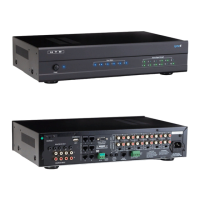
Lync 6 Controller
Model DMA-1240, DMA-1275, DMA-1240ADS
Model DMA-1240ADS ONLY
This section, found only in model DMA-1240ADS, includes inputs for voice assistant devices like the Alexa Dot. These are
used in addition to the typical amplier connections shown on pages 11-12. See the amplier owner’s manual for details.
6
Left Right
Out 2
Out 1
In 2
In 1
1
2
3
Line In
4
5
6
7
8
9
10
11
12
Line In
1 2 Line
Bridged
L L+R RL L+R RL L+R RL L+R RL L+R RL L+R RL L+R RL L+R RL L+R RL L+R RL L+R RL L+R R
On
Auto On
3-30V
AC/DC
Trigger In
AC 120V-60Hz
Fuse: T15A/250V
Power Consumption: 1200W
12V DC
Control
Out
Trigger
1 2 Line 1 2 Line 1 2 Line 1 2 Line 1 2 Line 1 2 Line 1 2 Line 1 2 Line 1 2 Line 1 2 Line 1 2 Line
Line In Line In Line In Line In
Bridged Bridged Bridged Bridged Bridged
DMA-1240
Power
Vol 1Vol 2Vol 3Vol 4Vol 5Vol 6 Vol 7Vol 8Vol 9Vol 10 Vol 11 Vol 12
Product Features
Power
123456 123456
789101112
Zone Status Source Signal Strength
AC 120V~60Hz
FUSE T2AL/250V
DOOR INTERFACE
Power Consumption: 160W
ROUTED IR OUT
SOURCE INPUT
KEYPAD PORTS
7
8
9
10
11
12
MP3
L
ZONE 1 PREOUT ZONE 2 PREOUT ZONE 3 PREOUT ZONE 4 PREOUT ZONE 5 PREOUT ZONE 6 PREOUT
MONO STEREO MONO STEREO MONO STEREO MONO STEREO MONO STEREO MONO STEREO
R
LRLR
LRLR
LR LR LR LR
LRLRLR
R
L
43
2
1
56
IR IN
RS232
INTERFACE
GLOBAL
IR OUT
12V/DC
TRIGGER
100mA
IN OUT
System
TRIGGER
AC/DC 3-20V
Mute
Made in Ta iwan
CAUTION
To Prevent Electric Shock,
Do Not Remove Cover. No
User-Serviceable Parts Inside,
Refer Servicing To Qualified
Service Personnel.
WARNING
To Prevent Fire Or Shock
Hazard, Do Not Expose This
Unit To Rain Or Moisture.
FIXEDVA RIABLE
IR IN
SOURCE 7
Power On/Off button
Line In - typically used with
whole house Audio zones.
Set to Left, Left + Right, or Right
only when using In 1 or In 2. Switch
position is irrelevant when “Line” is
selected.
Set to Line unless
using In 1 or In 2
On/Auto/Trigger
Trigger In - when used, amp
stays in sleep mode until a
zone is powered on.
Speaker Connections
In 1 and In 2 - typically used for whole house
audio zones only when more than 4 speakers
are required in a zone
Analog Source
Inputs
3.5mm Analog/Digital Optical Source Input
USB Flash Drive (MP3) Input
RS232 for Gateway App Control
IR Input (connect to IR receiving
eye - sold separately)
Global IR Output - Passes IR
signals via a single or dual IR
emitter regardless of Source
selected by a zone
Routed IR Outputs - Pass IR
signals via a single IR emitter
only to the Source selected
by a zone
RJ-45 input (for Cat 5/Cat 6
cable to LyncTouch)
Zone Output
Fixed / Variable
Zone Output - Mono/
Stereo Switch
Trigger Out
System Mute
Trigger In
Zones 1 - 6 DI-21 Interface Input
Power Plug
Zone Status indicates when a zone is
powered on.
Source status indicates the strength
of an input signal
Included with Lync 6
(6) Shielded Stereo Patch Cable (3 feet long)
(1) 3.5mm (mono) Trigger Cable
(1) Toslink Adapter for digital source using Source 7
(1) Power Cable


 To Next Page
