5
Quick Setup
For most installations, the following steps will get you up and running quickly. Please read the balance of this own-
er’s manual for further explanation as well as additional connection options that help you customize the system to
your particular situation.
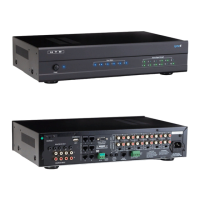
1. Make sure the multi-channel amplier and central Lync controller (model Lync 6 or Lync 12) are powered off.
2. Install and connect LyncTouch keypads following the instructions beginning on page 21.
3. To use the HTD Lync app, follow the instructions provided with the gateway (model GW-SL1 or WGW-SL1).
4. Connect all speakers to the multi-channel amplier(s).
5. Set the switch on the multi-channel amplier to power on using Trigger and connect the trigger cable (short
mono 3.5mm patch cable) from the Trigger Out on the Lync controller to the Trigger In on the multi-channel
amplier. If an additional multi-channel amplier is used, connect the special 2.5mm to 3.5mm mono trigger
cable (included) from the rst amplier to the second.
6. Connect stereo RCA patch cables from the Variable Outputs on the Lync controller for each zone to the RCA
Line inputs on each channel of the multi-channel amplier, i.e. Zone 1 Variable Out to Ch 1 and 2 on the multi-
channel amp; Zone 2 Variable Out to Ch 3 and 4; Zone 3 Variable Out to Ch 5 and 6 . . . Zone 6 Variable Out
to Ch 11 and 12.
7. Conrm that all of the “1 2 Line” switches on the multi-channel amplier(s) are set to “Line”.
8. Connect one audio source into the Source 7 Input (Lync 6) or Source 13 Input (Lync 12) on the back of the
Lync controller and power on this source. If the audio source has a variable volume level output, turn the audio
volume all the way up.
9. Power on the Lync Controller.
10. Power on the Multi-Channel Amplier(s). It will be in “sleep” mode until a zone is powered on.
11. Make sure all gain knobs on the Multi-Channel Amplier(s) are set at the 3 o’clock position or higher. You can
later adjust these as necessary.
12. Check the front of the Lync Controller to conrm that the green signal strength indicator light is on for Source 7
(or Source 13). Note that this light intensity will vary (ash) with the strength of the audio signal connected to
the source input.
13. Use the LyncTouch connected to Zone 1 or the HTD Lync app to power on Zone 1. This will cause the multi-
channel amplier to trigger out of sleep mode. Conrm that the blue light for Zone 1 on the front of the Lync
Controller is lit.
14. Select Source 7 (Lync 6) or Source 13 (Lync 12) to begin enjoying audio in your home!
NOTE: It is best not to connect and disconnect an active device (LyncTouch, Analog Input Panel,
Digital Input Panel, Bluetooth Input Panel) while the central Lync controller is powered on. Devices
are only recognized when the Lync controller is rst powered on.


 To Next Page
