Sequ
ence
Num
ber
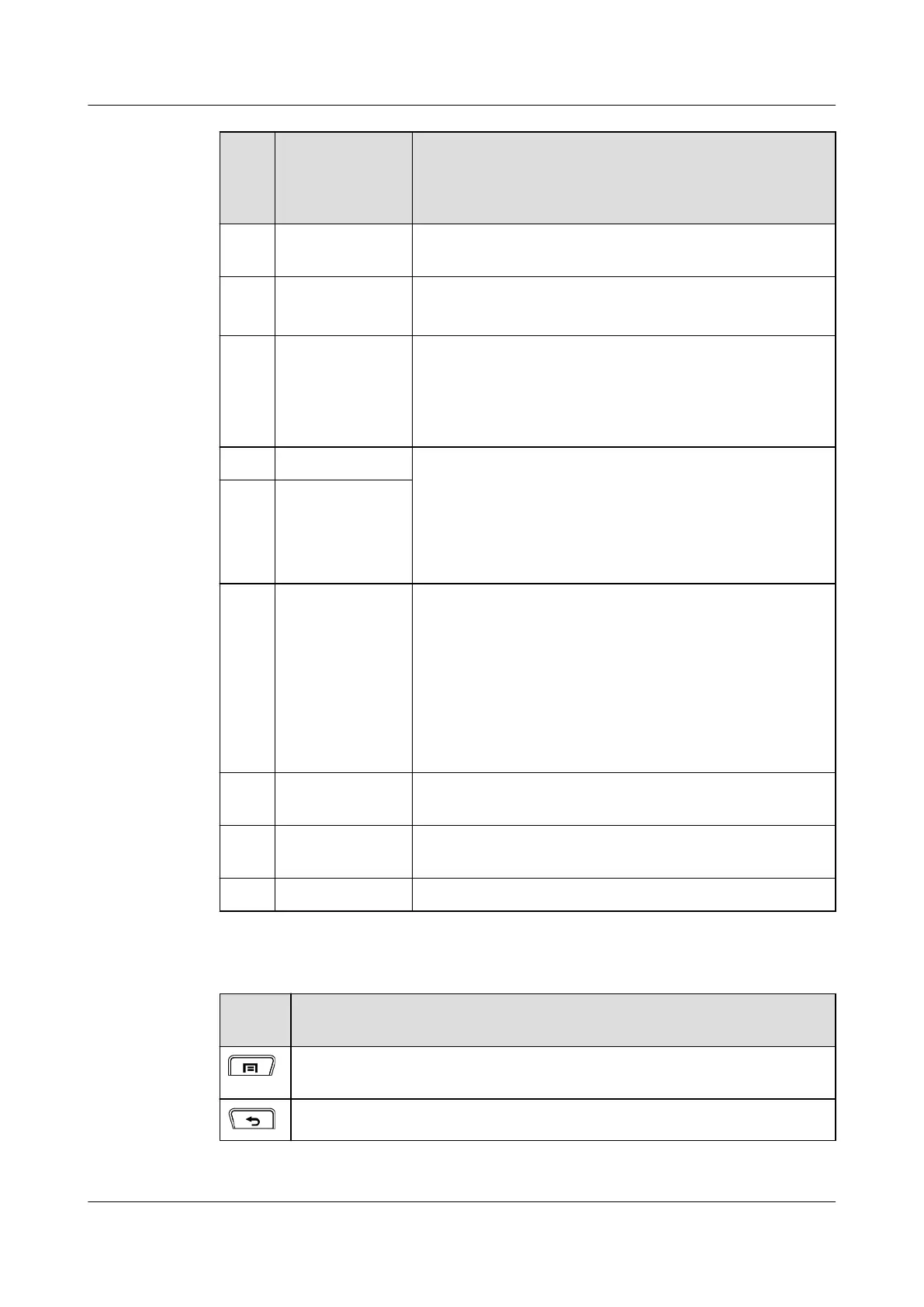
Name Description
16 Keyboard
interface
None
17 PTT call button
l This button is used for a PTT call.
l You can wake up a dormant EP820 by pressing the key.
18 Multifunctional
interface
The HDMI multifunctional interface can be connected with a
data cable for battery charging or connected to other
accessories such as a hand microphone or a charging cable. A
locking component is attached to the interface for secure
connections.
19 Volume (+)
l Controls the ringing volume.
l Turns off the ringtone of an incoming call.
l Controls the earpiece volume of an ongoing call.
l Moves the cursor up/down on the group list screen.
l Hold down Volume (-) to display the group list screen.
20 Volume (-)
21 Power Key
l When an EP820 is off, hold down the key for 3s to power
on the EP820.
l When an EP820 is on, hold down the key for 1s to 10s and
then choose the power-off option from the displayed
menu.
l When an EP820 is on, hold down the key for longer than
10s to restart the EP820.
l You can wake up a dormant EP820 by pressing the key.
22 Customized
function key
Hold down the key to customize the function key. By default,
this key is a shortcut to video sending.
23 Charger
connection point
None
24 Strap hole None
Table 3-2 EP820 Keypad
Legen
d
Description
Press the key to display an options menu if available. The screen does not
respond if it has no options menu programmed.
Press the key to return to an upper-level menu.
EP820
User Guide
3 Overview
Issue 05 (2016-06-20) Huawei Proprietary and Confidential
Copyright © Huawei Technologies Co., Ltd.
9









 To Next Page