8
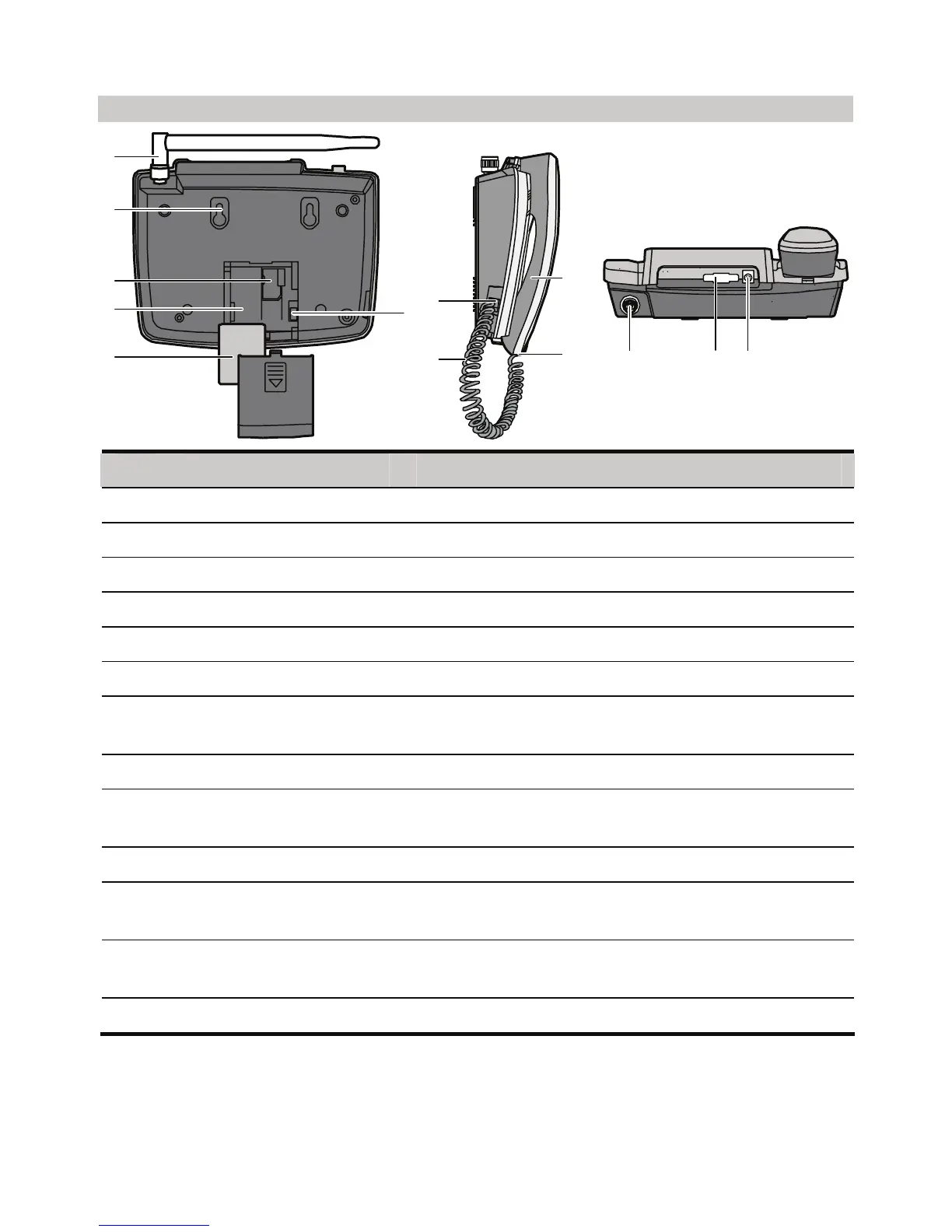
Back View
1
2
3
5
4
6
7
8
10
9
11
12 13
No. Item Description
1 Indoor antenna To receive signals.
2 Hook To fix the FWT when installed vertically.
3 UIM case slot To house the UIM card.
4 Battery case To house the spare battery.
5 Spare battery To supply the FWT with power.
6 Battery cord jack To connect to the battery cord.
7 Coiled cord jack on the
main unit
To connect to the handset coiled cord.
8 Coiled cord To connect to the handset to the Main unit.
9 Coiled cord jack on
handset
To connect to the handset coiled cord.
10 Handset To make a call or answer a call by lifting it.
11 Antenna jack To connect to the indoor antenna or the outdoor
antenna.
12 DB9 serial port To maintain the FWT and realize data services
through it.
13 Power jack To connect to the power adapter for power supply.










 To Next Page