≥ 6 mm
2
(SUN2000-8KTL-M2/SUN2000-
10KTL-M2/SUN2000-12KTL-M2)
≥ 10 mm
2
(SUN2000-15KTL-M2/SUN2000-
17KTL-M2/SUN2000-20KTL-M2)
6–16 mm
2
(SUN2000-8KTL-M2/SUN2000-
10KTL-M2/SUN2000-12KTL-M2)
10–16 mm
2
(SUN2000-15KTL-M2/SUN2000
17KTL-M2/SUN2000-20KTL-M2)
Standard outdoor
PV cable in the
industry
Conductor cross-sectional area: 4–6 mm
2
Cable outer diameter: 5.5–9 mm
(Optional) RS485
communications cable
core outdoor
shielded twisted
pair cable
Conductor cross-sectional area: 0.2–1 mm
2
(0.5 mm
2
is recommended)
Cable outer diameter: 4–11 mm
(Optional) Rapid
shutdown switch signal
cable
(Optional) Grid
scheduling signal cable
•
Connect cables in accordance with the local installation laws and regulations.
•
Before connecting cables, ensure that the DC switch on the inverter and all the switches
connecting to the inverter are set to OFF. Otherwise, the high voltage of the inverter may
result in electric shocks.
Preparing for Installation
3.1
3
Electrical Connections
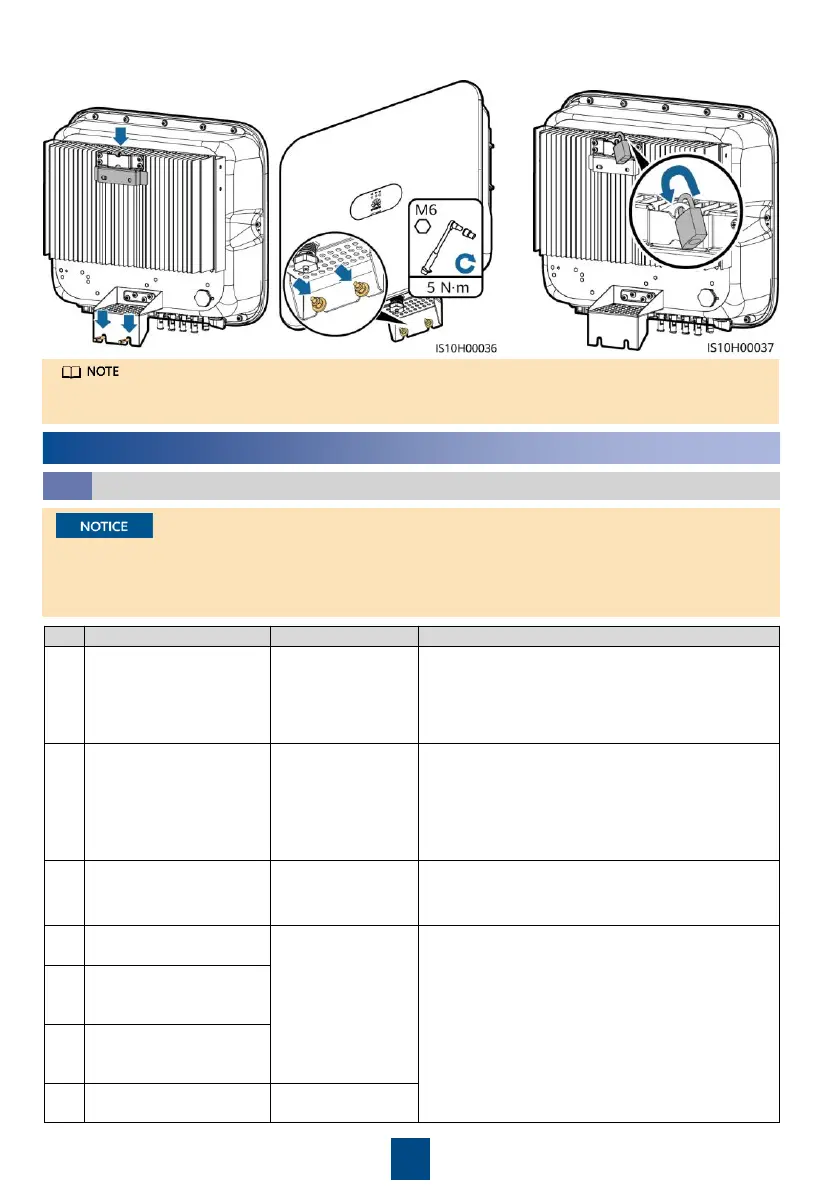
Prepare an anti-theft lock suitable for the lock hole diameter (Ф8 mm) and ensure that the lock
can be installed successfully. An outdoor waterproof lock is recommended.
3. Install the inverter on the mounting bracket.
4. (Optional) Install an anti-theft lock.





 To Next Page