TP482000B V300R002C03 Telecom Power
(TP482000B-N20B1, TP482000B-N20B2,
TP481200B-N20B1, and TP481200B-N20B2)
User Manual
Copyright © Huawei Technologies Co., Ltd.
7 Parts Replacement
7.1 Replacing a Rectifier
Prerequisites
A pair of protective gloves, an ESD box or bag, and the cabinet door key are available.
The new rectifier is intact.
The AC input to the power system is normal and batteries are in float charging mode.
Procedure
Step 1 Put on protective gloves.
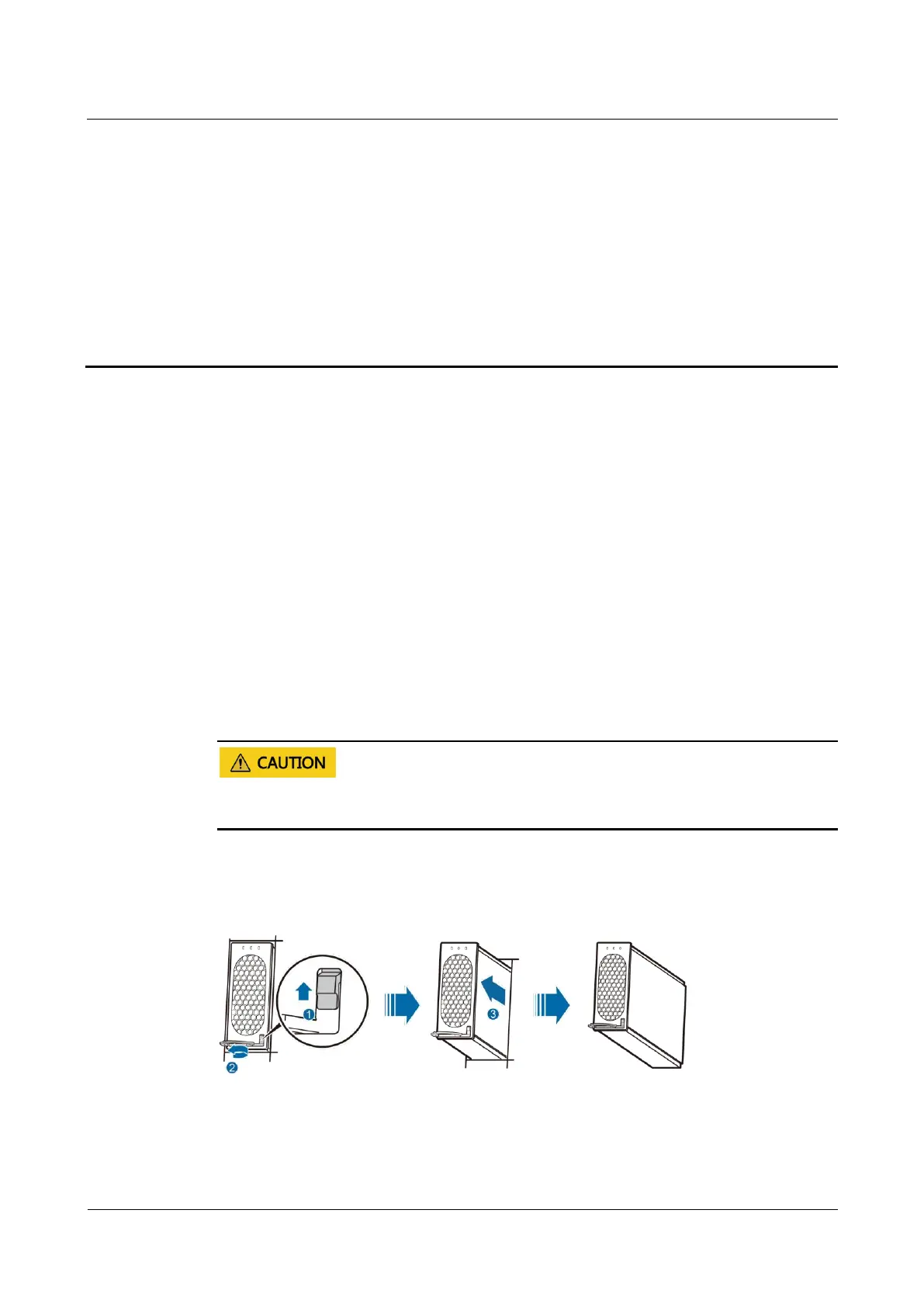
Step 2 Push the locking latch on the right of the rectifier panel upwards.
To prevent burns, exercise caution when removing a rectifier because the rectifier may be hot
as a result of continuous operation.
Step 3 Gently draw the handle outwards, and then remove the rectifier from the slot, as shown in
Figure 7-1.
Figure 7-1 Removing the rectifier
Step 4 Push the locking latch on the new rectifier upwards, and pull out the handle.
Step 5 Place the new rectifier in the appropriate slot.






 To Next Page