UPS2000-A-(6 kVA-10 kVA)
User Manual
Copyright © Huawei Technologies Co., Ltd.
For a single UPS, install a short-circuit bar between JP1 and JP2. For a parallel system, do
not install it. When transferring from single mode to parallel mode, confirm that the
short-circuit bar is removed.
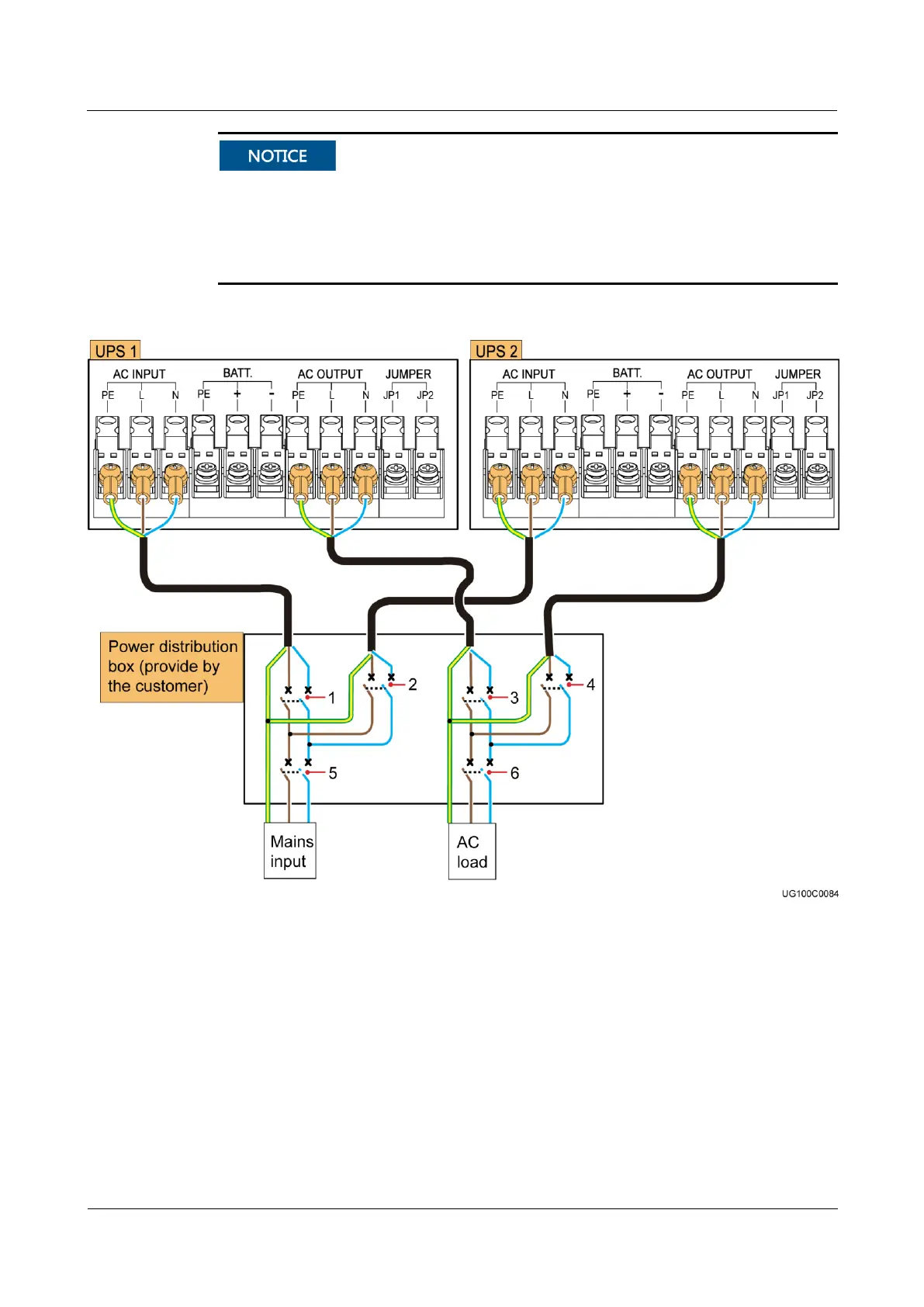
This section uses the 1+1 parallel system as an example to illustrate how to connect cables
to a parallel system. Cable connections for other parallel systems are similar.
Figure 3-23 Connecting cables to the UPS professional version with long backup time
(1) AC input circuit
breaker of UPS 1
(2) AC input circuit breaker of
UPS 2
(3) AC output circuit breaker of
UPS 1
(4) AC output circuit
breaker of UPS 2
(5) General AC input circuit
breaker of the parallel system
(6) General AC output circuit
breaker of the parallel system
Step 4 Install battery cables to external battery strings or external battery boxes. The battery cable
connection method for a single UPS and a parallel system is the same.
Step 5 Reinstall the AC input, output, and battery wiring cover on the UPS.
Step 6 Connect parallel cables, as shown in Figure 3-24.


 To Next Page
 Loading...