PSP8620311
Rev. E
29
6 — Control Programming
Connecting to a Recloser with WiFi Radio
In order to communicate with the WiFi radio, the Versa-Tech Single
Phase Programmer v4.50.15 or higher will need to be used.
To establish communication:
1. Ensure that the +12V battery pack is inserted into the recloser unit
firmly. If the recloser sees a current less than 10A, power cycle
(pull the handle down and then push it backup) the NR handle
(red) once to turn the remote radio on for 10 minutes. The NR
handle (red) can also be left in the down position to power the
WiFi radio for 60 minutes. If the current is more than 10A the WiFi
radio is always ON.
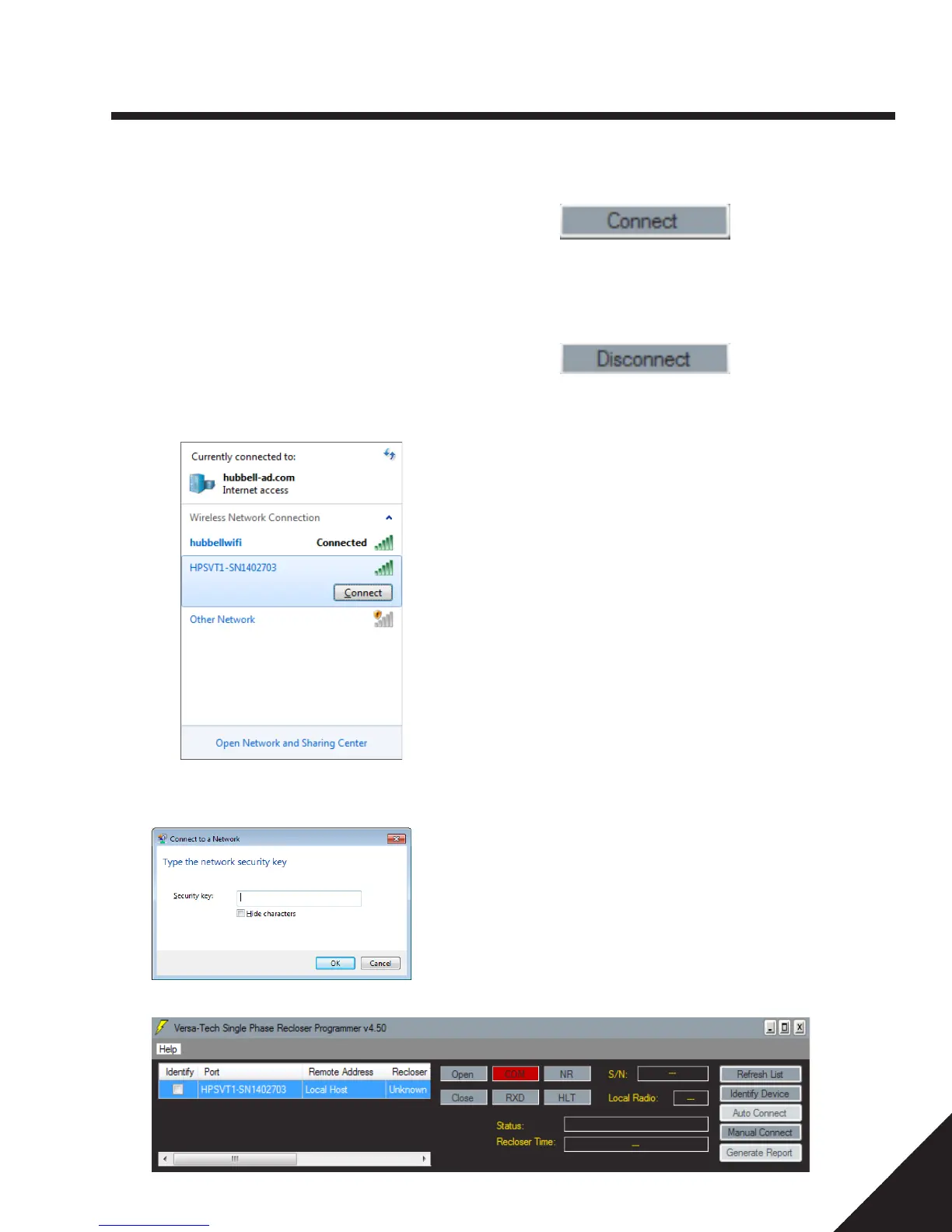
2. Open up the wireless networks on the PC. Click "Connect" under
the wireless network HPSVT1_SNX where X is the serial number
of the WiFi Remote Radio.
3. Enter the security key "hubbell1234" when prompted.
4. Highlight the appropriate port and click "Identify Device".
5. Once the WiFi Remote Radio is identified, the "Connect" button
will be enabled. Click "Connect".
6. Once communication has been established with the recloser, the
RXD communication light flashes in green and the "Status" box
will show "Connected".
7. To disconnect from the recloser, click Disconnect.


 To Next Page