PSP8620311
Rev. E
28
Connection
Communications with the Versa-Tech Recloser can be established
through the below two options.
1. Identify Device
2. Manual Connect
Identify device option scans for all possible reclosers available within
the communication range with respect to the local device connected
and selected on the Versa-Tech Single Phase Programmer. Manual
connect option is used to specifically connect to a recloser whose RF
address is known.
Connecting to a Recloser with a Digi/XBee or SiFLEX Radio
After the drivers have been correctly installed as per the previous
section, communications can be established to the recloser by the
Versa-Tech Single Phase Recloser Programmer using the below two
options.
Identify Device
To establish communications:
1. Connect the local radio link (or RS 232 DB9-F serial cable) to the
USB (or RS 232) port of the computer and with the remote radio
(or RS 232 DB9-M serial cable) plugged into the RS 232 F port
of the recloser.
2. Ensure that the +12V battery pack is inserted into the recloser unit
firmly. If the recloser sees a current less than10A, power cycle (pull
the handle down and then push it backup) the NR handle(red) once
to turn the remote radio on for 10 minutes. If the current is more
than 10A the remote radio is always ON.
3. Hit "Refresh List" on the Programmer to populate the local devices
in the communication grid.
4. Now, Check the Local Device(highlighted in blue) in the
communication grid where communication has to initiate and then
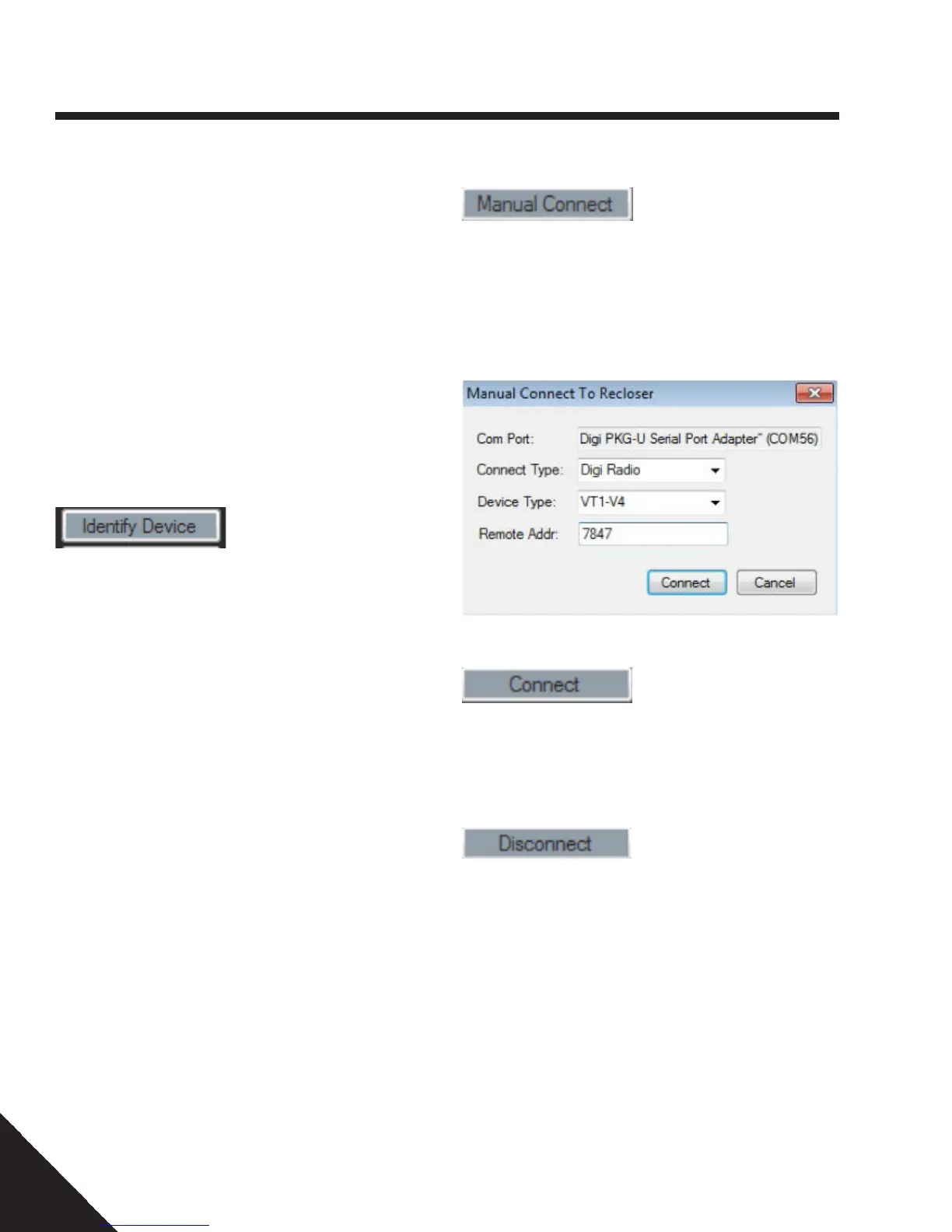
click "Identify Device".
5. When the Programmer returns all the available reclosers with
the Remote Radio addresses, select each recloser individually
(highlighted in blue) and connect to the unit by clicking Connect
option on the Programmer.
6. User can change the settings once the communications has been
established. Program the settings by writings the settings to Recloser
with the password provided.
7. To disconnect from the recloser, click Disconnect.
Manual Connect
To establish communications through Manual Connect:
1. Follow Step 1 - Step 3 from Identify Device section
2. Click Manual Connect option.
3. Select the Manual Connect parameters as per the recloser specifications
and enter the Remote Radio RF address of the recloser as below.
4. Click Connect.
5. Once the communication has been established with the specific recloser
unit, the RXD communication light flashes in green to confirm successful
communication.
6. To disconnect from the recloser, click Disconnect
6 — Control Programming


 To Next Page